
Turn on suggestions
Auto-suggest helps you quickly narrow down your search results by suggesting possible matches as you type.
Showing results for
Administration & Architecture
Explore discussions on Databricks administration, deployment strategies, and architectural best practices. Connect with administrators and architects to optimize your Databricks environment for performance, scalability, and security.
Turn on suggestions
Auto-suggest helps you quickly narrow down your search results by suggesting possible matches as you type.
Showing results for
- Databricks Community
- Administration & Architecture
- Re: Can a Databricks Workspace be renamed after cr...
Options
- Subscribe to RSS Feed
- Mark Topic as New
- Mark Topic as Read
- Float this Topic for Current User
- Bookmark
- Subscribe
- Mute
- Printer Friendly Page

Options
- Mark as New
- Bookmark
- Subscribe
- Mute
- Subscribe to RSS Feed
- Permalink
- Report Inappropriate Content
10-29-2025 08:17 AM
A Databricks workspace has already been created with all configurations completed. The customer has now requested to change the workspace name. Is it possible to rename an existing Databricks workspace after creation?


2 ACCEPTED SOLUTIONS
Accepted Solutions

Options
- Mark as New
- Bookmark
- Subscribe
- Mute
- Subscribe to RSS Feed
- Permalink
- Report Inappropriate Content
10-29-2025 05:29 PM
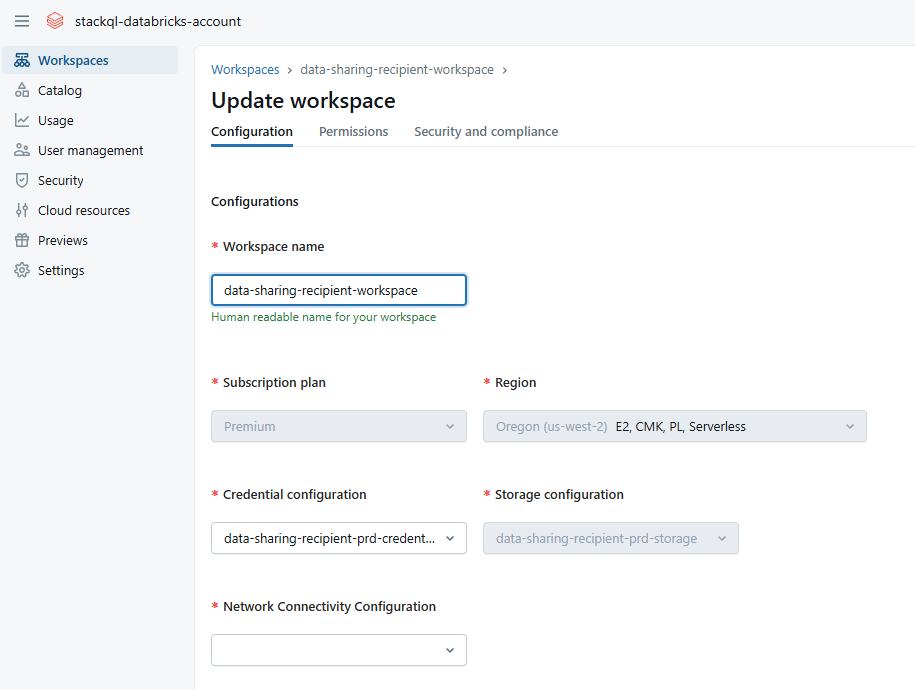
Yes you can update workspace names, what you can't change is the deployment name (part of the workspace URL, eg the dbc-4c2df2f4-018b in this https://dbc-4c2df2f4-018b.cloud.databricks.com/ - this may be what Nayan was referring to), the workspace name is largely cosmetic, it can be changed in the account console or the workspace console (you would need to be an account admin or workspace admin of course), see the attached screen shots for the UI approach to doing this, it is exposed in the backend API as well https://docs.databricks.com/api/account/workspaces/update
Options
- Mark as New
- Bookmark
- Subscribe
- Mute
- Subscribe to RSS Feed
- Permalink
- Report Inappropriate Content
10-29-2025 06:29 PM
Yes, you can safely rename it. The workspace name is largely cosmetic - it won't affect the actual workspace functionality, API endpoints, or integrations since those all rely on the deployment name/URL (which doesn't change).
That said, just a heads up: you may want to check if your organization references the workspace name in any documentation, monitoring dashboards, or cost tracking systems - those would need updating to reflect the new name. But from a technical/operational standpoint, the workspace itself will continue functioning normally.
4 REPLIES 4

Options
- Mark as New
- Bookmark
- Subscribe
- Mute
- Subscribe to RSS Feed
- Permalink
- Report Inappropriate Content
10-29-2025 10:38 AM
No, it is not currently possible to rename an existing Databricks workspace after it has been created—whether on Azure or AWS. Workspace names are immutable once provisioned through the Databricks account console or cloud provider portal.
Workaround Options:
If renaming is essential, here are your alternatives:
- Create a new workspace with the desired name.
- Migrate resources (notebooks, clusters, jobs, users, etc.) from the old workspace to the new one.
- Decommission the old workspace once migration is complete.
Options
- Mark as New
- Bookmark
- Subscribe
- Mute
- Subscribe to RSS Feed
- Permalink
- Report Inappropriate Content
10-29-2025 05:29 PM
Yes you can update workspace names, what you can't change is the deployment name (part of the workspace URL, eg the dbc-4c2df2f4-018b in this https://dbc-4c2df2f4-018b.cloud.databricks.com/ - this may be what Nayan was referring to), the workspace name is largely cosmetic, it can be changed in the account console or the workspace console (you would need to be an account admin or workspace admin of course), see the attached screen shots for the UI approach to doing this, it is exposed in the backend API as well https://docs.databricks.com/api/account/workspaces/update
Options
- Mark as New
- Bookmark
- Subscribe
- Mute
- Subscribe to RSS Feed
- Permalink
- Report Inappropriate Content
10-29-2025 06:18 PM
Workspace name is tightly coupled with several backend configuration right; Is that fine to rename the existing workspace it wont create any issues ? Please confirm. Thanks
Options
- Mark as New
- Bookmark
- Subscribe
- Mute
- Subscribe to RSS Feed
- Permalink
- Report Inappropriate Content
10-29-2025 06:29 PM
Yes, you can safely rename it. The workspace name is largely cosmetic - it won't affect the actual workspace functionality, API endpoints, or integrations since those all rely on the deployment name/URL (which doesn't change).
That said, just a heads up: you may want to check if your organization references the workspace name in any documentation, monitoring dashboards, or cost tracking systems - those would need updating to reflect the new name. But from a technical/operational standpoint, the workspace itself will continue functioning normally.

Announcements


.png)
Related Content
- Databricks Dashboards: Is there an equivalent to Power BI's SEMANTIC MODEL ? in Warehousing & Analytics
- Column Tags Not Accessible in Genie (Azure Databricks) in Data Engineering
- Best practices for health monitoring in Administration & Architecture
- Terraform folder structure and states in Administration & Architecture
- Best practice:Using Databricks managed storage vs customer‑owned ADLS for enterprise production data in Administration & Architecture