
Turn on suggestions
Auto-suggest helps you quickly narrow down your search results by suggesting possible matches as you type.
Showing results for
Administration & Architecture
Explore discussions on Databricks administration, deployment strategies, and architectural best practices. Connect with administrators and architects to optimize your Databricks environment for performance, scalability, and security.
Turn on suggestions
Auto-suggest helps you quickly narrow down your search results by suggesting possible matches as you type.
Showing results for
- Databricks Community
- Administration & Architecture
- Re: Networking Challenges with Databricks Serverle...
Options
- Subscribe to RSS Feed
- Mark Topic as New
- Mark Topic as Read
- Float this Topic for Current User
- Bookmark
- Subscribe
- Mute
- Printer Friendly Page

Options
- Mark as New
- Bookmark
- Subscribe
- Mute
- Subscribe to RSS Feed
- Permalink
- Report Inappropriate Content
05-02-2025 09:45 AM - edited 05-02-2025 09:46 AM
Hi Databricks Community,
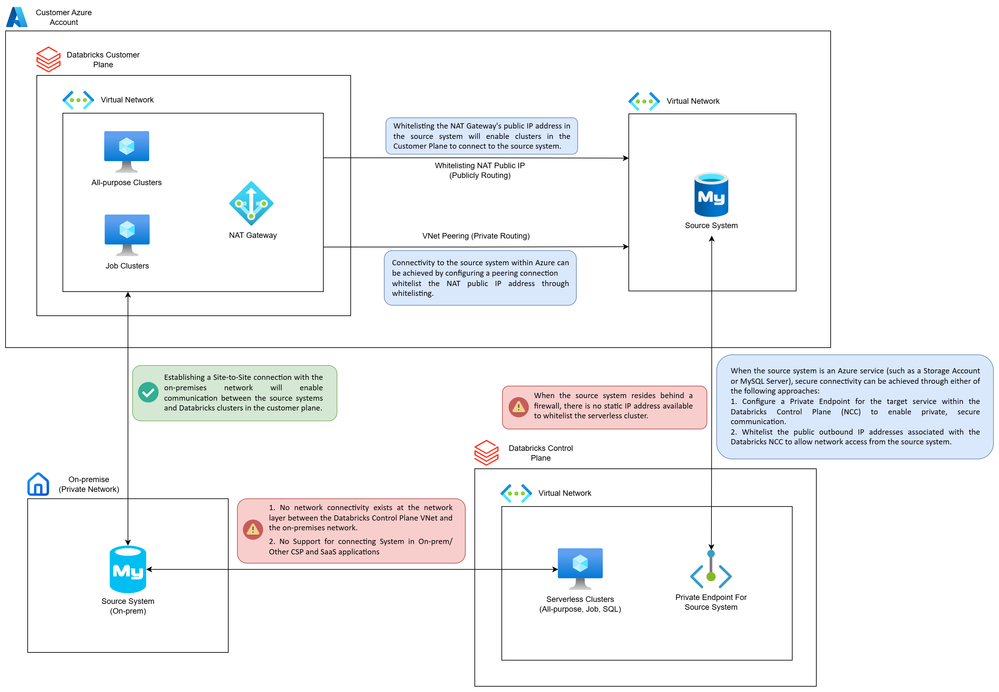
I'm working through some networking challenges when connecting Databricks clusters to various data sources and wanted to get advice or best practices from others who may have faced similar issues.
Current Setup:
I have four types of source systems that I need to connect to from Databricks:
1. Customer Plane Clusters → Source in Azure VNet
Approach: Peered the Databricks Customer VNet with the source system’s VNet.
Connectivity: Whitelisted the NAT Gateway Public IP in the source system’s firewall.
2. Customer Plane Clusters → On-Prem System
Approach: Established a Site-to-Site VPN between the Databricks Customer VNet and On-Prem network.
Connectivity: Whitelisted the private IPs on the on-prem side.
3. Control Plane Clusters (Serverless Compute) → Azure Services (Storage Account, MySQL, etc.)
Approach: Using Network Connectivity Configuration (NCC) in Databricks.
4. Control Plane Clusters (Serverless Compute) → On-Prem System
Approach: Not applicable yet — looking for guidance here.
Connectivity challenge: Unable to establish direct connectivity due to lack of support for peering or site-to-site connections from Control Plane to On-Prem.
The Problem: However, I'm running into networking limitations when trying to connect Serverless Compute (Control Plane) to systems behind firewalls - especially in on-premises or other CSPs / SaaS applications.
Issue A: No Static Outbound IPs for Serverless Compute
For external systems behind a firewall, there is no static public IP address available from serverless compute to whitelist.
Issue B: No Network-Level Integration with On-Prem Networks
Unlike customer-managed clusters, serverless compute does not support peering or site-to-site connections, and there is no direct network-level communication.
Issue C: Limited Support for Hybrid or Multi-Cloud Scenarios
There’s currently no supported way to securely connect Databricks serverless compute to:
- On-prem systems
- Other cloud providers (AWS/GCP)
- Third-party SaaS applications requiring IP-based access control
Labels:
- Labels:
-
Partner


1 ACCEPTED SOLUTION
Accepted Solutions

Options
- Mark as New
- Bookmark
- Subscribe
- Mute
- Subscribe to RSS Feed
- Permalink
- Report Inappropriate Content
10-20-2025 11:55 AM
Greetings @chandru44 , Thanks for sharing this detailed networking setup—you've clearly done thorough work mapping out your connectivity patterns. You've correctly identified the fundamental architectural limitation with serverless compute and on-premises connectivity. Let me address your concerns and provide some practical guidance.
Understanding the Limitation
You're absolutely right that Databricks serverless compute does not currently support direct network-level integration with on-premises systems. This is by design—serverless compute runs in the Databricks-managed control plane, not in your customer VNet, which means traditional networking approaches (VNet peering, Site-to-Site VPN) cannot be applied.
Why NCC Doesn't Solve On-Prem Connectivity
Network Connectivity Configurations (NCC) are designed specifically for Azure-native resources only (Storage Accounts, MySQL, Cosmos DB, etc.) using Azure Private Link and managed private endpoints. NCC cannot establish connectivity to on-premises systems because it relies on Azure's Private Link infrastructure, which doesn't extend to on-prem networks.
Recommended Workarounds
Option 1: Hybrid Data Sync Pattern (Recommended for Most Cases)
The most reliable approach is to use a staging/synchronization layer:
1. Use your customer plane clusters (with Site-to-Site VPN connectivity) to extract data from on-prem systems
2. Land the data in Azure storage (ADLS Gen2, Blob Storage) with appropriate governance
3. Use serverless compute to process the data in Azure
4. Optionally sync processed results back to on-prem via customer plane clusters
This pattern prevents overwhelming on-prem systems with cloud-scale operations and provides better performance and cost optimization.
Option 2: Expose On-Prem Services via Azure Gateway
If real-time access is required:
1. Deploy an Azure Application Gateway or API Management service in your Azure VNet
2. Configure ExpressRoute or Site-to-Site VPN from Azure to on-prem
3. Expose on-prem services through this gateway with appropriate authentication
4. Configure NCC firewall rules to allow serverless compute to access the gateway's subnet
Note: This still requires the gateway to be an Azure resource that NCC can reach.
Option 3: Use Classic Compute for On-Prem Connectivity
For workloads that must have direct on-prem connectivity, continue using customer plane clusters with VNet injection. You can design a hybrid architecture where:
- Serverless compute handles Azure-native workloads (better performance, lower cost)
- Classic compute clusters handle on-prem connectivity workloads
- Both layers interact via Unity Catalog tables
Addressing Your Specific Issues
Issue A - No Static Outbound IPs: Correct—serverless compute does not provide static public IPs for whitelisting. For customer plane clusters, you can whitelist NAT Gateway IPs, but this isn't available for serverless.
Issue B - No Network Integration: This is a fundamental architectural constraint. Serverless compute prioritizes rapid scaling and zero infrastructure management over custom networking.
Issue C - Multi-Cloud/SaaS Limitations: For external systems requiring IP whitelisting, the hybrid sync pattern (Option 1) or exposing services via Azure-native endpoints (Option 2) are your best options.
Additional Considerations
- Delta Sharing: For governed data distribution between on-prem and cloud environments, consider using Delta Sharing to share curated datasets without data duplication.
- Cost Optimization: The hybrid approach actually helps with cost—you avoid unnecessary data egress charges and can optimize compute usage based on workload type.
- Security: The staging pattern provides better data governance and audit trails compared to direct connectivity.
Unfortunately, there's no direct solution for serverless-to-on-prem connectivity in the current architecture. The workarounds above represent the practical approaches used by organizations facing similar constraints.
Hope this helps clarify your options!
Cheers, Louis.
4 REPLIES 4

Options
- Mark as New
- Bookmark
- Subscribe
- Mute
- Subscribe to RSS Feed
- Permalink
- Report Inappropriate Content
10-14-2025 02:21 PM
Thank you for posting this question. I am encountering the exact same scenarios with Databricks serverless compute while trying to connect to on-prem systems via site-to-site VPN as well as third party SaaS applications requiring IP-based access control. Has anyone figured out the correct way to address these issues?
Thanks!
Options
- Mark as New
- Bookmark
- Subscribe
- Mute
- Subscribe to RSS Feed
- Permalink
- Report Inappropriate Content
10-20-2025 11:55 AM
Greetings @chandru44 , Thanks for sharing this detailed networking setup—you've clearly done thorough work mapping out your connectivity patterns. You've correctly identified the fundamental architectural limitation with serverless compute and on-premises connectivity. Let me address your concerns and provide some practical guidance.
Understanding the Limitation
You're absolutely right that Databricks serverless compute does not currently support direct network-level integration with on-premises systems. This is by design—serverless compute runs in the Databricks-managed control plane, not in your customer VNet, which means traditional networking approaches (VNet peering, Site-to-Site VPN) cannot be applied.
Why NCC Doesn't Solve On-Prem Connectivity
Network Connectivity Configurations (NCC) are designed specifically for Azure-native resources only (Storage Accounts, MySQL, Cosmos DB, etc.) using Azure Private Link and managed private endpoints. NCC cannot establish connectivity to on-premises systems because it relies on Azure's Private Link infrastructure, which doesn't extend to on-prem networks.
Recommended Workarounds
Option 1: Hybrid Data Sync Pattern (Recommended for Most Cases)
The most reliable approach is to use a staging/synchronization layer:
1. Use your customer plane clusters (with Site-to-Site VPN connectivity) to extract data from on-prem systems
2. Land the data in Azure storage (ADLS Gen2, Blob Storage) with appropriate governance
3. Use serverless compute to process the data in Azure
4. Optionally sync processed results back to on-prem via customer plane clusters
This pattern prevents overwhelming on-prem systems with cloud-scale operations and provides better performance and cost optimization.
Option 2: Expose On-Prem Services via Azure Gateway
If real-time access is required:
1. Deploy an Azure Application Gateway or API Management service in your Azure VNet
2. Configure ExpressRoute or Site-to-Site VPN from Azure to on-prem
3. Expose on-prem services through this gateway with appropriate authentication
4. Configure NCC firewall rules to allow serverless compute to access the gateway's subnet
Note: This still requires the gateway to be an Azure resource that NCC can reach.
Option 3: Use Classic Compute for On-Prem Connectivity
For workloads that must have direct on-prem connectivity, continue using customer plane clusters with VNet injection. You can design a hybrid architecture where:
- Serverless compute handles Azure-native workloads (better performance, lower cost)
- Classic compute clusters handle on-prem connectivity workloads
- Both layers interact via Unity Catalog tables
Addressing Your Specific Issues
Issue A - No Static Outbound IPs: Correct—serverless compute does not provide static public IPs for whitelisting. For customer plane clusters, you can whitelist NAT Gateway IPs, but this isn't available for serverless.
Issue B - No Network Integration: This is a fundamental architectural constraint. Serverless compute prioritizes rapid scaling and zero infrastructure management over custom networking.
Issue C - Multi-Cloud/SaaS Limitations: For external systems requiring IP whitelisting, the hybrid sync pattern (Option 1) or exposing services via Azure-native endpoints (Option 2) are your best options.
Additional Considerations
- Delta Sharing: For governed data distribution between on-prem and cloud environments, consider using Delta Sharing to share curated datasets without data duplication.
- Cost Optimization: The hybrid approach actually helps with cost—you avoid unnecessary data egress charges and can optimize compute usage based on workload type.
- Security: The staging pattern provides better data governance and audit trails compared to direct connectivity.
Unfortunately, there's no direct solution for serverless-to-on-prem connectivity in the current architecture. The workarounds above represent the practical approaches used by organizations facing similar constraints.
Hope this helps clarify your options!
Cheers, Louis.
Options
- Mark as New
- Bookmark
- Subscribe
- Mute
- Subscribe to RSS Feed
- Permalink
- Report Inappropriate Content
10-21-2025 02:58 PM
Thank you Louis for the detailed explanation and guidance!

Options
- Mark as New
- Bookmark
- Subscribe
- Mute
- Subscribe to RSS Feed
- Permalink
- Report Inappropriate Content
6 hours ago
Hi @chandru44 and @bitc, I’m adding an update because this thread still comes up for anyone researching this topic, and a few things have changed since the accepted answer. Thanks @Louis_Frolio, the hybrid sync pattern is still the right default for batch workloads.
First, the architecture can be much simpler
Before solving serverless-to-on-prem connectivity, I’d cut down the number of connectivity patterns. Four separate patterns for one platform means four sets of DNS, routing, firewall rules and troubleshooting paths.
- Scenario 1 likely doesn’t need the NAT IP allowlist. If the source is reached over its private IP through the VNet peering, traffic never uses the NAT Gateway. That IP only applies to internet-bound traffic. If the source is a PaaS service on a public endpoint, use a private endpoint instead and the peering does the rest.
- Move the VPN/ExpressRoute to a hub VNet. Instead of terminating the site-to-site VPN directly on the Databricks VNet, terminate it in a hub VNet and peer the spokes to it. Classic compute (via peering) and serverless (via the options below) then share one governed path to on-prem, so scenarios 2 and 4 stop being separate problems.
- Batch ingestion may not need serverless to reach on-prem at all. Land the data in Azure first, then process it on serverless. Databricks uses this split itself: in the standard setup, the Lakeflow Connect SQL Server connector runs its ingestion gateway on classic compute and its ingestion pipeline on serverless.
Ref: https://docs.databricks.com/en/ingestion/lakeflow-connect/sql-server/limitations.html - Issue C is really three different problems. SaaS apps are usually reachable publicly, and the only blocker is the vendor’s IP allowlist. AWS/GCP is a routing problem. On-prem is a private-network problem. Each one has a different fix.
What’s new for serverless → private/on-prem connectivity (Azure)
- Private Network Gateway (Public Preview on Azure, Private Preview on AWS). You delegate a subnet in your VNet, and Databricks runs a managed gateway that lets serverless reach your VNet, peered VNets, and on-prem through your existing ExpressRoute/VPN. It can also route egress through your own network, so SaaS vendors see a customer-owned source IP. This largely addresses Issues A, B and C.
Ref: https://www.databricks.com/blog/introducing-private-network-gateway - Established alternative (not in preview): NCC private endpoint → Private Link Service → Standard Load Balancer. A forwarder VM behind the load balancer routes traffic on to on-prem. This has more moving parts but doesn’t depend on a preview feature.
Docs: https://learn.microsoft.com/en-us/azure/databricks/security/network/serverless-network-security/pl-t...
On-prem reference architecture: https://community.databricks.com/t5/technical-blog/azure-databricks-serverless-private-connectivity-... - For the App Gateway / APIM approach (Option 2 in the accepted answer), use an NCC private endpoint. Azure App Gateway v2 and API Management are supported private endpoint targets for serverless, so you don’t need firewall rules on the gateway’s subnet. Note that App Gateway v2 rules are configured through the NCC REST API, not the UI.
Docs: https://learn.microsoft.com/en-us/azure/databricks/security/network/serverless-network-security/serv... - Outbound IPs exist, but they aren’t yours. Serverless traffic to external systems leaves through Databricks-managed NAT IPs. Databricks now publishes these ranges in JSON format (the legacy static list was retired in mid-2026; on Azure, access may require your account team). These ranges are shared across all customers in the region and change periodically, so allowlisting them on an on-prem firewall is a weak control and needs automated updates. If you need a dedicated, customer-owned source IP, use option 1 or route traffic through your own VNet with option 2.
Docs: https://learn.microsoft.com/azure/databricks/security/network/serverless-network-security/serverless...
Note that serverless networking (private endpoints, data transfer) is billed, so include it in the cost comparison with classic.
Serverless-first, not serverless-only
Databricks is clearly moving toward serverless. Serverless workspaces (fully Databricks-managed, with no customer VNet or classic clusters) are now GA, the docs recommend serverless for almost all pipelines, and some features, such as incremental refresh for materialized views, only work on serverless.
Ref: https://docs.databricks.com/aws/en/ldp/concepts/serverless-vs-classic-compute
Even so, a small VNet-injected classic setup in a classic workspace is still the right tool when you need:
- A network path you control and can audit (your own NAT IP, all traffic forced through your firewall, direct ExpressRoute)
- The Lakeflow Connect ingestion gateway for database sources
- Init scripts, Maven libraries, compute policies, or jobs that run longer than 7 days
- To avoid preview features in regulated environments
Ref: https://docs.databricks.com/compute/serverless/limitations
My recommendation: Default to serverless and keep classic only for the workloads that need it. Private Network Gateway should shrink that classic footprint over time, but it doesn’t remove it yet.
Praveen Sriram | Principal Architect – Databricks Platform, Cloud Infra & AI | Nexus Tech

Announcements


Related Content
- Databricks Unity Catalog JDBC Connection: Can properties reference Databricks Secrets in Administration & Architecture
- Do Genie agents use Unity Catalog wikis as context? in Data Governance
- Unity Catalog secrets: GRANT READ SECRET ON SCHEMA fails with PRIVILEGE_NOT_APPLICABLE_TO_ENTITY in Data Governance
- Unable to user serverless GPU in Administration & Architecture
- Unable to Attach Databricks Serverless Compute – Environment Version 5 (Heavy Load Warning) in Data Engineering