Databricks ABAC lets you apply a single schema-level policy across columns of any data type — no more managing one mask function per type. Here's how to use the VARIANT data type to make it work.
If you've implemented column masking in Unity Catalog, you've probably run into this friction: every column type needs its own mask function. A STRING column needs a STRING-returning UDF. A DATE column needs a DATE-returning UDF. Multiply that across a schema with dozens of sensitive columns and you're managing a small army of functions and policies.
There's a better way. By combining ABAC (Attribute-Based Access Control) with the VARIANT data type, you can write one function and one policy that handles every column type automatically.
The Setup
- Create a test table. In this example it’s the employees table.
CREATE TABLE abac_variant_test_catalog.abac_test.employees (
  id INT,
  name STRING,
  salary DOUBLE,
  birthdate DATE,
  dept STRING -- control column, not masked)
COMMENT 'The table contains records of employees, including relevant details such as their names, salaries, birthdates, and departments. Possible use cases include analyzing salary distributions, tracking employee demographics, and evaluating departmental staffing levels.'
- Tag your sensitive columns with a governed tag — no matter what type they are:
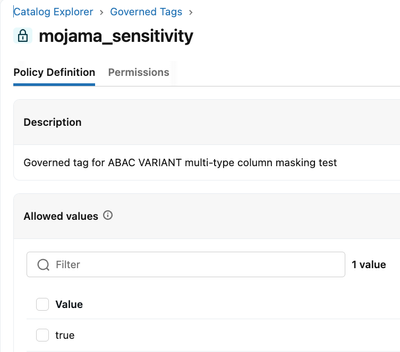
ALTER TABLE employees ALTER COLUMN id SET TAGS ('sensitivity' = 'true');
ALTER TABLE employees ALTER COLUMN name SET TAGS ('sensitivity' = 'true');
ALTER TABLE employees ALTER COLUMN salary SET TAGS ('sensitivity' = 'true');
ALTER TABLE employees ALTER COLUMN birthdate SET TAGS ('sensitivity' = 'true');
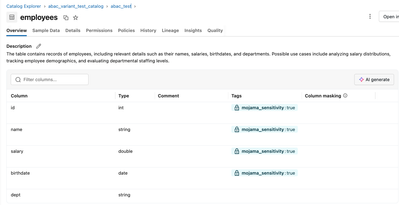
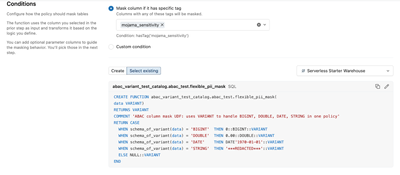
- Write one VARIANT UDF that branches on schema_of_variant():
CREATE FUNCTION mask_sensitive(data VARIANT)
RETURNS VARIANT
RETURN CASE
  WHEN schema_of_variant(data) = 'BIGINT' THEN 0::BIGINT::VARIANT
  WHEN schema_of_variant(data) = 'DOUBLE' THEN 0.00::DOUBLE::VARIANT
  WHEN schema_of_variant(data) = 'DATE'   THEN DATE'1970-01-01'::VARIANT
  WHEN schema_of_variant(data) = 'STRING' THEN '***REDACTED***'::VARIANT
  ELSE NULL::VARIANT
END;
- Create one schema-level ABAC policy that auto-applies to every tagged column:
CREATE POLICY mask_all_sensitive
ON SCHEMA my_catalog.my_schema
COLUMN MASK mask_sensitive
TO `account users`
FOR TABLES
MATCH COLUMNS hasTag('sensitivity') AS col
ON COLUMN col;
That's it. Any column tagged sensitivity = true — regardless of type — is now masked for all users.
Insert Data
Sample data (4 rows):
|
id
|
name
|
salary
|
birthdate
|
dept
|
|
1
|
Alice Johnson
|
95000.50
|
1985-03-12
|
Engineering
|
|
2
|
Bob Smith
|
120000.00
|
1979-07-22
|
Finance
|
|
3
|
Carol White
|
78500.75
|
1992-11-05
|
Marketing
|
|
4
|
David Lee
|
145000.00
|
1975-01-30
|
Engineering
|
What the Results Look Like
As you can see all the columns, even though they are different data types, are masked now, except for the dept column which we are just using as a control column for illustration purposes.
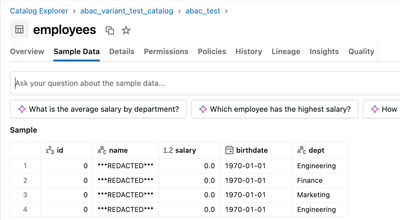
And the column types stay native. ABAC automatically coerces the VARIANT return value back to the original column type — no extra JSON quotes, no broken ORDER BY, no explicit casts needed in queries.
What the Results Look Like for Policy-Exempted Users
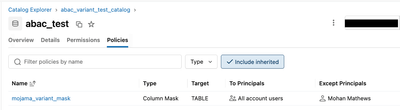
Sometimes you want a principal to be exempted from the ABAC Policy as they are allowed to see the unmasked/unfiltered data and/or want to enable them to Delta Share tables with ABAC RLS/CLM for which they need to be in the EXCEPT clause. You would add them as seen below:
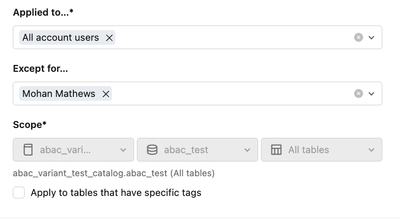
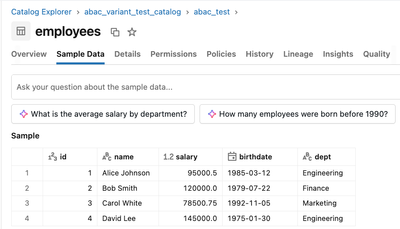
Mohan Mathews (ie me) is part of the EXCEPT clause so is able to see the unmasked data.
A Few Gotchas Worth Knowing
`schema_of_variant()` maps INT to BIGINT. When an INT is cast to VARIANT, schema_of_variant() returns 'BIGINT', not 'INT'. If your CASE checks for 'INT' it will silently fall through to NULL. Always use 'BIGINT'.
ABAC type coercion doesn't happen with traditional column masks. If you apply a VARIANT-returning UDF as a regular ALTER TABLE SET MASK, the columns come back as VARIANT type in query results — STRING/DATE values get JSON quotes, and ORDER BY on integer columns breaks. ABAC was specifically designed to handle VARIANT with automatic type casting. Stick with ABAC for this pattern.
Governed tags require account admin to create. The hasTag() condition in ABAC policies only works with governed tags (not regular UC object tags). These are created once by an account admin via Catalog > Govern > Governed Tags in the workspace UI. Once created and assigned, any user with table ownership can tag columns and the policy auto-applies. Also: create your tag with at least one allowed value — an empty allowed values list will reject all tag assignments.
Why This Matters
The traditional approach — one mask function per column type, applied per column — doesn't scale. With ABAC + VARIANT:
- One function handles any column type you throw at it
- One policy at the schema level auto-applies as new tagged tables are added
- Zero per-column management after initial setup
- Native types preserved in query results with no workarounds
It's a clean, scalable pattern for organizations with large data estates and mixed-type PII across many tables.




