
Turn on suggestions
Auto-suggest helps you quickly narrow down your search results by suggesting possible matches as you type.
Showing results for
Data Engineering
Join discussions on data engineering best practices, architectures, and optimization strategies within the Databricks Community. Exchange insights and solutions with fellow data engineers.
Turn on suggestions
Auto-suggest helps you quickly narrow down your search results by suggesting possible matches as you type.
Showing results for
- Databricks Community
- Data Engineering
- Re: Issue in "Build a Declarative Pipeline with Sp...
Options
- Subscribe to RSS Feed
- Mark Topic as New
- Mark Topic as Read
- Float this Topic for Current User
- Bookmark
- Subscribe
- Mute
- Printer Friendly Page

Options
- Mark as New
- Bookmark
- Subscribe
- Mute
- Subscribe to RSS Feed
- Permalink
- Report Inappropriate Content
yesterday
I am trying to complete the "Get Started with Data Engineering" course, but I have been running into an issue.
I have gotten to this step in "Build a Declarative Pipeline with Spark Declarative Pipelines":
Demo: Create and Run the Pipeline
Now you'll configure an ETL Pipeline in the Databricks UI that uses this notebook as its source.
Follow these steps:
- In the left sidebar, click Jobs & Pipelines (right-click → open in a new tab so you can refer back to these instructions)
- Click Create and select ETL Pipeline
- Give your pipeline a name (e.g., yourname-sdp-bronze-silver-gold)
- Under Source code, click Browse and navigate to this notebook:
- Find your project folder → select 08 - Build a Declarative Pipeline with Spark Declarative Pipelines
- Under Destination, set:
- Catalog: dbacademy
- Schema: get_started_de
- Under Compute, confirm Serverless is selected
- Click Create
The problem is that the UI doesn't match the steps. Clicking "Create" automatically creates an empty pipeline, which is fine, but there doesn't seem to be anywhere to select source code.
Is there a workaround for this?


1 ACCEPTED SOLUTION
Accepted Solutions
Options
- Mark as New
- Bookmark
- Subscribe
- Mute
- Subscribe to RSS Feed
- Permalink
- Report Inappropriate Content
yesterday
I have added the source now. I went to the root folder > Create pipeline asset > New pipeline source code folder. I was then able to go to the right of the pipeline name at the top of the screen and edit the catalogue and schema.
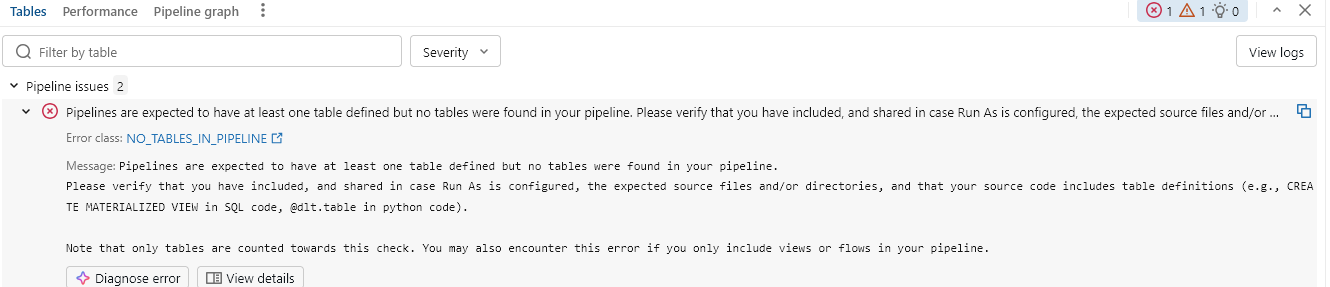
However, after running the pipeline, I received the error in the screenshot attached.
Reviewing the warning below the error, I believe I may just need to change the language from python to SQL and remove %sql from the code.
I will report back whether that works.
3 REPLIES 3
Options
- Mark as New
- Bookmark
- Subscribe
- Mute
- Subscribe to RSS Feed
- Permalink
- Report Inappropriate Content
yesterday
I have added the source now. I went to the root folder > Create pipeline asset > New pipeline source code folder. I was then able to go to the right of the pipeline name at the top of the screen and edit the catalogue and schema.
However, after running the pipeline, I received the error in the screenshot attached.
Reviewing the warning below the error, I believe I may just need to change the language from python to SQL and remove %sql from the code.
I will report back whether that works.
Options
- Mark as New
- Bookmark
- Subscribe
- Mute
- Subscribe to RSS Feed
- Permalink
- Report Inappropriate Content
yesterday
It worked!

Options
- Mark as New
- Bookmark
- Subscribe
- Mute
- Subscribe to RSS Feed
- Permalink
- Report Inappropriate Content
yesterday
Hi seanpmcn,
Great job troubleshooting that! It is very common for the UI steps in training documentation to occasionally lag behind the platform's rapid evolution, and you navigated that perfectly by exploring the "Create pipeline asset" workflow.
Your experience with the language syntax error is a perfect example of how declarative pipelines (like DLT/SDP) require strict environment settings compared to interactive notebooks. When a pipeline is configured for SQL, the engine expects pure SQL execution, and the inclusion of %sql magic commands (which are meant for interactive Python/notebook shells) will naturally trigger an error.
Architect’s Pro-Tip: When moving from interactive development (using %sql or %python cells) to declarative production (pipelines), I always recommend cleaning up the code into pure language-specific files or standard notebooks. It not only avoids these execution errors but also makes your code much more compatible with Databricks Asset Bundles (DABs) for CI/CD later on.
It’s great that you shared the solution—this will definitely save the next person.
Data Architect | 13 Years Domain Expertise | Databricks SA Champion Cohort

Announcements



Related Content
- Issue in "Build a Declarative Pipeline with Spark Declarative Pipelines" in Data Engineering
- Streaming Considerations for Daily Batch Ingestion in Data Engineering
- Best practices for data quality in lakeflow in Data Engineering
- Streaming tables fail with DELTA_STREAMING_INCOMPATIBLE_SCHEMA_CHANGE_USE_SCHEMA_LOG after adding a in Data Engineering
- Declarative Automation Bundle - How to handle Managed resources? in Data Engineering