
Turn on suggestions
Auto-suggest helps you quickly narrow down your search results by suggesting possible matches as you type.
Showing results for
Data Engineering
Join discussions on data engineering best practices, architectures, and optimization strategies within the Databricks Community. Exchange insights and solutions with fellow data engineers.
Turn on suggestions
Auto-suggest helps you quickly narrow down your search results by suggesting possible matches as you type.
Showing results for
- Databricks Community
- Data Engineering
- Re: Lakeflow Connect - SQL Server - Database Setup...
Options
- Subscribe to RSS Feed
- Mark Topic as New
- Mark Topic as Read
- Float this Topic for Current User
- Bookmark
- Subscribe
- Mute
- Printer Friendly Page

Options
- Mark as New
- Bookmark
- Subscribe
- Mute
- Subscribe to RSS Feed
- Permalink
- Report Inappropriate Content
02-27-2026 08:42 AM - edited 02-27-2026 08:43 AM
Hello,
I am trying to ingest data from an Azure SQL Database using lakeflow connect.
- I'm using a service principle for authentication (created the login and user in the DB am trying to ingest)
- The utility script was executed by a DB owner
=== Installation Summary ===
Platform: AZURE_SQL_DATABASE
Version: 1.5
✓ lakeflowDetectPlatform function created successfully
✓ lakeflowUtilityVersion_1_5 function created successfully
✓ lakeflowFixPermissions procedure created successfully
✓ lakeflowSetupChangeTracking procedure created successfully
✓ lakeflowSetupChangeDataCapture procedure created successfully
- Both "lakeflowSetupChangeTracking" and "lakeflowFixPermissions" were executed correctly
Platform: AZURE_SQL_DATABASE
Mode: INSTALL
Tables: dbo.Table1, dbo.Table2, dbo.Table3
Setting up change tracking infrastructure...
ℹ Change tracking already enabled at database level
Granting permissions to user: service-principle
✓ Granted SELECT on lakeflowDdlAudit_1_5 to service-principle
✓ Granted VIEW CHANGE TRACKING on lakeflowDdlAudit_1_5 to service-principle
✓ Granted VIEW DEFINITION to service-principle
Processing tables for change tracking enablement...
Processing specified tables: dbo.Table1, dbo.Table2, dbo.Table3
ℹ Change tracking already enabled on [dbo].[Table1]
ℹ Change tracking already enabled on [dbo].[Table2]
ℹ Change tracking already enabled on [dbo].[Table3]

=== Granting VIEW CHANGE TRACKING Permissions ===
Granting VIEW CHANGE TRACKING on specified tables...
  ✓ Granted VIEW CHANGE TRACKING on [dbo].[Table1]
  ✓ Granted VIEW CHANGE TRACKING on [dbo].[Table2]
  ✓ Granted VIEW CHANGE TRACKING on [dbo].[Table3]

VIEW CHANGE TRACKING permission summary:
  - Tables granted: 3
  - Tables with permission errors: 0
✓ VIEW CHANGE TRACKING permissions granted to user: service-principle

CT setup summary:
  - Tables processed: 0
  - Tables already enabled: 3
  - Tables with processing errors: 0
  - Tables skipped (no PK): 0
Change tracking setup completed successfully
Platform: AZURE_SQL_DATABASE
User: service-principle
Tables parameter: dbo.Table1, dbo.Table2, dbo.Table3
=== System Object Permissions ===
✓ Granted SELECT on sys.objects
✓ Granted SELECT on sys.schemas
✓ Granted SELECT on sys.tables
✓ Granted SELECT on sys.columns
✓ Granted SELECT on sys.key_constraints
✓ Granted SELECT on sys.foreign_keys
✓ Granted SELECT on sys.check_constraints
✓ Granted SELECT on sys.default_constraints
✓ Granted SELECT on sys.triggers
✓ Granted SELECT on sys.indexes
✓ Granted SELECT on sys.index_columns
✓ Granted SELECT on sys.fulltext_index_columns
✓ Granted SELECT on sys.fulltext_indexes
✓ Granted SELECT on sys.change_tracking_tables
ℹ Skipping cdc.change_tables (CDC not enabled)
ℹ Skipping cdc.captured_columns (CDC not enabled)
ℹ Skipping cdc.index_columns (CDC not enabled)
ℹ Skipping system stored procedure permissions on Azure SQL Database
Database users have implicit EXECUTE access to system stored procedures
=== Table-Level SELECT Permissions ===
Processing specified tables: dbo.Table1, dbo.Table2, dbo.Table3
✓ Granted SELECT on [dbo].[Table1]
✓ Granted SELECT on [dbo].[Table2]
✓ Granted SELECT on [dbo].[Table3]
Table permission summary:
- Tables processed: 3
- Tables with errors: 0
Permission fixes completed for user: service-principle- additional permissions were given to the SP:
GRANT EXECUTE ON [dbo].[lakeflowFixPermissions] TO [service-principle];
GRANT EXECUTE ON [dbo].[lakeflowSetupChangeTracking] TO [service-principle];
GRANT EXECUTE ON [dbo].[lakeflowSetupChangeDataCapture] TO [service-principle];
GRANT EXECUTE ON [dbo].[lakeflowDetectPlatform] TO [service-principle];
GRANT EXECUTE ON [dbo].[lakeflowUtilityVersion_1_5] TO [service-principle];

GRANT SELECT ON sys.objects TO [service-principle];
GRANT SELECT ON sys.tables TO [service-principle];
GRANT SELECT ON sys.schemas TO [service-principle];
GRANT SELECT ON sys.triggers TO [service-principle];
- The DB is discoverable. I could select the tables from the schema and even specify the columns (so it's not an authentication issue) in the "Source" step
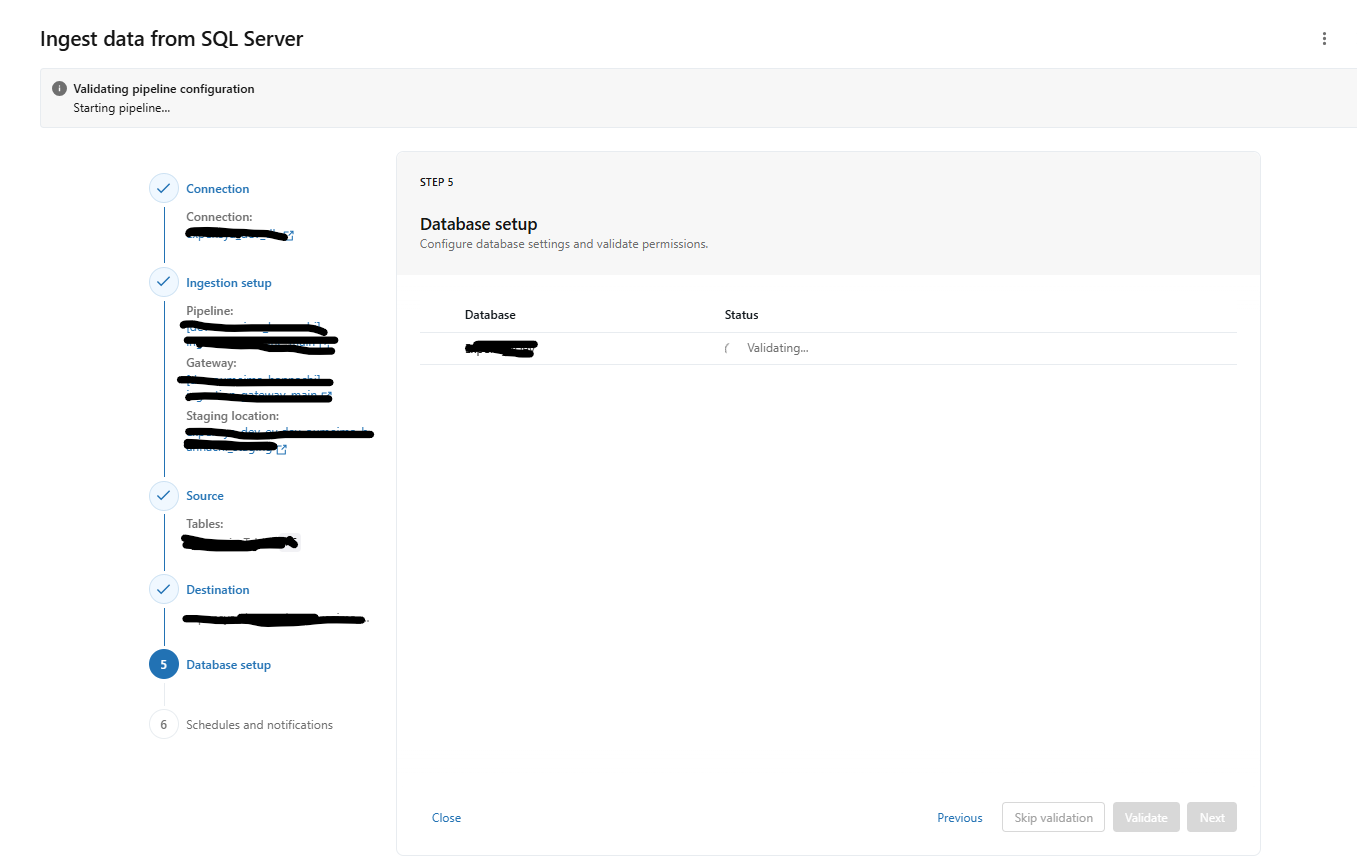
- Then when reaching the Database Setup step, it keeps running until it timeouts with the following error:
Timed out waiting for validation report. Verify that the Ingestion Gateway pipeline is running.which i suspect is not the real error.
Any idea what could be the issue and how i can troubleshoot this?
Labels:
- Labels:
-
Workflows


1 ACCEPTED SOLUTION
Accepted Solutions
Options
- Mark as New
- Bookmark
- Subscribe
- Mute
- Subscribe to RSS Feed
- Permalink
- Report Inappropriate Content
04-26-2026 01:01 PM
We figured out the issue finally! We checked the database sql audit logs and noticed that there was a particular query that was taking too long (4min) for the ingestion user. This was causing a timeout. This query is very simple and takes usually a couple seconds or even less for a DB owner:
SELECT DISTINCT SCHEMA_NAME(schema_id) FROM sys.objects WHERE type_desc = 'USER_TABLE'
AND is_ms_shipped = 0;
We had too many objects in our DB and the ingestion user had to go through a lot of security checks for each object.
The solution was to clean up our DB from the unused objects and we communicated an optimized query to the databricks team to consider (which took 16sec without the cleanup):
SELECT DISTINCT s.name
FROM sys.tables t
INNER JOIN sys.schemas s ON t.schema_id = s.schema_id
WHERE t.is_ms_shipped = 0;
thank you all for your suggestions!
5 REPLIES 5

Options
- Mark as New
- Bookmark
- Subscribe
- Mute
- Subscribe to RSS Feed
- Permalink
- Report Inappropriate Content
03-02-2026 08:45 AM
Hi @Oumeima,
Thank you for your question. Let me try to help you!
The error
Timed out waiting for validation report. Verify that the Ingestion Gateway pipeline is running.is returned when:
1. The ingestion gateway is not running. It may have failed to start.
2. The validation step is taking too long and is causing the timeout.
Can you go to your ingestion pipeline and check if it is running?
1. Go to Jobs & Pipelines > Filter the pipeline type for "Ingestion"
2. Find the ingestion pipeline you created. Click on it.
3. Confirm if it is running. If it is not running, click on Start. Wait for it to start and confirm it is not failing.
During startup, it infers the schema of all tables that the user has access to, and not only the 3 you chose.
If it starts successfully, go back and try running the database setup again.
If it fails to start, go to the event logs and look for the errors. You should also check the Driver logs, check the stdout, stderr, and log4j files to get more information about the cause of the error.
You can refer to our documentation here too -> https://docs.databricks.com/aws/en/ingestion/lakeflow-connect/sql-server-troubleshoot
Let us know what you find!
Leonardo Galler
Options
- Mark as New
- Bookmark
- Subscribe
- Mute
- Subscribe to RSS Feed
- Permalink
- Report Inappropriate Content
03-02-2026 12:28 PM
Hello,
Thank you for your reply!
Both ingestion gateway and ingestion pipeline are running correctly. I couldn't spot any a clear error message in the logs but i could troubleshoot something. I tested using a user that has the role "db_owner" (to discard any potential permissions issues). The validation is passing and i could ingest data. So, the service principle i used initially for ingestion is missing permission(s) rather something else.
I already ran the "lakeflowFixPermissions" stored procedure as dictated in the docs. These are the permissions that my service principle has:
| Permission source | object name | schema name | object type | permission class | permission name | grant state |
| EXPLICIT | Table1 | dbo | USER_TABLE | OBJECT_OR_COLUMN | SELECT | GRANT |
| EXPLICIT | Table1 | dbo | USER_TABLE | OBJECT_OR_COLUMN | VIEW CHANGE TRACKING | GRANT |
| EXPLICIT | Table2 | dbo | USER_TABLE | OBJECT_OR_COLUMN | SELECT | GRANT |
| EXPLICIT | Table2 | dbo | USER_TABLE | OBJECT_OR_COLUMN | VIEW CHANGE TRACKING | GRANT |
| EXPLICIT | DATABASE | NULL | DATABASE | CONNECT | GRANT | |
| EXPLICIT | DATABASE | NULL | DATABASE | VIEW DEFINITION | GRANT | |
| EXPLICIT | DATABASE | NULL | DATABASE | VIEW DATABASE STATE | GRANT | |
| EXPLICIT | DATABASE | NULL | OBJECT_OR_COLUMN | SELECT | GRANT | |
| EXPLICIT | DATABASE | NULL | OBJECT_OR_COLUMN | SELECT | GRANT | |
| EXPLICIT | DATABASE | NULL | OBJECT_OR_COLUMN | SELECT | GRANT | |
| EXPLICIT | DATABASE | NULL | OBJECT_OR_COLUMN | SELECT | GRANT | |
| EXPLICIT | DATABASE | NULL | OBJECT_OR_COLUMN | SELECT | GRANT | |
| EXPLICIT | DATABASE | NULL | OBJECT_OR_COLUMN | SELECT | GRANT | |
| EXPLICIT | DATABASE | NULL | OBJECT_OR_COLUMN | SELECT | GRANT | |
| EXPLICIT | DATABASE | NULL | OBJECT_OR_COLUMN | SELECT | GRANT | |
| EXPLICIT | DATABASE | NULL | OBJECT_OR_COLUMN | SELECT | GRANT | |
| EXPLICIT | DATABASE | NULL | OBJECT_OR_COLUMN | SELECT | GRANT | |
| EXPLICIT | DATABASE | NULL | OBJECT_OR_COLUMN | SELECT | GRANT | |
| EXPLICIT | DATABASE | NULL | OBJECT_OR_COLUMN | SELECT | GRANT | |
| EXPLICIT | DATABASE | NULL | OBJECT_OR_COLUMN | SELECT | GRANT | |
| EXPLICIT | DATABASE | NULL | OBJECT_OR_COLUMN | SELECT | GRANT | |
| EXPLICIT | Table3 | dbo | USER_TABLE | OBJECT_OR_COLUMN | SELECT | GRANT |
| EXPLICIT | Table3 | dbo | USER_TABLE | OBJECT_OR_COLUMN | VIEW CHANGE TRACKING | GRANT |
| EXPLICIT | lakeflowDdlAudit_1_5 | dbo | USER_TABLE | OBJECT_OR_COLUMN | SELECT | GRANT |
| EXPLICIT | lakeflowDdlAudit_1_5 | dbo | USER_TABLE | OBJECT_OR_COLUMN | VIEW CHANGE TRACKING | GRANT |
| ROLE MEMBERSHIP | db_datareader | DATABASE_ROLE | ROLE | MEMBER OF | GRANT |
Is it missing something? Do you have the full list of permissions the ingestion user must have for this to work?
Thank you!
Options
- Mark as New
- Bookmark
- Subscribe
- Mute
- Subscribe to RSS Feed
- Permalink
- Report Inappropriate Content
03-05-2026 07:59 AM
Thanks for the extra details – this is very helpful.
From what you shared, your service principal already has the right permissions inside the target database (SELECT on your tables, VIEW CHANGE TRACKING, VIEW DEFINITION, VIEW DATABASE STATE, sys.* grants, etc.), and the setup script ran successfully. That matches what we expect for the ingestion user.
For Azure SQL Database, there is one additional requirement that isn’t obvious: the ingestion login must have access to the master database so Lakeflow can discover databases and run some metadata queries. The recommended way to do this is to add the login to the built‑in ##MS_DatabaseConnector## role in master:
-- Run in the master database
ALTER ROLE ##MS_DatabaseConnector##
ADD MEMBER [service-principle-login];
Alternatively (if you can’t use that role), you can:
- Create a login in
master(if not already present), and - Create a user for that login in `master` with minimal permissions, and then a user in the target database with the documented grants.
The full list of required permissions is documented here under “Azure SQL Database”:
Microsoft SQL Server database user requirements – Azure SQL Database sectionAfter you add the master‑db access (via
##MS_DatabaseConnector##or the alternative), please:
- Restart the ingestion gateway pipeline.
- Re‑run the **Database setup → Validate** step.
If it still times out, the next step would be to grab the gateway driver logs (stdout / log4j) from the ingestion gateway job and look for permission or “System access validation” messages – feel free to paste those here, and we can dig deeper.
Let us know if it works.
Leonardo Galler

Options
- Mark as New
- Bookmark
- Subscribe
- Mute
- Subscribe to RSS Feed
- Permalink
- Report Inappropriate Content
03-08-2026 10:42 PM
Hi @Oumeima,
Your permissions and change tracking setup all look correct based on the output you shared, so the timeout during the "Database Setup" validation step is most likely a network connectivity issue between the Databricks control plane (where the Ingestion Gateway pipeline runs) and your Azure SQL Database. Here are the areas to investigate:
NETWORK CONNECTIVITY
The "Database Setup" step launches the Ingestion Gateway pipeline, which needs to reach your Azure SQL Database over port 1433. If the gateway cannot establish a connection, it will spin until the validation times out with the message you are seeing.
Check the following:
1. Azure SQL Database firewall rules: Make sure the Databricks control plane IPs for your region are allowed. If your Azure SQL Database has "Deny public network access" enabled, you will need to set up a Private Link or VNet-injected connection. You can find the control plane IP addresses for your region in the Databricks documentation:
https://docs.databricks.com/en/resources/supported-regions.html
2. If you are using Private Link or a VNet service endpoint, confirm that the Databricks serverless compute (which runs the Ingestion Gateway) can route to your Azure SQL Database. Serverless compute uses a different networking path than classic clusters, so even if a notebook on a classic cluster can reach the database, the Ingestion Gateway might not be able to.
3. If your Azure SQL Database is behind a virtual network rule, make sure the "Allow Azure services and resources to access this server" option is enabled in the Azure SQL Server firewall settings, or configure the appropriate private endpoint.
INGESTION GATEWAY PIPELINE STATUS
The error message itself suggests checking whether the Ingestion Gateway pipeline is running. You can verify this:
1. Go to the Workflows section in your Databricks workspace.
2. Look for the pipeline associated with your Lakeflow Connect ingestion. It may have been auto-created when you started the setup wizard.
3. Check the pipeline's event log and any error messages. The event log often contains more specific errors (such as connection refused, authentication failures, or timeout details) that the UI wizard does not surface.
If no pipeline was created, or if the pipeline failed to start, that itself could be the root cause. The "Database Setup" step relies on the pipeline being in a running state to execute the validation queries against your source database.
SERVICE PRINCIPAL AUTHENTICATION
Your setup output shows the service principal was granted all the expected permissions. A few additional items to double-check:
1. Confirm that the service principal credentials (client ID and client secret) stored in the Databricks connection are still valid and have not expired.
2. If you are using Azure Active Directory (Entra ID) authentication for the service principal, verify that the Azure SQL Database has Azure AD authentication enabled and that the service principal is a valid AAD user in the database.
3. Make sure the connection in the Databricks catalog (under External Data > Connections) uses the correct hostname, port, and database name. A mismatch in the database name between the connection and the actual database where you ran the utility scripts would cause the validation to fail.
ADDITIONAL TROUBLESHOOTING
1. Try running a simple connectivity test from a Databricks notebook using the same service principal credentials. For example, you can use the JDBC driver:
url = "jdbc:sqlserver://<your-server>.database.windows.net:1433;database=<your-db>;encrypt=true;trustServerCertificate=false;hostNameInCertificate=*.database.windows.net;loginTimeout=30"

df = spark.read.format("jdbc") \
.option("url", url) \
.option("dbtable", "dbo.Table1") \
.option("user", "<client-id>@<tenant-id>") \
.option("password", "<client-secret>") \
.option("driver", "com.microsoft.sqlserver.jdbc.SQLServerDriver") \
.option("authentication", "ActiveDirectoryServicePrincipal") \
.load()

df.show()
If this works from a notebook but the Lakeflow Connect wizard still fails, it narrows the issue to the Ingestion Gateway's network path or configuration.
2. Check the Databricks audit logs or the pipeline event log for any additional error details. The timeout message in the UI is a generic wrapper, and the underlying logs typically contain the specific failure reason.
3. If everything checks out, consider reaching out to your Databricks account team or opening a support ticket. They can inspect the Ingestion Gateway pipeline logs from the backend and pinpoint the exact failure in the validation step.
Documentation references:
- Lakeflow Connect overview: https://docs.databricks.com/en/connect/ingestion/index.html
- SQL Server ingestion with Lakeflow Connect: https://docs.databricks.com/en/connect/ingestion/sql-server/sql-server-managed.html
- Network requirements for serverless compute: https://docs.databricks.com/en/compute/serverless/networking.html
* This reply used an agent system I built to research and draft this response based on the wide set of documentation I have available and previous memory. I personally review the draft for any obvious issues and for monitoring system reliability and update it when I detect any drift, but there is still a small chance that something is inaccurate, especially if you are experimenting with brand new features.
If this answer resolves your question, could you mark it as "Accept as Solution"? That helps other users quickly find the correct fix.
Options
- Mark as New
- Bookmark
- Subscribe
- Mute
- Subscribe to RSS Feed
- Permalink
- Report Inappropriate Content
04-26-2026 01:01 PM
We figured out the issue finally! We checked the database sql audit logs and noticed that there was a particular query that was taking too long (4min) for the ingestion user. This was causing a timeout. This query is very simple and takes usually a couple seconds or even less for a DB owner:
SELECT DISTINCT SCHEMA_NAME(schema_id) FROM sys.objects WHERE type_desc = 'USER_TABLE'
AND is_ms_shipped = 0;
We had too many objects in our DB and the ingestion user had to go through a lot of security checks for each object.
The solution was to clean up our DB from the unused objects and we communicated an optimized query to the databricks team to consider (which took 16sec without the cleanup):
SELECT DISTINCT s.name
FROM sys.tables t
INNER JOIN sys.schemas s ON t.schema_id = s.schema_id
WHERE t.is_ms_shipped = 0;
thank you all for your suggestions!

Announcements


Related Content
- How to Unit Test Spark Declarative Pipelines in Data Engineering
- Lakeflow connect SQL server ingestion can be made elastic? in Data Engineering
- Operationalizing Lakeflow Connect:Handling Upstream Schema Evolution & Historical Backfill in Data Engineering
- How can I configure Lakeflow Connect SQL Server CDC Gateway to use a desired VM type? in Data Engineering
- Regarding the DAB Ingestion Pipeline Creating the Volume in Data Engineering