
Turn on suggestions
Auto-suggest helps you quickly narrow down your search results by suggesting possible matches as you type.
Showing results for
Data Engineering
Join discussions on data engineering best practices, architectures, and optimization strategies within the Databricks Community. Exchange insights and solutions with fellow data engineers.
Turn on suggestions
Auto-suggest helps you quickly narrow down your search results by suggesting possible matches as you type.
Showing results for
- Databricks Community
- Data Engineering
- Re: Metric views joins
Options
- Subscribe to RSS Feed
- Mark Topic as New
- Mark Topic as Read
- Float this Topic for Current User
- Bookmark
- Subscribe
- Mute
- Printer Friendly Page

Options
- Mark as New
- Bookmark
- Subscribe
- Mute
- Subscribe to RSS Feed
- Permalink
- Report Inappropriate Content
04-10-2026 12:35 AM
I am currently working on a migration project from power BI to ai bi dashboard in databricks . Now i am using the metric views to create all the measures and DAX queries which i have in my power BI report in YAML in the metric views but the main problem is as in power bi we ca select the columns from multiple tables but the same this i cant do in databricks as we can only select a single datasource while creating a chart .
Let me give you an example suppose i have sales table and a product table and there are two columns from the both the table in power bi but to do the same thing metric views i cant do it , as either i can select my sales table or my product table .
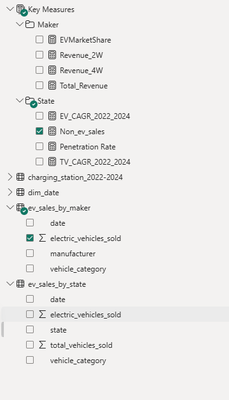
for example this you can refer to One is from sales by state one is from sales by maker .


1 ACCEPTED SOLUTION
Accepted Solutions

Options
- Mark as New
- Bookmark
- Subscribe
- Mute
- Subscribe to RSS Feed
- Permalink
- Report Inappropriate Content
04-10-2026 04:21 AM
Hey @Akshatkumar69, welcome to the community.
You're not alone on this one, it is common with folks coming from Power BI.
The key thing to understand is that AI/BI charts do expect a single data source, but that source can be a metric view that already joins your tables together. You don't need to pick just one table.
For your Sales + Product example, this is a classic fact-to-dimension pattern, and metric views handle it natively through the joins block in the YAML:
version: 0.1
source: my_catalog.my_schema.sales

joins:
  - name: product
    source: my_catalog.my_schema.product
    on: product.product_id = source.product_id

dimensions:
  - name: State
    expr: state
  - name: Maker
    expr: product.maker

measures:
  - name: Total Sales
    expr: SUM(sales_amount)
Then in AI/BI, you point your chart at this single metric view. "Sales by State" and "Sales by Maker" both work from the same source because the join is already defined in the semantic layer.
One thing to be aware of. Metric view joins are designed for many-to-one relationships (fact to dimension). If you're joining two fact tables or dealing with a many-to-many relationship, the metric view join won't give you correct results. In those cases, create a pre-joined SQL view in Unity Catalog and use that as your metric view source instead.
The mental model shift from Power BI is this: instead of the tool resolving relationships at query time, you define them upfront in your metric view YAML. Once that's in place, the single-source constraint stops being a limitation.
Cheers, Lou
3 REPLIES 3

Options
- Mark as New
- Bookmark
- Subscribe
- Mute
- Subscribe to RSS Feed
- Permalink
- Report Inappropriate Content
04-10-2026 03:23 AM
You can approach it in multiple ways
1. Unified Metric View
Build a single unified view by joining Sales and Product tables. It allows to expose State and Maker as dimensions within one metric view.
CREATE VIEW sales_product_view AS
SELECT
 s.state,
 s.sales_amount,
 p.maker
FROM sales s
JOIN product p
ON s.product_id = p.product_id;
Its simple and quick to implement with centralized logic.
2. Modular Metric Views with Joins
Create separate modular metric views based on purpose
- Sales by State - Metric View with a join between sales and state dimension
- Sales by Maker - Metric view with a join between sales and product dimension.
It aligns well with domain driven design and easy to manage
3. Star Schema Approach
Adopt a star schema (Fact & Dimension) design as it simplifies metric view creation with easier governance and extensibility if it supports the case.
Options
- Mark as New
- Bookmark
- Subscribe
- Mute
- Subscribe to RSS Feed
- Permalink
- Report Inappropriate Content
04-10-2026 04:21 AM
Hey @Akshatkumar69, welcome to the community.
You're not alone on this one, it is common with folks coming from Power BI.
The key thing to understand is that AI/BI charts do expect a single data source, but that source can be a metric view that already joins your tables together. You don't need to pick just one table.
For your Sales + Product example, this is a classic fact-to-dimension pattern, and metric views handle it natively through the joins block in the YAML:
version: 0.1
source: my_catalog.my_schema.sales

joins:
  - name: product
    source: my_catalog.my_schema.product
    on: product.product_id = source.product_id

dimensions:
  - name: State
    expr: state
  - name: Maker
    expr: product.maker

measures:
  - name: Total Sales
    expr: SUM(sales_amount)
Then in AI/BI, you point your chart at this single metric view. "Sales by State" and "Sales by Maker" both work from the same source because the join is already defined in the semantic layer.
One thing to be aware of. Metric view joins are designed for many-to-one relationships (fact to dimension). If you're joining two fact tables or dealing with a many-to-many relationship, the metric view join won't give you correct results. In those cases, create a pre-joined SQL view in Unity Catalog and use that as your metric view source instead.
The mental model shift from Power BI is this: instead of the tool resolving relationships at query time, you define them upfront in your metric view YAML. Once that's in place, the single-source constraint stops being a limitation.
Cheers, Lou
Options
- Mark as New
- Bookmark
- Subscribe
- Mute
- Subscribe to RSS Feed
- Permalink
- Report Inappropriate Content
04-12-2026 10:56 PM
Hey @Louis_Frolio, thanks for this but i have a question , suppose you have 15-20 tables in a dashboard , at that time also can we use this same like defining all the relations, all the measure and dimensions into the same metric views . As an update got released out on Friday about this local metric views so we can create joins and add fields/dimensions all in a single metric view . Just wanted to know for the same like if we have 15-20 tables, approx 15 relations , 10-15 measures , and in total 30-40 dimensions , then it would be a best practice to write all in a single metric view as one . ??
For Example :- Suppose i have this YAML and in this i have somewhere around 5-6 tables and there are multiple dimensions and obviously there would be multiple measures as well so can we do this each and every time . Like is this the beast practice ?
version: 1.1
source: bidashboard.go_cloud.users
joins:
- name: go_cloud_sessions
source: bidashboard.go_cloud.go_cloud_sessions
"on": source.Username = go_cloud_sessions.Usermatch
joins:
- name: date_table
source: bidashboard.go_cloud.date_table
"on": go_cloud_sessions.SessionStartTime = date_table.Date
joins:
- name: go_cloud_cost
source: bidashboard.go_cloud.go_cloud_cost
"on": date_table.Date = go_cloud_cost.Date
- name: managers
source: bidashboard.go_cloud.managers
"on": source.Username = managers.Value
- name: sesions_since_aug
source: bidashboard.go_cloud.sesions_since_aug
"on": source.Username = sesions_since_aug.Usermatch
- name: user_identities
source: bidashboard.go_cloud.user_identities
"on": source.UserID = user_identities.UserID
dimensions:
- name: FullName
expr: source.FullName
display_name: Full Name
- name: Username
expr: source.Username
display_name: Username
- name: UserID
expr: source.UserID
display_name: User ID
- name: Department
expr: source.Department
display_name: Department
- name: OrgTree
expr: source.OrgTree
display_name: Org Tree
- name: JobFamily
expr: source.JobFamily
display_name: Job Family
- name: JobLevel
expr: source.JobLevel
display_name: Job Level
- name: Country
expr: source.Country
display_name: Country
- name: JobFamilyGroup
expr: source.JobFamilyGroup
display_name: Job Family Group
- name: IsPeopleManager
expr: source.IsPeopleManager
display_name: Is People Manager
- name: ManagementRole
expr: source.ManagementRole
display_name: Management Role
- name: EmployeeType
expr: source.EmployeeType
display_name: Employee Type
- name: HireDate
expr: source.HireDate
display_name: Hire Date
- name: ContinuousServiceDate
expr: source.ContinuousServiceDate
display_name: Continuous Service Date
- name: TransformedUser
expr: source.TransformedUser
display_name: Transformed User
- name: Managers_Value
expr: source.`Managers.Value`
display_name: Managers Value
- name: OrgTree_Custom_1
expr: source.`OrgTree_Custom.1`
display_name: Org Tree Custom 1
- name: OrgTree_Custom_2
expr: source.`OrgTree_Custom.2`
display_name: Org Tree Custom 2
- name: OrgTree_Custom_3
expr: source.`OrgTree_Custom.3`
display_name: Org Tree Custom 3
- name: OrgTree_Custom_4
expr: source.`OrgTree_Custom.4`
display_name: Org Tree Custom 4
- name: OrgTree_Custom_5
expr: source.`OrgTree_Custom.5`
display_name: Org Tree Custom 5
- name: OrgTree_Custom_6
expr: source.`OrgTree_Custom.6`
display_name: Org Tree Custom 6
- name: OrgTree_Custom_7
expr: source.`OrgTree_Custom.7`
display_name: Org Tree Custom 7
- name: OrgTree_Custom_8
expr: source.`OrgTree_Custom.8`
display_name: Org Tree Custom 8
- name: c_Department
expr: source.c_Department
display_name: C Department
- name: Isactive
expr: source.Isactive
display_name: Isactive
- name: Contractor_FTE
expr: source.`Contractor/FTE`
display_name: Contractor FTE
- name: ISP
expr: go_cloud_sessions.ISP
- name: Fuzzy_FullName
expr: go_cloud_sessions.`Fuzzy.FullName`
display_name: Fuzzy Full Name
- name: Fuzzy_Username
expr: go_cloud_sessions.`Fuzzy.Username`
display_name: Fuzzy Username
- name: Usermatch
expr: go_cloud_sessions.Usermatch
- name: ActiveUser
expr: go_cloud_sessions.ActiveUser
- name: CustomUser_Username
expr: go_cloud_sessions.`CustomUser.Username`
display_name: Custom User Username
- name: UserIdentities_Username
expr: go_cloud_sessions.`UserIdentities.Username`
display_name: User Identities Username
- name: UserIdentities1_Username
expr: go_cloud_sessions.`UserIdentities1.Username`
display_name: User Identities1 Username
- name: DesktopType
expr: go_cloud_sessions.DesktopType
- name: cpus
expr: go_cloud_sessions.cpus
- name: VDI_Count
expr: go_cloud_sessions.VDI_Count
- name: TimeStamp
expr: go_cloud_sessions.TimeStamp
- name: SessionExperience
expr: go_cloud_sessions.SessionExperience
- name: SessionState
expr: go_cloud_sessions.SessionState
- name: SessionType
expr: go_cloud_sessions.SessionType
- name: SessionUserName
expr: go_cloud_sessions.UserName
display_name: Session User Name
- name: SessionStartTime
expr: go_cloud_sessions.SessionStartTime
- name: MachineName
expr: go_cloud_sessions.MachineName
- name: DeliveryGroupName
expr: go_cloud_sessions.DeliveryGroupName
- name: SessionLogonDuration
expr: go_cloud_sessions.SessionLogonDuration
- name: HDXConnection
expr: go_cloud_sessions.HDXConnection
- name: InteractiveSessions
expr: go_cloud_sessions.InteractiveSessions
- name: SiteName
expr: go_cloud_sessions.SiteName
- name: SessionResponsiveness
expr: go_cloud_sessions.SessionResponsiveness
- name: EndpointCity
expr: go_cloud_sessions.EndpointCity
- name: WorkspaceAppVersion
expr: go_cloud_sessions.WorkspaceAppVersion
- name: EndpointOS
expr: go_cloud_sessions.EndpointOS
- name: EndpointCountry
expr: go_cloud_sessions.EndpointCountry
- name: EndpointIP
expr: go_cloud_sessions.EndpointIP
- name: MachineAddress
expr: go_cloud_sessions.MachineAddress
- name: LaunchType
expr: go_cloud_sessions.LaunchType
- name: LaunchStatus
expr: go_cloud_sessions.LaunchStatus
- name: ApplicationName
expr: go_cloud_sessions.ApplicationName
- name: SessionDuration
expr: go_cloud_sessions.SessionDuration
- name: SessionEndTime
expr: go_cloud_sessions.SessionEndTime
- name: FailureReason
expr: go_cloud_sessions.FailureReason
- name: FailureType
expr: go_cloud_sessions.FailureType
- name: ManagerValue
expr: managers.Value
display_name: Manager Value
- name: VDI_CountAug
expr: sesions_since_aug.VDI_CountAug
- name: IdentityProvider
expr: user_identities.IdentityProvider
- name: IdentitySourceDisplayName
expr: user_identities.IdentitySourceDisplayName
- name: IdentityAccountEnabled
expr: user_identities.IdentityAccountEnabled
- name: IdentitySourceLogin
expr: user_identities.IdentitySourceLogin
- name: IdentityProviderSourceID
expr: user_identities.IdentityProviderSourceID
- name: IdentityAdditionalIdentifier
expr: user_identities.IdentityAdditionalIdentifier
- name: Created
expr: user_identities.Created
- name: LastModified
expr: user_identities.LastModified
- name: RemovalDate
expr: user_identities.RemovalDate
- name: IdentityID
expr: user_identities.IdentityID
- name: CompanyName
expr: user_identities.CompanyName
- name: Date
expr: go_cloud_sessions.date_table.Date
- name: Year
expr: go_cloud_sessions.date_table.Year
- name: MonthNumber
expr: go_cloud_sessions.date_table.`Month Number`
display_name: Month Number
- name: MonthName
expr: go_cloud_sessions.date_table.`Month Name`
display_name: Month Name
- name: Quarter
expr: go_cloud_sessions.date_table.Quarter
- name: YearMonth
expr: go_cloud_sessions.date_table.`Year-Month`
display_name: Year-Month
- name: YearQuarter
expr: go_cloud_sessions.date_table.`Year-Quarter`
display_name: Year-Quarter
- name: Cost
expr: go_cloud_sessions.date_table.go_cloud_cost.Cost
measures:
- name: count
expr: COUNT(*)
comment: Represents the total number of rows in the dataset. Use this measure
to count all
display_name: Count

Announcements


Related Content
- Choosing between a materialized view and a job-maintained Delta table for an expensive SQL query in Data Engineering
- Metric views materialization failure in Data Engineering
- Semantics as Code: Looking for Collaborators on Open Enterprise Business Semantics in Data Governance
- Unity Catalog Metric Views to be accessible to Custom Apps outside of DBX environment in Administration & Architecture
- Declarative Until It Isn't: Four Sharp Edges of Lakeflow Declarative Pipelines in Data Engineering