cancel
Showing results for 
Search instead for 
Did you mean: 
Data Engineering
Join discussions on data engineering best practices, architectures, and optimization strategies within the Databricks Community. Exchange insights and solutions with fellow data engineers.
cancel
Showing results for 
Search instead for 
Did you mean: 

NULL rows getting inserted in delta table- Schema mismatch

AanchalSoni
Contributor

I'm trying to add _metadata column while reading a json file:


from pyspark.sql.functions import col
from pyspark.sql.types import StructType, StructField, LongType, TimestampType

df_accounts_read = spark.readStream.format("cloudFiles").\
    option("cloudFiles.format", "json").\
    option("multiline", "true").\
    option("schemaLocation", "/Volumes/capstone_project/raw/raw_data/Accounts/Schema/").\
    schema(schema).\
    option("cloudFiles.rescuedDataColumn", "_rescued_data").\
    option("mode", "dropMalformed").\
    load("/Volumes/capstone_project/raw/raw_data/Accounts").\
    withColumn("_metadata", col("_metadata").cast(
        StructType(
            [
        StructField("file_path", StringType()),
        StructField("file_name", StringType()),
        StructField("file_size", LongType()),
        StructField("file_block_start", LongType()),
        StructField("file_block_length", LongType()),
        StructField("file_modification_time", TimestampType())
            ]
    )))
 
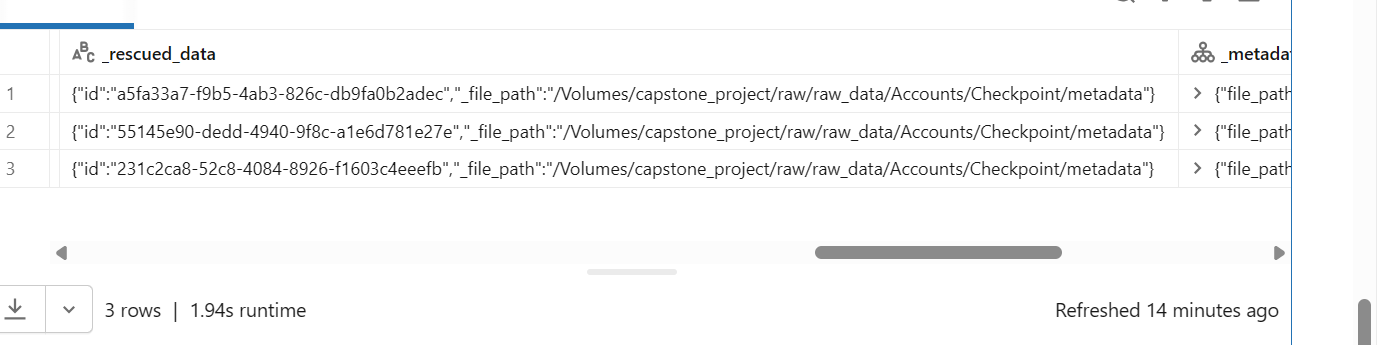
The schema has been explicitly defined for the json file. I'm writing the reads to a delta table using auto loader. When I check the table for null records, I see that metadata column is creating 3 null rows. Please refer screenshot. I'm unable to merge schema of metadata column. Please guide, how can I avoid these NULL rows?
 
Write stream code:
df_accounts_read.writeStream.format("delta").\
    option("checkpointLocation", "/Volumes/capstone_project/raw/raw_data/Accounts/Checkpoint/").\
    option("cloudFiles.schemaEvolutionMode", "addNewColumns").\
    option("mergeSchema", "true").\
    trigger(once=True).\
    toTable("capstone_project.bronze.b_accounts")
 
 
1 ACCEPTED SOLUTION

Accepted Solutions

Ashwin_DSA
Databricks Employee
Databricks Employee

Hi @AanchalSoni,

Looking at the first snapshot, it appears the path in all three records points to the checkpoint location.image.png
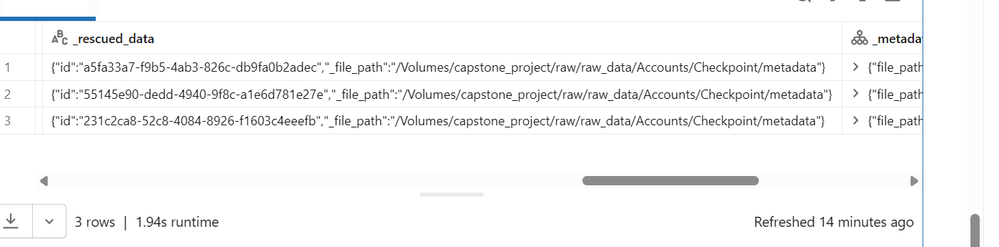
The _metadata column isn’t the root cause here. The issue is that Autoloader is ingesting your checkpoint files as data.

Because Checkpoint/ lives inside the data directory, Autoloader picks up those checkpoint JSONs. They don’t match your explicit schema, so all your business columns (and _metadata after cast) become NULL, and their content goes into _rescued_data.

To fix this, consider moving the checkpoint location outside the source path.. Example given below.

df_accounts_read.writeStream.format("delta") \
  .option("checkpointLocation",
          "/Volumes/capstone_project/checkpoints/accounts/") \
  .option("cloudFiles.schemaEvolutionMode", "addNewColumns") \
  .option("mergeSchema", "true") \
  .trigger(once=True) \
  .toTable("capstone_project.bronze.b_accounts")

You can clean up existing bad rows from the Delta table, for example, by deleting rows where _rescued_data contains the checkpoint path.

Once the checkpoint dir is outside the data tree, those extra NULL rows will stop appearing, and your _metadata cast/schema merge will behave as expected.

Hope this helps.

If this answer resolves your question, could you mark it as “Accept as Solution”? That helps other users quickly find the correct fix. 

Regards,
Ashwin | Delivery Solution Architect @ Databricks
Helping you build and scale the Data Intelligence Platform.
***Opinions are my own***


View solution in original post

2 REPLIES 2

Ashwin_DSA
Databricks Employee
Databricks Employee

Hi @AanchalSoni,

Looking at the first snapshot, it appears the path in all three records points to the checkpoint location.image.png

The _metadata column isn’t the root cause here. The issue is that Autoloader is ingesting your checkpoint files as data.

Because Checkpoint/ lives inside the data directory, Autoloader picks up those checkpoint JSONs. They don’t match your explicit schema, so all your business columns (and _metadata after cast) become NULL, and their content goes into _rescued_data.

To fix this, consider moving the checkpoint location outside the source path.. Example given below.

df_accounts_read.writeStream.format("delta") \
  .option("checkpointLocation",
          "/Volumes/capstone_project/checkpoints/accounts/") \
  .option("cloudFiles.schemaEvolutionMode", "addNewColumns") \
  .option("mergeSchema", "true") \
  .trigger(once=True) \
  .toTable("capstone_project.bronze.b_accounts")

You can clean up existing bad rows from the Delta table, for example, by deleting rows where _rescued_data contains the checkpoint path.

Once the checkpoint dir is outside the data tree, those extra NULL rows will stop appearing, and your _metadata cast/schema merge will behave as expected.

Hope this helps.

If this answer resolves your question, could you mark it as “Accept as Solution”? That helps other users quickly find the correct fix. 

Regards,
Ashwin | Delivery Solution Architect @ Databricks
Helping you build and scale the Data Intelligence Platform.
***Opinions are my own***

Thanks Ashwin! This seems to have worked.