Turn on suggestions
Auto-suggest helps you quickly narrow down your search results by suggesting possible matches as you type.
Showing results for
Databricks Academy Learners
Turn on suggestions
Auto-suggest helps you quickly narrow down your search results by suggesting possible matches as you type.
Showing results for
- Databricks Community
- Databricks Academy Learners
- Forum
- Impossible to find notebooks of courses you enroll...
Options
- Subscribe to RSS Feed
- Mark Topic as New
- Mark Topic as Read
- Float this Topic for Current User
- Bookmark
- Subscribe
- Mute
- Printer Friendly Page

Options
- Mark as New
- Bookmark
- Subscribe
- Mute
- Subscribe to RSS Feed
- Permalink
- Report Inappropriate Content
11-30-2025 03:45 AM
I am following this course called "Data Ingestion with Lakeflow Connect".
I have paid the $200 subscription to become a customer of the academy which gives me all the notebooks in the courses.
However, I cannot find the link to the notebooks in the "Data Ingestion with Lakeflow Connect" course.
How do I get the Notebooks for the courses I enroll into?


1 ACCEPTED SOLUTION
Accepted Solutions


Options
- Mark as New
- Bookmark
- Subscribe
- Mute
- Subscribe to RSS Feed
- Permalink
- Report Inappropriate Content
12-02-2025 02:12 AM
Hey @BertC!
As @szymon_dybczak mentioned, you’ll need to access the course from the Academy Lab Subscription section. The version you’re currently enrolled in is the free self-paced course, which doesn’t include labs.

5 REPLIES 5

Options
- Mark as New
- Bookmark
- Subscribe
- Mute
- Subscribe to RSS Feed
- Permalink
- Report Inappropriate Content
11-30-2025 08:03 AM
Hi @BertC,
There's no direct link to download notebooks. Instead, you can access all source code through labs workspace that will be created for you.
1. Launch you lab environment:

2. You should get an access to dedicated workspace that contains all notebooks with source code. Now click 3 vertical dots and choose option "Download as" to export it to your local pc:

Options
- Mark as New
- Bookmark
- Subscribe
- Mute
- Subscribe to RSS Feed
- Permalink
- Report Inappropriate Content
12-01-2025 03:18 AM
Hello szymon_dybczak,
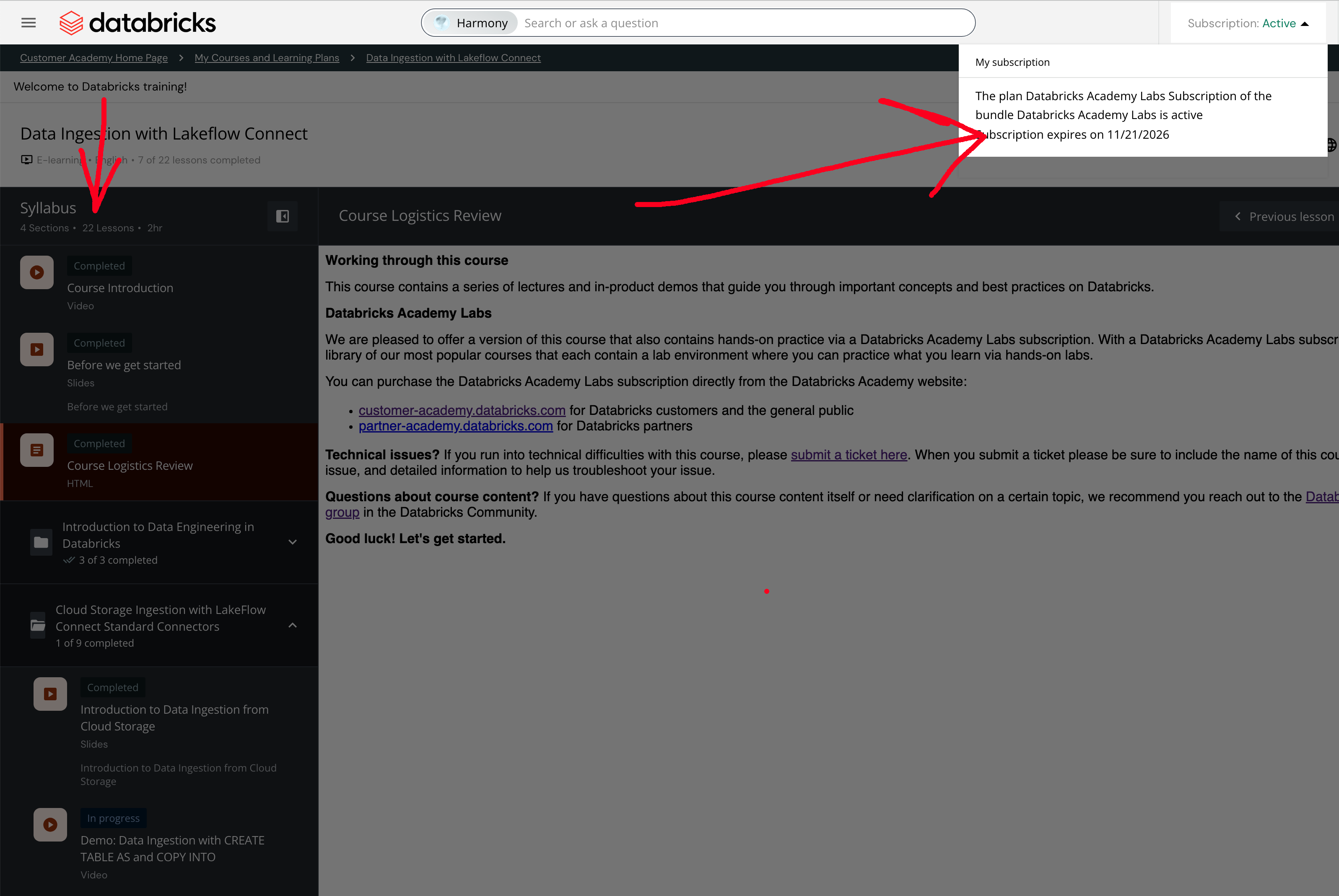
I have 22 lessons and you have 27 lessons.
The lessons with the Vocareum Labs and SP Lab Environment are missing in my environment.
While I do have the Subscription in my customer-academy.
See screenshot.
What is going wrong here? Am I missing something? I was under the impression that paying the $200 for the academy-subscription gave me all access to courses and lab-notebooks.
Hope you can help me.
Many thanks.
Options
- Mark as New
- Bookmark
- Subscribe
- Mute
- Subscribe to RSS Feed
- Permalink
- Report Inappropriate Content
12-02-2025 01:37 AM
Hi @BertC ,
I'm using partner academy so the site view could be a bit different to yours. But since you've bought labs you should also have access to that one.
Go to your labs catalog and in a search bar type in Data Ingestion with Lakeflow Connect


You should see following lab. Click on it and it should give you an access to lab environment.

Options
- Mark as New
- Bookmark
- Subscribe
- Mute
- Subscribe to RSS Feed
- Permalink
- Report Inappropriate Content
12-02-2025 02:12 AM
Hey @BertC!
As @szymon_dybczak mentioned, you’ll need to access the course from the Academy Lab Subscription section. The version you’re currently enrolled in is the free self-paced course, which doesn’t include labs.
Options
- Mark as New
- Bookmark
- Subscribe
- Mute
- Subscribe to RSS Feed
- Permalink
- Report Inappropriate Content
12-02-2025 03:08 AM
Ok, this is quite confusing, but I solved it.
You go to https://www.databricks.com/databricks-academy-labs
then login with your credentials.
There you see a lot of courses. Filter on "Data Ingestion with Lakeflow Connect".
See screenshot: 3 courses, all 3 with the same name.
- One course is 2 hours. That one if "Free", so I suspect that's the one I started with before which does not give you the Lab-Notebooks.
- One course is 4 hours. Clicking on that shows that is costing $750,- and I need to pay for that. So, that one is not included in the subscription.
- One course is 3 hours. Clicking on that and there I can enroll for that course. So, I suspect this is the one I should use.
Maybe a tip to make an overview in the paid courses you are able to do if you paid the the $200,- subscription. Because now it seems like trial-and-error.


![Community [Industry BrickTalk #3]: Scaling Video Intelligence Using AI on Databricks](/t5/image/serverpage/image-id/25651iB18C1F3FD2C2DA5A/image-size/large?v=v2&px=999)