
Turn on suggestions
Auto-suggest helps you quickly narrow down your search results by suggesting possible matches as you type.
Showing results for
Generative AI
Explore discussions on generative artificial intelligence techniques and applications within the Databricks Community. Share ideas, challenges, and breakthroughs in this cutting-edge field.
Turn on suggestions
Auto-suggest helps you quickly narrow down your search results by suggesting possible matches as you type.
Showing results for
- Databricks Community
- Generative AI
- Re: Error: "Invalid model name" in Databricks AI G...
Options
- Subscribe to RSS Feed
- Mark Topic as New
- Mark Topic as Read
- Float this Topic for Current User
- Bookmark
- Subscribe
- Mute
- Printer Friendly Page

Options
- Mark as New
- Bookmark
- Subscribe
- Mute
- Subscribe to RSS Feed
- Permalink
- Report Inappropriate Content
04-10-2026 06:40 AM
Hi everyone,
I'm trying to set up a new serving endpoint in Databricks using Google Cloud Vertex AI as the provider. I want to route it to claude-opus-4-6.
However, as soon as I try to create it, I get the following UI error (see screenshot):
"Invalid model name: claude-opus-4-6. Please refer to docs for supported models for VertexAI."
Has anyone successfully deployed this specific model via Databricks Model Serving? Do I need to use a specific versioned string (like @2026...), or is this model simply not yet supported by the Databricks AI Gateway / Serving allowlist? Could you add it to the allowed list? 😉
Any hints on the correct naming convention would be greatly appreciated! Thanks!
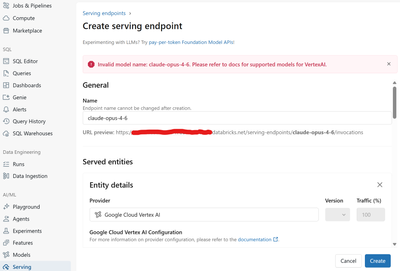
Labels:
- Labels:
-
GenAIGeneration AI


1 ACCEPTED SOLUTION
Accepted Solutions

Options
- Mark as New
- Bookmark
- Subscribe
- Mute
- Subscribe to RSS Feed
- Permalink
- Report Inappropriate Content
04-10-2026 08:44 PM
Hi @martkev -- good news: your model name is correct. The Vertex AI model ID for Claude Opus 4.6 is indeed claude-opus-4-6 (per Anthropic's official documentation). The issue is on the Databricks side -- the UI enforces an internal allowlist of recognized model names for each external provider, and that allowlist can lag behind what the providers actually support.
Here are some approaches to work around this.
———
Understanding the Problem
When you create an external model endpoint in Databricks, the UI validates the model name against a hardcoded list of known model IDs for each provider. For the google-cloud-vertex-ai provider, the allowlist may not yet include the latest Claude models. The model name itself is valid on Vertex AI -- Databricks just doesn't know about it yet.
For reference, here are the current Vertex AI model IDs from Anthropic's documentation:
|
Model |
Vertex AI Model ID |
|
Claude Opus 4.6 |
claude-opus-4-6 |
|
Claude Sonnet 4.6 |
claude-sonnet-4-6 |
|
Claude Sonnet 4.5 |
claude-sonnet-4-5@20250929 |
|
Claude Opus 4.5 |
claude-opus-4-5@20251101 |
|
Claude Opus 4.1 |
claude-opus-4-1@20250805 |
|
Claude Sonnet 4 |
claude-sonnet-4@20250514 |
|
Claude Opus 4 |
claude-opus-4@20250514 |
|
Claude Haiku 4.5 |
claude-haiku-4-5@20251001 |
———
Workaround 1: Create the Endpoint via REST API (Bypasses UI Validation)
The UI validation is client-side. You can often bypass it by creating the endpoint directly through the Databricks REST API or the MLflow Deployments SDK, which may not enforce the same allowlist:
import mlflow.deployments
client = mlflow.deployments.get_deploy_client("databricks")
endpoint = client.create_endpoint(
name="claude-opus-vertex",
config={
"served_entities": [
{
"external_model": {
"name": "claude-opus-4-6",
"provider": "google-cloud-vertex-ai",
"task": "llm/v1/chat",
"google_cloud_vertex_ai_config": {
"private_key": "{{secrets/your-scope/vertex-private-key}}",
"region": "us-east1",
"project_id": "your-gcp-project-id",
},
}
}
],
},
)
Or via curl:
curl -X POST "https://<your-databricks-host>/api/2.0/serving-endpoints" \
-H "Authorization: Bearer <your-token>" \
-H "Content-Type: application/json" \
-d '{
"name": "claude-opus-vertex",
"config": {
"served_entities": [{
"external_model": {
"name": "claude-opus-4-6",
"provider": "google-cloud-vertex-ai",
"task": "llm/v1/chat",
"google_cloud_vertex_ai_config": {
"private_key": "{{secrets/your-scope/vertex-private-key}}",
"region": "us-east1",
"project_id": "your-gcp-project-id"
}
}
}]
}
}'
Note: If the API also rejects the model name, move on to Workaround 2.
———
Workaround 2: Use the "anthropic" Provider Directly (Instead of Vertex AI)
If your primary goal is to use Claude Opus 4.6 through Databricks AI Gateway and you have an Anthropic API key, you can skip Vertex AI entirely and use the anthropic provider directly:
import mlflow.deployments
client = mlflow.deployments.get_deploy_client("databricks")
endpoint = client.create_endpoint(
name="claude-opus-direct",
config={
"served_entities": [
{
"external_model": {
"name": "claude-opus-4-6",
"provider": "anthropic",
"task": "llm/v1/chat",
"anthropic_config": {
"anthropic_api_key": "{{secrets/your-scope/anthropic-key}}",
},
}
}
],
},
)
The anthropic provider allowlist tends to be updated faster than the Vertex AI one, since the model names come directly from Anthropic. This also gives you access to the global endpoint with no region restrictions.
———
Workaround 3: Use the "custom" Provider with Vertex AI's OpenAI-Compatible Endpoint
Databricks supports a custom provider type that can point to any OpenAI-compatible API. Since Vertex AI now offers an OpenAI-compatible endpoint for Claude models, you can use this to bypass the allowlist entirely:
import mlflow.deployments
client = mlflow.deployments.get_deploy_client("databricks")
endpoint = client.create_endpoint(
name="claude-opus-custom-vertex",
config={
"served_entities": [
{
"external_model": {
"name": "claude-opus-4-6",
"provider": "custom",
"task": "llm/v1/chat",
"custom_provider_config": {
"bearer_token_auth": "{{secrets/your-scope/gcp-access-token}}",
},
}
}
],
},
)
Caveat: The custom provider approach requires managing the GCP access token yourself (OAuth tokens expire), so this is more of a temporary workaround than a production solution.
———
Workaround 4: Try a Versioned Model String
Some Databricks allowlists recognize versioned model strings that include the @date suffix. Try these variations in the UI:
- claude-opus-4-6 (what you already tried)
- claude-opus-4-6@20250205
- claude-opus-4-6@latest
The @date suffix is how Vertex AI pins model versions internally. For example, claude-sonnet-4-5@20250929 is the pinned version of Claude Sonnet 4.5. However, Claude Opus 4.6 and Sonnet 4.6 appear to use the bare name (without @date) in Vertex AI itself.
———
The Real Fix: File a Support Ticket
Since the model name is valid on Vertex AI but rejected by Databricks, this is an allowlist gap that Databricks needs to fix on their side. I would recommend:
- Filing a Databricks support ticket requesting that claude-opus-4-6 and claude-sonnet-4-6 be added to the google-cloud-vertex-ai provider's model allowlist.
- Reference this Anthropic documentation for the official model IDs: https://platform.claude.com/docs/en/build-with-claude/claude-on-vertex-ai
Allowlist updates are typically released in platform patches and don't require a full version upgrade.
———
Summary
|
Approach |
Effort |
Production-Ready |
|
**REST API / SDK** (bypass UI) |
Low |
Yes, if API accepts it |
|
**anthropic provider** (skip Vertex) |
Low |
Yes |
|
custom provider |
Medium |
No (token management) |
|
Versioned model string |
Low |
Worth a try |
|
**Support ticket** (permanent fix) |
Low |
Yes (once resolved) |
Bottom line: Your model name is correct. This is a Databricks allowlist lag issue. Use the REST API or the direct anthropic provider as a workaround while waiting for the allowlist to be updated.
Hope this helps!
———
References
- Anthropic: Claude on Vertex AI (official model IDs)
- Google: Claude models on Vertex AI
- Databricks: External models in Mosaic AI Model Serving
- Google Blog: Expanding Vertex AI with Claude Opus 4.6
Anuj Lathi
Solutions Engineer @ Databricks
Solutions Engineer @ Databricks
1 REPLY 1
Options
- Mark as New
- Bookmark
- Subscribe
- Mute
- Subscribe to RSS Feed
- Permalink
- Report Inappropriate Content
04-10-2026 08:44 PM
Hi @martkev -- good news: your model name is correct. The Vertex AI model ID for Claude Opus 4.6 is indeed claude-opus-4-6 (per Anthropic's official documentation). The issue is on the Databricks side -- the UI enforces an internal allowlist of recognized model names for each external provider, and that allowlist can lag behind what the providers actually support.
Here are some approaches to work around this.
———
Understanding the Problem
When you create an external model endpoint in Databricks, the UI validates the model name against a hardcoded list of known model IDs for each provider. For the google-cloud-vertex-ai provider, the allowlist may not yet include the latest Claude models. The model name itself is valid on Vertex AI -- Databricks just doesn't know about it yet.
For reference, here are the current Vertex AI model IDs from Anthropic's documentation:
|
Model |
Vertex AI Model ID |
|
Claude Opus 4.6 |
claude-opus-4-6 |
|
Claude Sonnet 4.6 |
claude-sonnet-4-6 |
|
Claude Sonnet 4.5 |
claude-sonnet-4-5@20250929 |
|
Claude Opus 4.5 |
claude-opus-4-5@20251101 |
|
Claude Opus 4.1 |
claude-opus-4-1@20250805 |
|
Claude Sonnet 4 |
claude-sonnet-4@20250514 |
|
Claude Opus 4 |
claude-opus-4@20250514 |
|
Claude Haiku 4.5 |
claude-haiku-4-5@20251001 |
———
Workaround 1: Create the Endpoint via REST API (Bypasses UI Validation)
The UI validation is client-side. You can often bypass it by creating the endpoint directly through the Databricks REST API or the MLflow Deployments SDK, which may not enforce the same allowlist:
import mlflow.deployments
client = mlflow.deployments.get_deploy_client("databricks")
endpoint = client.create_endpoint(
name="claude-opus-vertex",
config={
"served_entities": [
{
"external_model": {
"name": "claude-opus-4-6",
"provider": "google-cloud-vertex-ai",
"task": "llm/v1/chat",
"google_cloud_vertex_ai_config": {
"private_key": "{{secrets/your-scope/vertex-private-key}}",
"region": "us-east1",
"project_id": "your-gcp-project-id",
},
}
}
],
},
)
Or via curl:
curl -X POST "https://<your-databricks-host>/api/2.0/serving-endpoints" \
-H "Authorization: Bearer <your-token>" \
-H "Content-Type: application/json" \
-d '{
"name": "claude-opus-vertex",
"config": {
"served_entities": [{
"external_model": {
"name": "claude-opus-4-6",
"provider": "google-cloud-vertex-ai",
"task": "llm/v1/chat",
"google_cloud_vertex_ai_config": {
"private_key": "{{secrets/your-scope/vertex-private-key}}",
"region": "us-east1",
"project_id": "your-gcp-project-id"
}
}
}]
}
}'
Note: If the API also rejects the model name, move on to Workaround 2.
———
Workaround 2: Use the "anthropic" Provider Directly (Instead of Vertex AI)
If your primary goal is to use Claude Opus 4.6 through Databricks AI Gateway and you have an Anthropic API key, you can skip Vertex AI entirely and use the anthropic provider directly:
import mlflow.deployments
client = mlflow.deployments.get_deploy_client("databricks")
endpoint = client.create_endpoint(
name="claude-opus-direct",
config={
"served_entities": [
{
"external_model": {
"name": "claude-opus-4-6",
"provider": "anthropic",
"task": "llm/v1/chat",
"anthropic_config": {
"anthropic_api_key": "{{secrets/your-scope/anthropic-key}}",
},
}
}
],
},
)
The anthropic provider allowlist tends to be updated faster than the Vertex AI one, since the model names come directly from Anthropic. This also gives you access to the global endpoint with no region restrictions.
———
Workaround 3: Use the "custom" Provider with Vertex AI's OpenAI-Compatible Endpoint
Databricks supports a custom provider type that can point to any OpenAI-compatible API. Since Vertex AI now offers an OpenAI-compatible endpoint for Claude models, you can use this to bypass the allowlist entirely:
import mlflow.deployments
client = mlflow.deployments.get_deploy_client("databricks")
endpoint = client.create_endpoint(
name="claude-opus-custom-vertex",
config={
"served_entities": [
{
"external_model": {
"name": "claude-opus-4-6",
"provider": "custom",
"task": "llm/v1/chat",
"custom_provider_config": {
"bearer_token_auth": "{{secrets/your-scope/gcp-access-token}}",
},
}
}
],
},
)
Caveat: The custom provider approach requires managing the GCP access token yourself (OAuth tokens expire), so this is more of a temporary workaround than a production solution.
———
Workaround 4: Try a Versioned Model String
Some Databricks allowlists recognize versioned model strings that include the @date suffix. Try these variations in the UI:
- claude-opus-4-6 (what you already tried)
- claude-opus-4-6@20250205
- claude-opus-4-6@latest
The @date suffix is how Vertex AI pins model versions internally. For example, claude-sonnet-4-5@20250929 is the pinned version of Claude Sonnet 4.5. However, Claude Opus 4.6 and Sonnet 4.6 appear to use the bare name (without @date) in Vertex AI itself.
———
The Real Fix: File a Support Ticket
Since the model name is valid on Vertex AI but rejected by Databricks, this is an allowlist gap that Databricks needs to fix on their side. I would recommend:
- Filing a Databricks support ticket requesting that claude-opus-4-6 and claude-sonnet-4-6 be added to the google-cloud-vertex-ai provider's model allowlist.
- Reference this Anthropic documentation for the official model IDs: https://platform.claude.com/docs/en/build-with-claude/claude-on-vertex-ai
Allowlist updates are typically released in platform patches and don't require a full version upgrade.
———
Summary
|
Approach |
Effort |
Production-Ready |
|
**REST API / SDK** (bypass UI) |
Low |
Yes, if API accepts it |
|
**anthropic provider** (skip Vertex) |
Low |
Yes |
|
custom provider |
Medium |
No (token management) |
|
Versioned model string |
Low |
Worth a try |
|
**Support ticket** (permanent fix) |
Low |
Yes (once resolved) |
Bottom line: Your model name is correct. This is a Databricks allowlist lag issue. Use the REST API or the direct anthropic provider as a workaround while waiting for the allowlist to be updated.
Hope this helps!
———
References
- Anthropic: Claude on Vertex AI (official model IDs)
- Google: Claude models on Vertex AI
- Databricks: External models in Mosaic AI Model Serving
- Google Blog: Expanding Vertex AI with Claude Opus 4.6
Anuj Lathi
Solutions Engineer @ Databricks
Solutions Engineer @ Databricks

Announcements


Related Content
- Premium PAYG account stuck at TRIAL_VERIFIED (rate limit of 0 on resold models) — how do I get promo in Generative AI
- Serverless compute is not available in my account/workspaces in Administration & Architecture
- Resource limits in Administration & Architecture
- Gemini Foundation Model endpoint unavailable in 14-day commercial trial in Generative AI
- Routing between GLM 5.3 Flash and GLM 5.3 with ai_decide: a cheap router in front of ai_query in Generative AI