
Turn on suggestions
Auto-suggest helps you quickly narrow down your search results by suggesting possible matches as you type.
Showing results for
Get Started Discussions
Start your journey with Databricks by joining discussions on getting started guides, tutorials, and introductory topics. Connect with beginners and experts alike to kickstart your Databricks experience.
Turn on suggestions
Auto-suggest helps you quickly narrow down your search results by suggesting possible matches as you type.
Showing results for
- Databricks Community
- Get Started Discussions
- Re: Databricks Dataframe: Merge exception for stri...
Options
- Subscribe to RSS Feed
- Mark Topic as New
- Mark Topic as Read
- Float this Topic for Current User
- Bookmark
- Subscribe
- Mute
- Printer Friendly Page
Databricks Dataframe: Merge exception for string column in delta table with change detectio enabled.

Options
- Mark as New
- Bookmark
- Subscribe
- Mute
- Subscribe to RSS Feed
- Permalink
- Report Inappropriate Content
01-31-2026 09:08 AM
Hi,
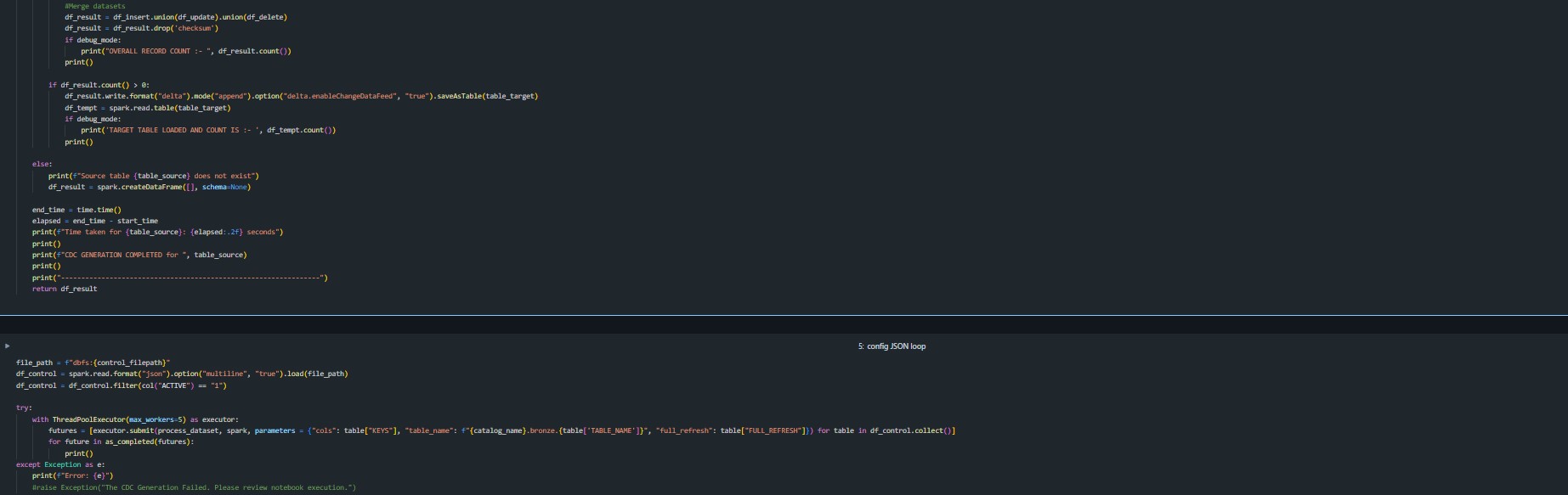
I am trying to append change data records into delta table using dataframe. However, I am encountering an issue while appending new records to existing data in delta table. The exception raised is
Cannot merge columns 'ColumnX' into 'ColumnX'
Both new dataframe column datatype and delta table column datatype is string.
Is there any way to avoid this issue ?
Code Line:
df_result.write.format("delta").mode("append").option("delta.enableChangeDataFeed", "true").saveAsTable(table_target)
Attached script code.
Labels:
- Labels:
-
Azure Databricks Delta Table


4 REPLIES 4

Options
- Mark as New
- Bookmark
- Subscribe
- Mute
- Subscribe to RSS Feed
- Permalink
- Report Inappropriate Content
01-31-2026 09:19 AM
You can use option ("mergeSchema", "true")
Options
- Mark as New
- Bookmark
- Subscribe
- Mute
- Subscribe to RSS Feed
- Permalink
- Report Inappropriate Content
01-31-2026 09:39 AM
I think there is a common misconception that MergeSchema option can handle datatype changes. As per documentation, it works for new columns. For schema type change of existing columns, use of overwriteschema option.
However, in my scenario, the data type remains same, string, reason I have this challenge.

Options
- Mark as New
- Bookmark
- Subscribe
- Mute
- Subscribe to RSS Feed
- Permalink
- Report Inappropriate Content
01-31-2026 08:26 PM
Enabling Change Data Feed (CDF) is a table feature, not a per-write option. Mixing “turn CDF on” with a data write forces Delta to reconcile table properties and schema in the same transaction, which is where the “Cannot merge columns 'X' into 'X'” shows up even when both sides are STRING..You will have to break the above operation in two steps .
Apply cdf in the target table seperatly before you write any data to it not during the write .
spark.sql("ALTER TABLE table_target SET TBLPROPERTIES (delta.enableChangeDataFeed = true))

df_aligned.write.format("delta").mode("append").saveAsTable(table_target)
Thank You
Pradeep Singh - https://www.linkedin.com/in/dbxdev
Pradeep Singh - https://www.linkedin.com/in/dbxdev

Options
- Mark as New
- Bookmark
- Subscribe
- Mute
- Subscribe to RSS Feed
- Permalink
- Report Inappropriate Content
03-07-2026 11:40 PM
Hi @crami,
The "Cannot merge columns 'ColumnX' into 'ColumnX'" error you are seeing is caused by passing "delta.enableChangeDataFeed" as a write option on the DataFrame writer. Change Data Feed (CDF) is a table-level property, not a per-write option. When you include it in the .option() call during a write, Delta Lake attempts to reconcile the table property change and the data write in the same transaction, which triggers this column merge conflict even when the data types match on both sides.
The fix is to separate the two operations: first enable CDF on the table, then write your data.
STEP 1: ENABLE CHANGE DATA FEED ON THE TARGET TABLE
If the table already exists, run this once before writing:
spark.sql("ALTER TABLE table_target SET TBLPROPERTIES (delta.enableChangeDataFeed = true)")
If you are creating a new table, you can include it in the CREATE TABLE statement:
CREATE TABLE table_target (...)
USING DELTA
TBLPROPERTIES (delta.enableChangeDataFeed = true)
Alternatively, you can set it at the session level so all new Delta tables get CDF enabled by default:
spark.conf.set("spark.databricks.delta.properties.defaults.enableChangeDataFeed", "true")
STEP 2: WRITE YOUR DATA WITHOUT THE CDF OPTION
Once CDF is enabled as a table property, remove the .option("delta.enableChangeDataFeed", "true") from your write call:
df_result.write.format("delta").mode("append").saveAsTable(table_target)
That is it. The table will automatically capture change data going forward without needing the option on every write.
WHY THIS HAPPENS
Change Data Feed adds internal metadata columns (_change_type, _commit_version, _commit_timestamp) to track row-level changes. When you pass "delta.enableChangeDataFeed" as a write option, Delta tries to alter the table schema to add these tracking columns at the same time it is merging your DataFrame schema into the table, which causes the "Cannot merge columns" conflict. Separating the two operations avoids this entirely.
ADDITIONAL NOTES
1. Only changes made after enabling CDF are recorded. It does not retroactively capture historical changes.
2. Make sure your table does not already have columns named _change_type, _commit_version, or _commit_timestamp, as these are reserved by CDF. If they exist, rename them before enabling the feature.
3. To read the change data later, use:
spark.read.format("delta").option("readChangeFeed", "true").option("startingVersion", 0).table("table_target")
Documentation references:
- Change data feed: https://docs.databricks.com/en/delta/delta-change-data-feed.html
- Delta table properties: https://docs.databricks.com/en/delta/table-properties.html
* This reply used an agent system I built to research and draft this response based on the wide set of documentation I have available and previous memory. I personally review the draft for any obvious issues and for monitoring system reliability and update it when I detect any drift, but there is still a small chance that something is inaccurate, especially if you are experimenting with brand new features.

Announcements



Related Content
- Urgent Request: One-Time Exception for Databricks Certification Exam in Certifications
- Serverless compute returns 403 on S3 buckets in the account-regional namespace in Get Started Discussions
- databricks not working in Databricks Free Edition Help
- Error while installing lakebridge in Get Started Discussions
- Help for Exam Rescheduling – Databricks Certified Generative AI Engineer Associate in Certifications