cancel
Showing results forย 
Search instead forย 
Did you mean:ย 
Lakebase Discussions
Ask questions, share challenges, and connect with others working on Lakebase. From troubleshooting to best practices, this is where conversations happen.
cancel
Showing results forย 
Search instead forย 
Did you mean:ย 

Lakebase error logs

pdiamond
Contributor

Anyone know where to see any logs related to Lakebase/Postgres? I have a Tableau Prep flow that is failing but the error is not clear and I'm trying to find out what the database is capturing.

1 ACCEPTED SOLUTION

Accepted Solutions

szymon_dybczak
Esteemed Contributor III

Hi @pdiamond ,

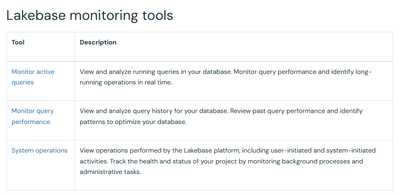
You can try to use Lakebase monitoring tools to capture query generated by Tableau Prep.

Monitor | Databricks on AWS

szymon_dybczak_0-1765645944440.png

Alternatively, it seems that you can also use external monitoring tools. So you can connect to your lakebase instance using pgAdmin which allows you to view performance metrics, analyze queries, and manage database operations through a web interface.

Monitor | Databricks on AWS


View solution in original post

3 REPLIES 3

szymon_dybczak
Esteemed Contributor III

Hi @pdiamond ,

You can try to use Lakebase monitoring tools to capture query generated by Tableau Prep.

Monitor | Databricks on AWS

szymon_dybczak_0-1765645944440.png

Alternatively, it seems that you can also use external monitoring tools. So you can connect to your lakebase instance using pgAdmin which allows you to view performance metrics, analyze queries, and manage database operations through a web interface.

Monitor | Databricks on AWS


Lu_Wang_ENB_DBX
Databricks Employee
Databricks Employee

There are multiple ways of monitoring Lakebase errors and warnings.


This will let you see what Tableau is actually sending and how it behaves (e.g., repeated failing INSERT).


3. Controlโ€‘plane / audit logs for Lakebase

Databricks audit logs include a databaseInstances service for Lakebase (create/delete/modify DB instances, not perโ€‘row SQL errors).

If youโ€™re using the audit log system table, you can run:

SELECT *
FROM system.access.audit
WHERE service_name = 'databaseInstances'
  AND event_time >= '<approx time>'
  AND event_time <  '<approx time + interval>';

That can help answer โ€œdid something happen to this instance?โ€ but wonโ€™t show the Tableau Prep SQL error itself.


4. Next steps for what to try

  1. Capture the exact SQL Tableau Prep is sending (from Prep logs or by turning on verbose logging there).
  2. Run that same SQL directly against Lakebase from DBSQL / psql and check the full Postgres error (often clearer than the Tableau UI).
  3. In parallel, check:
    • Lakebase Monitor (if Autoscaling) for failed queries around that time.
    • pg_stat_activity / pg_stat_statements to confirm the query text and behavior.

Thanks for the detailed response. We resolved the error. Turns out the Tableau connection was pointing to the wrong schema and in the Lakebase database someone had created the same table in 2 different schemas so this was not clear at first.