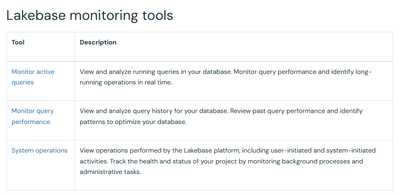
There are multiple ways of monitoring Lakebase errors and warnings.
This will let you see what Tableau is actually sending and how it behaves (e.g., repeated failing INSERT).
3. Control‑plane / audit logs for Lakebase
Databricks audit logs include a databaseInstances service for Lakebase (create/delete/modify DB instances, not per‑row SQL errors).
If you’re using the audit log system table, you can run:
SELECT *
FROM system.access.audit
WHERE service_name = 'databaseInstances'
  AND event_time >= '<approx time>'
  AND event_time <  '<approx time + interval>';
That can help answer “did something happen to this instance?” but won’t show the Tableau Prep SQL error itself.
4. Next steps for what to try
- Capture the exact SQL Tableau Prep is sending (from Prep logs or by turning on verbose logging there).
- Run that same SQL directly against Lakebase from DBSQL / psql and check the full Postgres error (often clearer than the Tableau UI).
- In parallel, check:
- Lakebase Monitor (if Autoscaling) for failed queries around that time.
pg_stat_activity / pg_stat_statements to confirm the query text and behavior.