Databricks continues to enhance workflow orchestration capabilities with the introduction of Disable Tasks in Lakeflow Jobs. Although this may appear to be a small enhancement, it provides significant operational flexibility for data engineers, platform engineers, and DevOps teams managing complex ETL and data pipelines.
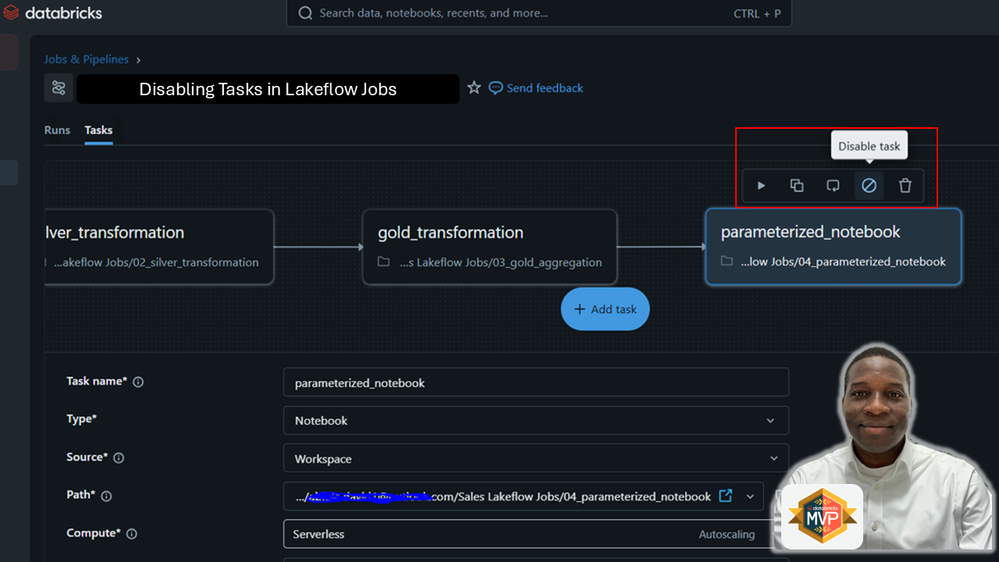
In modern data engineering environments, workflows often contain multiple dependent tasks responsible for ingestion, transformation, validation, machine learning, reporting, and notifications. During development, testing, debugging, or phased deployments, engineers frequently need to temporarily bypass specific tasks without deleting or redesigning the workflow. Previously, this required manual changes, custom conditional logic, or maintaining separate job versions. With disabled tasks, Databricks simplifies this process dramatically.
What Are Disabled Tasks in Lakeflow Jobs?
Disabled tasks allow you to temporarily deactivate specific tasks within a Lakeflow Job while preserving:
Task configuration
Dependencies
Cluster settings
Parameters
Run history
Workflow structure
Instead of deleting a task or modifying orchestration logic, you can simply disable it directly within the workflow.
This provides a cleaner and more maintainable orchestration experience.
Why This Feature Matters
In production-grade data platforms, workflows evolve continuously. Teams commonly face situations such as:
Temporarily skipping data quality checks
Disabling expensive ML scoring tasks
Pausing downstream reporting
Testing ingestion independently
Running partial workflows during debugging
Gradually deploying new pipeline stages
Handling maintenance windows
Without disabled tasks, engineers previously relied on:
Commenting out code
Creating duplicate jobs
Adding conditional notebook logic
Maintaining separate dev/test/prod workflows
Manually rewiring task dependencies
All these approaches increase complexity and operational overhead.
Disabled tasks solve this elegantly.
How Disabled Tasks Work
When a task is disabled:
The task does not execute
The workflow still retains the task definition
Databricks marks the task with a Disabled termination status
Downstream tasks behave according to their configured Run if conditions
This means workflow execution remains predictable and controlled.
For example:
Bronze Ingestion
      ↓
Silver Transformation
      ↓
Gold Aggregation
      ↓
Email Notification
If the Email Notification task is disabled:
Bronze, Silver, and Gold continue executing normally
Notification step is skipped
Workflow history remains intact
Practical Real-World Scenarios
1. Testing Individual Pipeline Layers
Suppose you are developing a Medallion Architecture pipeline:
Bronze → Silver → Gold
You may want to repeatedly test only the Bronze ingestion layer while skipping downstream transformations.
Instead of modifying notebook code, simply disable Silver and Gold tasks temporarily.
2. Phased Production Rollouts
During a new feature deployment:
Disabled tasks allow partial production deployments without maintaining separate workflow versions.
3. Reducing Compute Costs
Some tasks may be resource-intensive:
You can temporarily disable these tasks during low-priority runs or testing windows to reduce compute consumption.
4. Debugging Faster
Imagine a downstream notebook is failing repeatedly.
Instead of rerunning the entire workflow every time, you can disable problematic tasks and isolate execution paths more efficiently.
This significantly accelerates troubleshooting.
How to Disable a Task in Lakeflow Jobs
Inside Databricks:
Workflows
   → Jobs
      → Select Job
         → Select Task
            → Disable Task
Once disabled:
The task visually appears disabled in the DAG
Workflow orchestration remains intact
Dependencies are preserved
This makes workflow management cleaner and more transparent.
Understanding “Run If” Conditions
One important concept is how downstream tasks behave after a task is disabled.
Lakeflow Jobs uses “Run if” conditions such as:
Condition Behaviour
| All succeeded | Runs only if upstream succeeded |
| At least one succeeded | Runs if any upstream task succeeds |
| None failed | Runs if no upstream tasks failed |
| All done | Runs regardless of outcome |
Since a disabled task receives a Disabled status instead of Failed, downstream behaviour depends entirely on these conditions.
This gives engineers fine-grained orchestration control.
Example Architecture
Consider this workflow:
Ingestion
    ↓
Validation
    ↓
Transformation
    ↓
Reporting
If Validation is disabled:
This creates flexible orchestration patterns without rewriting pipelines.
Benefits of Disabled Tasks
Simpler Workflow Management
No need for duplicate jobs or branching orchestration logic.
Faster Development Cycles
Engineers can isolate and test specific tasks quickly.
Safer Production Deployments
Roll out workflows incrementally without affecting the entire pipeline.
Improved Operational Flexibility
Temporarily bypass unstable or expensive tasks while keeping workflows operational.
Better Maintainability
Workflow DAGs remain visually complete and easier to understand.
Best Practices
Use Meaningful Task Names
Clearly name tasks so disabled stages are easy to identify.
Example:
bronze_ingestion
silver_transformations
gold_aggregations
send_notifications
Combine with Parameters
Disabled tasks become even more powerful when paired with notebook parameters.
For example:
Dev environment skips notifications
Test environment skips ML scoring
Production runs all tasks
Monitor Disabled Tasks Carefully
Disabled tasks are intentional, but teams should document why tasks were disabled to avoid confusion later.
Avoid Permanent Overuse
Disabled tasks are excellent for temporary orchestration control, but long-term architectural changes should still be reflected in workflow redesigns where appropriate.
In conclusion, the introduction of disabled tasks in Databricks Lakeflow Jobs is a deceptively simple but highly impactful enhancement for workflow orchestration.
It reduces operational friction, simplifies debugging, improves deployment flexibility, and eliminates the need for unnecessary workflow duplication.
For organizations building modern data platforms on Databricks, this feature provides a cleaner and more maintainable way to manage evolving ETL and analytics pipelines.
As Lakeflow Jobs continues evolving into a more enterprise-grade orchestration platform, features like disabled tasks demonstrate Databricks’ focus on improving real-world engineering productivity.
For data engineers managing complex pipelines, this is a welcome addition that can immediately simplify daily operations.


