
Turn on suggestions
Auto-suggest helps you quickly narrow down your search results by suggesting possible matches as you type.
Showing results for
Administration & Architecture
Explore discussions on Databricks administration, deployment strategies, and architectural best practices. Connect with administrators and architects to optimize your Databricks environment for performance, scalability, and security.
Turn on suggestions
Auto-suggest helps you quickly narrow down your search results by suggesting possible matches as you type.
Showing results for
- Databricks Community
- Administration & Architecture
- Re: Serverless NCC Private Endpoint ESTABLISHED bu...
Options
- Subscribe to RSS Feed
- Mark Topic as New
- Mark Topic as Read
- Float this Topic for Current User
- Bookmark
- Subscribe
- Mute
- Printer Friendly Page

Options
- Mark as New
- Bookmark
- Subscribe
- Mute
- Subscribe to RSS Feed
- Permalink
- Report Inappropriate Content
06-03-2026 11:09 PM
Hi community,
I've been trying to connect Databricks Serverless to a SQL Server
running on an EC2 instance using NCC Private Endpoint, but traffic
is not being routed through PrivateLink.
## Setup
- Databricks Serverless (AWS, us-east-1)
- NCC attached to workspace: ESTABLISHED status
- VPC Endpoint Service: internal NLB (scheme: internal)
forwarding TCP:1433 to EC2 target (Healthy)
- Resource FQDN in NCC rule:
LBdemosql-80fcd74e8ec6b9b0.elb.us-east-1.amazonaws.com
- VPC Endpoint status: ESTABLISHED
## Evidence
From serverless notebook:
# DNS resolves correctly via PrivateLink
nslookup LBdemosql-80fcd74e8ec6b9b0.elb.us-east-1.amazonaws.com
→ 10.0.0.45, 10.0.0.23 ✅
# But routing goes via internet gateway, not PrivateLink
ip route get 10.0.0.45
→ 10.0.0.45 via 169.254.1.1 dev eth0 src 192.168.210.11 ❌
# TCP connection fails
socket.connect_ex("LBdemosql...", 1433) → 111 (Connection refused)
# Direct connection via EC2 public IP works fine ✅
## What I've tried
- Recreated NCC rule multiple times
- Verified NLB target is Healthy
- Verified Security Groups allow traffic
- Verified NACL allows all traffic
- Cross-zone load balancing enabled
- Windows Firewall disabled on EC2
- Allow principals includes Databricks IAM role
## Questions
1. Is an internal NLB supported as NCC PrivateLink target for
Serverless compute?
2. Does the FQDN need to resolve to a public IP for Serverless
to intercept DNS and route via PrivateLink?
3. Is there any additional configuration needed when the NLB
DNS resolves to private IPs (10.0.0.x)?
Thanks in advance.


1 ACCEPTED SOLUTION
Accepted Solutions
Options
- Mark as New
- Bookmark
- Subscribe
- Mute
- Subscribe to RSS Feed
- Permalink
- Report Inappropriate Content
a month ago
Louis thanks,
My issue was with the NLB. The Databricks documentation does not specify some of the required settings for this configuration. I found the solution in this post:
The NLB setting that I had to turn off was
Enable “cross-zone load balancing” and disable “enforce inbound rules on PrivateLink traffic” security settings on the NLB.
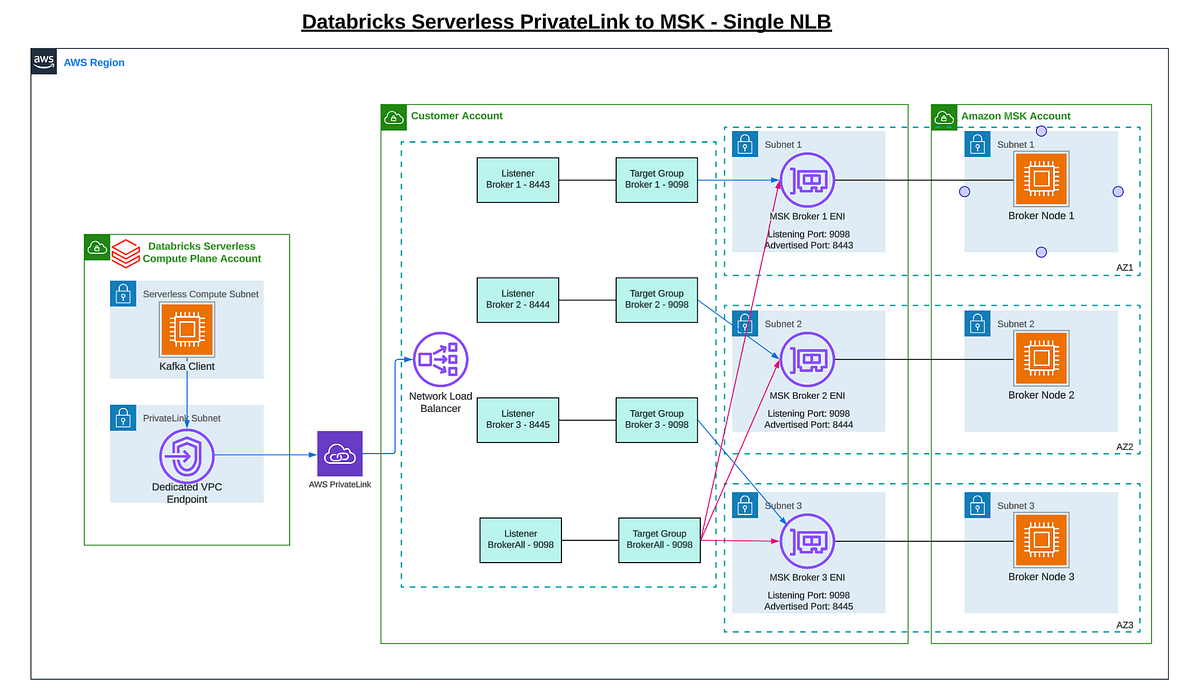
AWS Databricks Serverless Private Connectivity to Amazon MSK Introduction As organizations increasingly adopt Databricks Serverless for analytics and AI workloads, integrating with streaming ...
2 REPLIES 2

Options
- Mark as New
- Bookmark
- Subscribe
- Mute
- Subscribe to RSS Feed
- Permalink
- Report Inappropriate Content
06-05-2026 04:35 PM
Hey @Javier_Epad , I did some digging and here is what I found:
This is not a case of internal NLBs being unsupported. The AWS docs spell out serverless private connectivity to your VPC through an internal NLB sitting behind a VPC endpoint service, so the architecture itself is fine. The real problem shows up in your evidence.
Look at these two lines:
nslookup of the load balancer hostname returns 10.0.0.45 and 10.0.0.23. ip route get 10.0.0.45 goes via 169.254.1.1 on eth0.
That pattern tells the whole story. The NCC private endpoint DNS interception is not engaging for the hostname you're using. When interception works, the FQDN resolves to a Databricks serverless internal address and the route leaves through the private endpoint interface, never eth0. What you're seeing instead is the fallback public DNS answer (an internal NLB publishes its real private IPs), which serverless then tries to reach directly and can't. So an ESTABLISHED status only proves the PrivateLink tunnel exists. It does not prove serverless is routing to it.
Why it's happening
Per the docs, private routing happens only when the destination hostname matches one of the domain names in the rule, the FQDN corresponds to the destination resource in your connection URL, and there's no DNS chasing or DNS redirect (both unsupported).
The most likely concrete mistake: you registered and are connecting to the NLB's auto-generated *.elb.amazonaws.com name. The documented pattern (see the RDS example) is to register the destination resource's own FQDN, a stable hostname you control, not the NLB's name. The NLB and endpoint service are just the plumbing the rule points at by way of the VPC endpoint service name.
What to do next
-
Pick one stable custom FQDN you control for the SQL Server (something like sqlserver.internal.yourco.com) and use that exact name in three places: the SQL connection string, the NCC rule's domain_names field, and your internal DNS. Don't connect by IP, and steer clear of the raw *.elb.amazonaws.com name.
-
Verify domain_names directly through the Account API (GET the NCC rule) or Terraform, not just the UI. The match has to be exact: trailing dot, case, and no alias your driver might swap in silently.
-
Cut out any DNS indirection. If your name is a CNAME chain that ends at the NLB, replace it with a name that resolves directly through an A record. DNS chasing and redirect aren't supported.
-
Confirm the endpoint service settings: it's built on the internal NLB, and "Enforce inbound rules on PrivateLink traffic" is set to Off. Your ESTABLISHED status already proves acceptance and the IAM principal allowlist, so you can skip rechecking those.
-
Test the NLB path on its own. From a host inside the VPC, confirm a real TCP handshake to the NLB listener on 1433 completes. A "Healthy target" by itself isn't a full end-to-end test.
-
Re-test from a serverless notebook. You'll know it worked when the FQDN resolves to a serverless internal address and ip route get no longer uses eth0. If you still see 10.0.0.x via eth0, interception isn't active yet. Recheck steps 1 and 2, and give domain_names time to propagate.
Your three questions
-
Is an internal NLB supported? Yes. The docs actually require an internal-scheme NLB, so that's not your problem.
-
Does the FQDN have to resolve to a public IP? No. Interception works off hostname matching, independent of normal DNS. Your name resolving to a private 10.0.0.x and routing via eth0 is exactly the proof that interception is off. You should never be leaning on that fallback resolution.
-
Any extra config when DNS resolves to private IPs? It isn't about public versus private IP. It comes down to four things: an exact hostname match, no DNS indirection, registering the resource FQDN (not the NLB name), and the correct endpoint service settings.
If it's still "connection refused" after DNS is fixed
Once resolution stops leaking to eth0 and you're still getting errno 111 on 1433, shift your attention to the path. Check that the NLB listener and target group are both TCP 1433, that SQL Server is on the static default port 1433 (named instances plus SQL Browser on UDP 1434 won't cross an NLB cleanly), and that the endpoint and target security groups allow the serverless source. Your "direct via public IP works" test already proves the listener itself is fine.
If you escalate to Databricks support
Include all of this up front: NCC ID and workspace region, the VPC endpoint service name, the VPC endpoint ID, the exact JDBC/ODBC hostname, the nslookup and ip route get output from a serverless notebook, the connection timestamp, and proof that the same hostname and port work from a trusted host inside the VPC.
The takeaway: the tunnel is up, but serverless isn't using it because the hostname isn't triggering DNS interception. Fix the name (one stable FQDN you control, matched exactly in the rule, no CNAME chasing) and the routing should follow.
Cheers, Louis.
Helpful inks used in my research:
Configure private connectivity to resources in your VPC (AWS): https://docs.databricks.com/aws/en/security/network/serverless-network-security/pl-to-internal-netwo...
Manage private endpoint rules:
Configure private connectivity to AWS-managed resources:
https://docs.databricks.com/aws/en/security/network/serverless-network-security/pl-aws-resources Serverless compute plane networking: https://docs.databricks.com/aws/en/security/network/serverless-network-security
Options
- Mark as New
- Bookmark
- Subscribe
- Mute
- Subscribe to RSS Feed
- Permalink
- Report Inappropriate Content
a month ago
Louis thanks,
My issue was with the NLB. The Databricks documentation does not specify some of the required settings for this configuration. I found the solution in this post:
The NLB setting that I had to turn off was
Enable “cross-zone load balancing” and disable “enforce inbound rules on PrivateLink traffic” security settings on the NLB.
AWS Databricks Serverless Private Connectivity to Amazon MSK Introduction As organizations increasingly adopt Databricks Serverless for analytics and AI workloads, integrating with streaming ...

Announcements


Related Content
- Serverless NCC Private Endpoint ESTABLISHED but traffic routes via eth0 instead of PrivateLink (AWS in Administration & Architecture
- VNet Data Gateway unable to connect to Azure Databricks Serverless SQL via Private Endpoint in Administration & Architecture
- Intermittent connectivity issues between Power BI and Databricks in Warehousing & Analytics
- Ingesting Data from Event Hubs via Kafka API with Serverless Compute in Data Engineering
- Establish connectivity from databricks serverless to Cloud SQL (GCP) Postgres database in Data Engineering