
Turn on suggestions
Auto-suggest helps you quickly narrow down your search results by suggesting possible matches as you type.
Showing results for
Community Articles
Dive into a collaborative space where members like YOU can exchange knowledge, tips, and best practices. Join the conversation today and unlock a wealth of collective wisdom to enhance your experience and drive success.
Turn on suggestions
Auto-suggest helps you quickly narrow down your search results by suggesting possible matches as you type.
Showing results for
- Databricks Community
- Community Articles
- CI/CD on Databricks with Asset Bundles (DABs) and ...
Options
- Subscribe to RSS Feed
- Mark Topic as New
- Mark Topic as Read
- Float this Topic for Current User
- Bookmark
- Subscribe
- Mute
- Printer Friendly Page

Options
- Mark as New
- Bookmark
- Subscribe
- Mute
- Subscribe to RSS Feed
- Permalink
- Report Inappropriate Content
03-01-2026 05:12 AM
Hi all.
If you've ever manually promoted resources from dev to prod on Databricks — copying notebooks, updating configs, hoping nothing breaks — this post is for you.
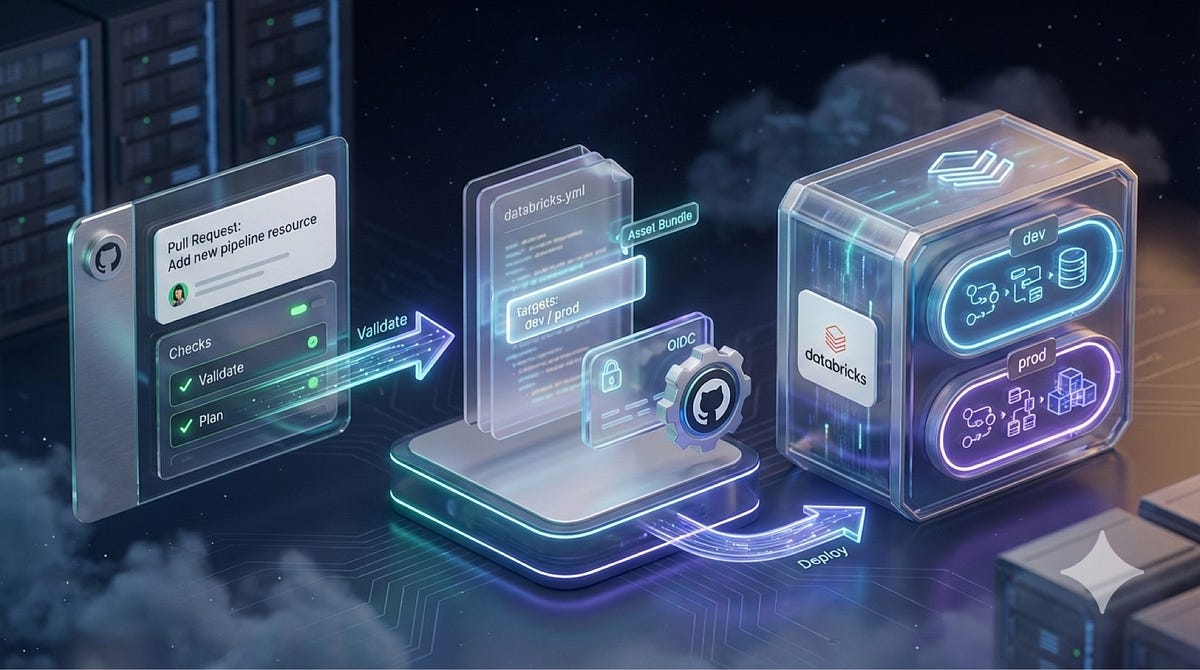
I've been building a CI/CD setup for a Speech-to-Text pipeline on Databricks, and I wanted to share the approach in case it's useful to others here. The goal was simple: treat Databricks resources as code, deploy them deterministically across environments, and authenticate from GitHub Actions without storing any long-lived tokens.
The stack is:
- Databricks Asset Bundles for infrastructure-as-code
- GitHub Actions for delivery
- OIDC federation for authentication.
What gets deployed by the bundle
The bundle manages the full solution end-to-end:
- Unity Catalog schema and volume — created automatically on deploy, no manual setup
- Silver pipelines (Spark Declarative Pipelines) — audio ingestion via Auto Loader and NLP enrichment with two parallel implementations: AI SQL functions and Foundation Model API
- Gold tables — transcription output from Whisper Large V3 via Model Serving endpoint, plus NLP evaluation results tracked with MLflow
- Model Serving endpoint — Whisper Large V3 for audio transcription
- AI/BI Dashboard — monitoring transcription quality and NLP results
- Genie Space — deployed as a job, since direct bundle support isn't available yet; it's a workaround worth knowing about if you're hitting the same limitation
- Orchestration job (stt_main) — sequences all the stages in order
Everything lives in the bundle YAML. If it's not in the repo, it doesn't exist in the workspace.
What the CI/CD setup covers
- Structuring the repo with the bundle isolated from application code
- Declaring dev and prod environments using DAB targets — same bundle YAML, different configurations
- Configuring a service principal with minimal Unity Catalog permissions
- Setting up OIDC federation policies so GitHub Actions authenticates without PATs
- GitHub Environments to isolate variables and secrets per environment, with required reviewers on Prod
- A workflow that runs bundle validate → bundle plan → bundle deploy, passing service_principal_id as the only external variable
One thing worth calling out: in dev, the workflow also syncs a Git folder in the workspace before deploying — useful for interactive development. In prod, the bundle is the only source of truth and the Git folder sync doesn't happen.
Resources
The full repo is on GitHub — the GitHub Actions workflows and all the DAB configuration with inline comments on every step are there: 🔗 https://github.com/alessandro9110/Speech-To-Text-With-Databricks
If you want the full walkthrough with context and explanation behind each decision, I wrote a detailed article on Medium: 🔗 https://medium.com/towards-data-engineering/ci-cd-on-databricks-with-asset-bundles-and-github-action...
Happy to answer questions or discuss alternative approaches — particularly around multi-workspace setups, how to handle Unity Catalog permissions when the deploy identity differs from run_as, or the Genie workaround if you're dealing with the same limitation.
Thank you to everyone for the support ❤️
An end-to-end, scalable STT solution on Databricks that transcribes audio into structured text in Delta Lake, ready for analytics, search, and GenAI/RAG. - alessandro9110/Speech-To-Text-With-Databricks
CI/CD on Databricks with Asset Bundles and GitHub Actions Manual deployments on Databricks break down as soon as you need repeatability, environment promotion, and a clean audit trail. The goal of ...
Labels:
- Labels:
-
Delta Lake
-
Spark
-
Workflows


1 ACCEPTED SOLUTION
Accepted Solutions
Options
- Mark as New
- Bookmark
- Subscribe
- Mute
- Subscribe to RSS Feed
- Permalink
- Report Inappropriate Content
03-07-2026 02:30 PM
I've recorded also a YouTube tutorial if someone needs support: https://youtu.be/kStRXqCznHA

In this tutorial I show you how to build a complete CI/CD pipeline for Databricks using Databricks Asset Bundles (DABs) and GitHub Actions with OIDC authentication - no static tokens, no manual deployments, no drift between environments. Starting from scratch, we configure a service principal with
3 REPLIES 3

Options
- Mark as New
- Bookmark
- Subscribe
- Mute
- Subscribe to RSS Feed
- Permalink
- Report Inappropriate Content
03-04-2026 09:23 AM
Ecellent Article!
We are also using DAB in our arg, and i like the statement Ìf it is not there in DAB, it does not exist in the workspace.`
Previous to DAB, we built our own framework on top of dbt, but that was really sub-optimal!
We have DEV, STG, PRD and PRD - SHADOW bundles which works seamlessly!
Options
- Mark as New
- Bookmark
- Subscribe
- Mute
- Subscribe to RSS Feed
- Permalink
- Report Inappropriate Content
03-07-2026 02:30 PM
I've recorded also a YouTube tutorial if someone needs support: https://youtu.be/kStRXqCznHA
In this tutorial I show you how to build a complete CI/CD pipeline for Databricks using Databricks Asset Bundles (DABs) and GitHub Actions with OIDC authentication - no static tokens, no manual deployments, no drift between environments. Starting from scratch, we configure a service principal with

Options
- Mark as New
- Bookmark
- Subscribe
- Mute
- Subscribe to RSS Feed
- Permalink
- Report Inappropriate Content
03-08-2026 08:55 PM
Hi,
Great question! Databricks Asset Bundles (DABs) are the recommended approach for CI/CD on Databricks. Here is a comprehensive walkthrough.
WHAT ARE DATABRICKS ASSET BUNDLES?
DABs let you define your Databricks resources (jobs, pipelines, dashboards, ML experiments, etc.) as YAML configuration alongside your source code. The Databricks CLI then validates, deploys, and runs these bundles. You initialize a project with:
databricks bundle init default-python
This gives you a project structure with databricks.yml, a resources/ folder for job/pipeline definitions, src/ for code, and tests/ for unit tests.
Docs: https://docs.databricks.com/dev-tools/bundles/
ENVIRONMENT PROMOTION (DEV -> STAGING -> PROD)
DABs use "targets" in databricks.yml to define environment-specific settings:
bundle:
  name: my_project

variables:
  catalog:
    description: The Unity Catalog catalog to use
  schema:
    description: The schema to use

targets:
  dev:
    mode: development
    default: true
    workspace:
      host: https://dev-workspace.cloud.databricks.com
    variables:
      catalog: dev_catalog
      schema: ${workspace.current_user.short_name}

  staging:
    workspace:
      host: https://staging-workspace.cloud.databricks.com
    variables:
      catalog: staging_catalog
      schema: staging
    run_as:
      service_principal_name: staging-sp@company.com

  prod:
    mode: production
    workspace:
      host: https://prod-workspace.cloud.databricks.com
    variables:
      catalog: prod_catalog
      schema: production
    run_as:
      service_principal_name: prod-sp@company.com
    permissions:
      - service_principal_name: prod-sp@company.com
        level: CAN_MANAGE
Key behaviors per mode:
- mode: development -- Prefixes resource names with [dev <username>], pauses schedules/triggers, enables concurrent job runs
- mode: production -- Validates that run_as and permissions are set, prevents cluster overrides, marks pipelines as production
Docs:
- Deployment modes: https://docs.databricks.com/en/dev-tools/bundles/deployment-modes.html
- Variables: https://docs.databricks.com/en/dev-tools/bundles/variables.html
- run_as: https://docs.databricks.com/en/dev-tools/bundles/run-as.html
CI/CD INTEGRATION - CORE CLI COMMANDS
The core commands used in any CI/CD pipeline:
databricks bundle validate --target prod    # Validate configuration
databricks bundle deploy --target prod      # Deploy resources
databricks bundle run --target prod my_job  # Run a specific job
GITHUB ACTIONS EXAMPLE
Databricks provides the official databricks/setup-cli action:
name: Deploy Bundle

on:
  pull_request:
    branches: [main]
  push:
    branches: [main]

permissions:
  id-token: write
  contents: read

jobs:
  validate:
    runs-on: ubuntu-latest
    steps:
      - uses: actions/checkout@v4
      - uses: databricks/setup-cli@main
      - run: databricks bundle validate --target staging
        env:
          DATABRICKS_HOST: ${{ secrets.DATABRICKS_HOST }}
          DATABRICKS_AUTH_TYPE: github-oidc
          DATABRICKS_CLIENT_ID: ${{ secrets.DATABRICKS_CLIENT_ID }}

  deploy-prod:
    needs: validate
    if: github.event_name == 'push' && github.ref == 'refs/heads/main'
    runs-on: ubuntu-latest
    environment: production
    concurrency: production
    steps:
      - uses: actions/checkout@v4
      - uses: databricks/setup-cli@main
      - run: databricks bundle deploy --target prod
        env:
          DATABRICKS_HOST: ${{ secrets.PROD_HOST }}
          DATABRICKS_AUTH_TYPE: github-oidc
          DATABRICKS_CLIENT_ID: ${{ secrets.DATABRICKS_CLIENT_ID }}
Docs: https://docs.databricks.com/dev-tools/ci-cd/github
AZURE DEVOPS EXAMPLE
trigger:
  branches:
    include:
      - main

pool:
  vmImage: 'ubuntu-latest'

stages:
  - stage: Validate
    jobs:
      - job: ValidateBundle
        steps:
          - script: |
              curl -fsSL https://raw.githubusercontent.com/databricks/setup-cli/main/install.sh | sh
            displayName: 'Install Databricks CLI'
          - script: databricks bundle validate --target prod
            env:
              DATABRICKS_HOST: $(DATABRICKS_HOST)
              DATABRICKS_CLIENT_ID: $(DATABRICKS_CLIENT_ID)
              DATABRICKS_CLIENT_SECRET: $(DATABRICKS_CLIENT_SECRET)

  - stage: Deploy
    dependsOn: Validate
    condition: and(succeeded(), eq(variables['Build.SourceBranch'], 'refs/heads/main'))
    jobs:
      - deployment: DeployProd
        environment: production
        strategy:
          runOnce:
            deploy:
              steps:
                - checkout: self
                - script: |
                    curl -fsSL https://raw.githubusercontent.com/databricks/setup-cli/main/install.sh | sh
                - script: databricks bundle deploy --target prod
                  env:
                    DATABRICKS_HOST: $(DATABRICKS_HOST)
                    DATABRICKS_CLIENT_ID: $(DATABRICKS_CLIENT_ID)
                    DATABRICKS_CLIENT_SECRET: $(DATABRICKS_CLIENT_SECRET)
Docs: https://docs.databricks.com/en/dev-tools/ci-cd/azure-devops.html
AUTHENTICATION IN CI/CD
Two recommended approaches (do NOT use personal access tokens for automation):
Option A: Workload Identity Federation (OIDC) -- Most Secure
Eliminates stored secrets entirely. Your CI/CD platform provides an OIDC token that Databricks validates directly. Supported for GitHub Actions natively.
Option B: OAuth M2M (Client Credentials) -- For Azure DevOps / GitLab / Jenkins
Create an OAuth secret for your service principal, then store the credentials as CI/CD secrets. OAuth secrets are valid for up to 730 days and can be rotated.
Docs:
- OAuth M2M: https://docs.databricks.com/en/dev-tools/auth/oauth-m2m.html
- Service principals: https://docs.databricks.com/admin/users-groups/service-principals
TESTING STRATEGIES
A complete CI/CD pipeline should include:
1. Lint and Unit Test -- On every PR (no Databricks access needed)
2. Bundle Validate -- On every PR (lightweight, catches YAML errors)
3. Deploy to Staging -- On PR merge or manual trigger
4. Integration Test -- Run test jobs in staging workspace
5. Deploy to Production -- On main branch push after staging passes
BEST PRACTICES
- Use service principals for all non-development deployments; set run_as in staging/prod targets
- Use mode: development for dev and mode: production for prod
- Store secrets properly -- never commit credentials
- Pin the CLI version in production pipelines for reproducibility
- Use variables for environment-specific values rather than duplicating resource definitions
- Validate before deploying -- always run "databricks bundle validate" as a separate CI step
- Use concurrency controls in your CI/CD to prevent parallel deployments to the same target
Docs: https://docs.databricks.com/dev-tools/ci-cd/best-practices
DOCUMENTATION REFERENCES
- Asset Bundles overview: https://docs.databricks.com/dev-tools/bundles/
- CI/CD best practices: https://docs.databricks.com/dev-tools/ci-cd/best-practices
- GitHub Actions: https://docs.databricks.com/dev-tools/ci-cd/github
- Azure DevOps: https://docs.databricks.com/en/dev-tools/ci-cd/azure-devops.html
- Deployment modes: https://docs.databricks.com/en/dev-tools/bundles/deployment-modes.html
- Bundle variables: https://docs.databricks.com/en/dev-tools/bundles/variables.html
- run_as: https://docs.databricks.com/en/dev-tools/bundles/run-as.html
- OAuth M2M: https://docs.databricks.com/en/dev-tools/auth/oauth-m2m.html
- Service principals: https://docs.databricks.com/admin/users-groups/service-principals
- Bundle examples repo: https://github.com/databricks/bundle-examples
Hope this helps! If you have a specific CI/CD platform or run into particular issues, feel free to share more details.
* This reply used an agent system I built to research and draft this response based on the wide set of documentation I have available and previous memory. I personally review the draft for any obvious issues and for monitoring system reliability and update it when I detect any drift, but there is still a small chance that something is inaccurate, especially if you are experimenting with brand new features.

Announcements


Related Content
- Serve Tableau Reports Directly from Databricks SQL in Technical Blog
- [CUSTOMER BLOG] How S&P Global Energy Made Its Structured Data Estate Conversational with Databricks in Technical Blog
- When Milliseconds Matter: Databricks Powers the Next Generation of Operational Workloads in Technical Blog
- Keep a PySpark Test Flood Out of Your Coding Agent's Context Window in Community Articles
- AgentOps on Databricks: Operating Production AI Agents in Technical Blog