Most Databricks deployment pipelines on Azure still authenticate with a service principal client secret. There is a better way and it does not require managing a single credential.
The standard pattern has a quiet problem
If you have set up Databricks CI/CD on Azure in the last few years, your GitHub Actions (or DevOps pipelines) probably looks something like this:
a service principal
a client secret
Both of which might be stored in GitHub secrets or a Key Vault, ready to be picked up at deploy time.
... and I mean it works, but that might the problem. Because it works, nobody revisits it and we accept this setup, and it becomes default.
If this is the real bad version, the client secret was probably set to never expire because rotating it is annoying. It has contributor-level permissions on a workspace because least-privilege felt like a task for later. It sits in GitHub secrets alongside six other things, owned by whoever set it up originally. And every time the pipeline runs, that secret is referenced in your pipeline as an environment variable.
None of this is catastrophic on its own. But you are now in the IT Security World, and not in the Data World. Rotation schedules, secret scanning, access audits. Every secret you own is a liability with a maintenance cost attached.
Workload Identity Federation is the key, that can get you back to the Data World.
What WIF actually does
The core idea is simple: instead of sharing a secret with your pipeline, you configure a trust relationship. Every time it runs, your GitHub Actions workflow proves its identity, specially which repo, which branch, which environment, using a signed JWT token issued by GitHub. Azure validates that token against a pre-configured trust policy and issues an access token in return. No secret ever changes hands. No human intervention or setup. Full auditability and traceability of what happened.
You are changing the security setup conceptually, from something you know (a password) to something you are (a verified identity). The pipeline does not authenticate by presenting a credential. It authenticates by proving who it is.
In practice this means two things change. First, there is no client secret to create, store, rotate, or accidentally leak. Second, the trust can be scoped with a lot of precision. You can configure it so that only the deploy job in a specific repo, running against a specific GitHub Environment, can assume the identity. That scope is then enforced by the token itself.
Diving into the setup in Azure
The setup happens on your existing service principal in Entra ID. You are not replacing anything, you are adding a federated credential that tells Entra ID which GitHub identity is allowed to act as this Service Principal. It is honestly fairly easy to set up:
Navigate to your service principal in Entra ID → App registrations and open Certificates & secrets → Federated credentials.
Add a new credential. Set the scenario to GitHub Actions deploying Azure resources.
Set your organisation, repository, and critically set the entity type to Environment. Give it the name of your GitHub Environment (e.g. dev).
Repeat for each environment you deploy to. Each gets its own federated credential, scoped to that environment name.
Best practice here is of course to have a separate principal for each environment, which is then scoped to that particular environment in GitHub.
"Be aware that you might not be able to create App Registrations yourself in your own organization - the steps are the same though - get the help from your Entra Admin"
The subject claim is what does the work here. When the federated credential is scoped to an Environment, Entra ID will only accept tokens where the claim matches exactly. In practice, this means that to use the claim, the job must not only be running specifically from GitHub, it must also be scoped to the correct GitHub Environment.
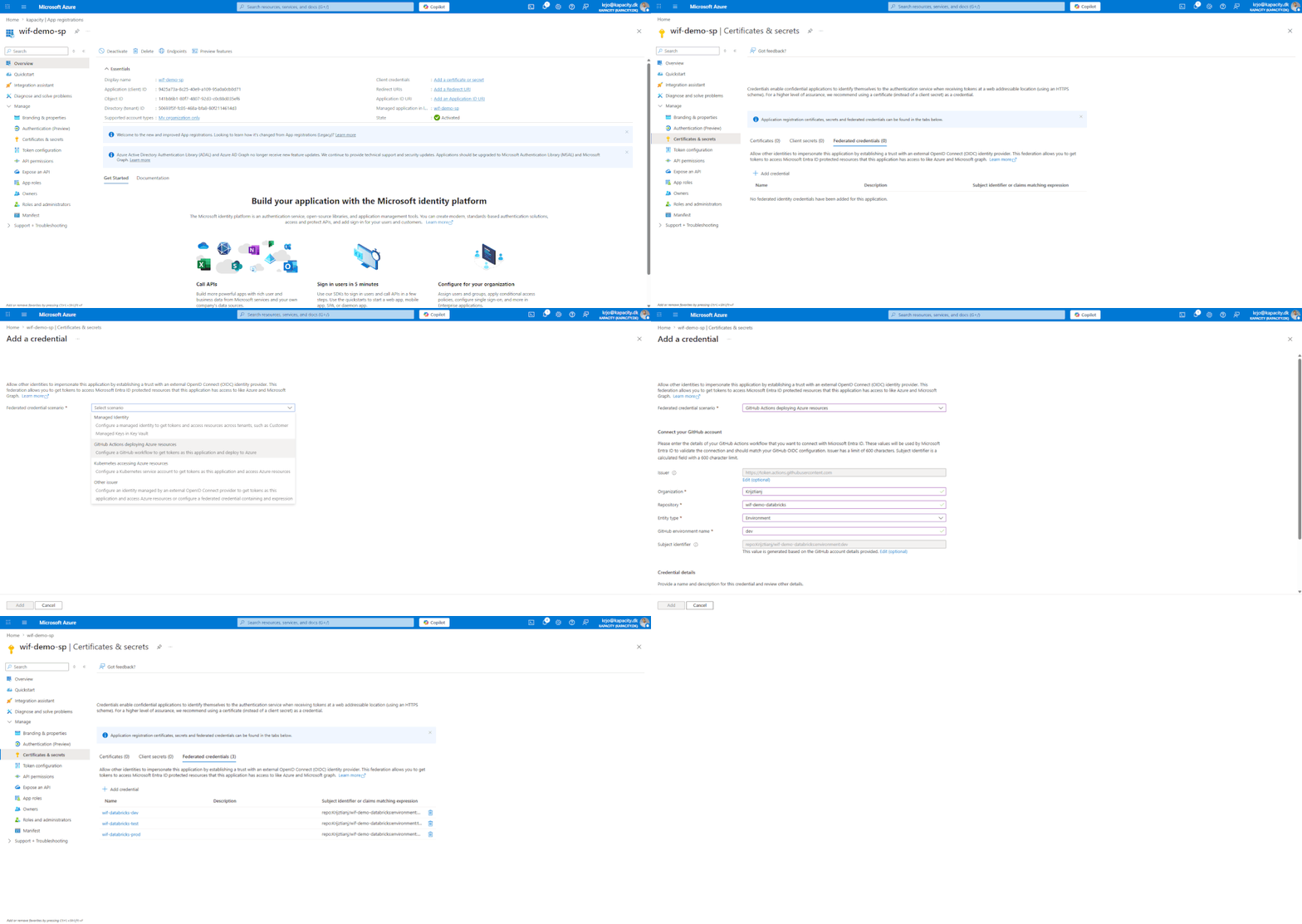
Setting up your Entra ID Application to authenticate using WIF against GitHub
Beyond the federated credential, the Service Principal still needs the correct permissions on your Databricks workspace to carry out whatever tasks you are asking it to do. If it is touching the resource itself in Azure, this would normally entail being contributor on the resource. If the principal is only used inside of your Databricks context (e.g. DABs deployments), you only need to add it in the Databricks User and Identity section, with the correctly scoped permissions (e.g. workspace access).
The GitHub Actions workflow
On the workflow side, two things need to be in place. The workflow needs permission to request an OIDC token from GitHub, and it needs to use that token when authenticating to Azure.
Release workflow
name: Release Solution

on:
  workflow_dispatch:
  workflow_call:

permissions:
  id-token: write   # Required — allows GitHub to mint an OIDC token
  contents: read

jobs:
  Dev:
    name: Release Databricks to Dev
    uses: ./.github/workflows/deploy_databricks.yml
    with:
      Environment: dev
      pool: ubuntu-latest
    secrets: inherit
The id-token: write permission is what enables the OIDC flow. Without it, GitHub will not issue the token and the authentication will fail silently.
Deploy workflow
name: Deploy DAB

on:
  workflow_call:
    inputs:
      Environment:
        type: string
        required: true
      pool:
        type: string
        required: true

jobs:
  deploy:
    runs-on: ${{ inputs.pool }}
    environment: ${{ inputs.Environment }}

    env:
      AZURE_CLIENT_ID: ${{ vars.AZURE_CLIENT_ID }}
      AZURE_TENANT_ID: ${{ vars.AZURE_TENANT_ID }}

    steps:
      - uses: actions/checkout@v4

      - uses: databricks/setup-cli@main

      - name: Authenticate to Azure
        uses: azure/login@v2
        with:
          client-id: ${{ env.AZURE_CLIENT_ID }}
          tenant-id: ${{ env.AZURE_TENANT_ID }}
          allow-no-subscriptions: true

      - name: Validate bundle
        run: databricks bundle validate -t ${{ inputs.Environment }}

      - name: Deploy bundle
        run: databricks bundle deploy -t ${{ inputs.Environment }} --force-lock
A few things here are worth pointing out explicitly.
The three Azure identifiers are set as variables, not secrets. They are not sensitive. Your tenant ID and subscription ID are identifiers, not credentials. By moving them to plain variables makes the intent clear: there is nothing secret here. An added benefit of this is that putting these ID's in Variables, you get to also see the actual ID in the logs. This makes debugging faster because you can instantly verify, what is going wrong in case you face some difficulties.
The environment key on the job is what shapes the OIDC token's subject claim. When the job runs under environment: dev, GitHub mints a token with sub: repo:org/repo:environment:dev. That is exactly what Entra ID checks against the federated credential you configured. If they do not match, authentication fails before a single command runs.
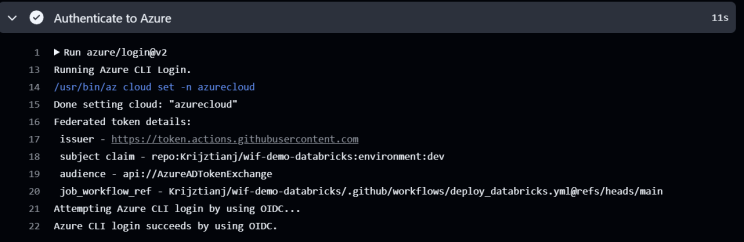
Notice the subject claim being referenced is scoped to GitHub and the combination of: Organization, Repos and Environment.
The azure/login@v2 action exchanges the GitHub OIDC token for an Azure access token and writes it into the runner environment. The Databricks CLI, as part of its unified authentication chain, detects the active Azure CLI session and uses it automatically. This means you need no additional configuration on the bundle itself.
The handoff is implicit but documented. The Databricks CLI checks for an active Azure CLI session as part of its credential chain. As long as azure/login has run successfully in the same job, the CLI will pick it up and use that same login.
A few things to get right
Subject claim precision matters
If you configure the federated credential with an overly broad subject, e.g. scoped to a branch wildcard rather than a named environment, you may inadvertently allow any job on that branch to authenticate, including pull request workflows. Use Environment scoping. It is the most precise and the hardest to accidentally widen.
The SP still needs correct grants
WIF removes the credential problem. It does not remove the permissions required or take over for these in any way. Your SP still needs contributor rights on the Databricks workspace resource in Azure, and if you are deploying resources that require Unity Catalog grants, those need to be in place too. A failed WIF authentication and a missing permission look very similar in the error output. It is worth checking the auth first, then the resource permissions.
Debugging failed token exchanges
When WIF fails, the error is usually generic. The most common causes are a mismatched subject claim (the environment name in the workflow does not match the federated credential exactly, including case), the id-token: write permission missing from the workflow, or the federated credential being configured on the wrong app registration. Validate the subject claim first, it is the most frequent culprit.
Never print the raw OIDC token to logs during debugging. It is short-lived, but it is still a valid credential for its lifetime. Use the Azure login action's built-in diagnostics instead if you need to debug.
The SP + secret pattern puts you in the credential management business whether you want to be or not. You own a secret, which means you own its rotation, its storage, its audit trail, and the cleanup if it leaks.
On the other hand we have WIF. This is not just a more secure version of the same pattern. It is a different model. Your pipeline's identity is the pipeline (the repo, the environment, the branch) all cryptographically asserted by GitHub and verified by Azure. There is nothing to rotate because there is nothing to steal.
Setting it up is honestly just as easy, but you get to keep running securely with no maintenance overhead. Honestly, from my point of view, there is no reason to not choose this route.
I would sum it all up with a few important takeaways:
WIF removes the overhead and risk of managing, storing and rotating keys and secrets
It changes the fundamentals of how your Service Principal authenticates
However, it does not change what the Service Principal is allowed to do on your platform
Therefore, remember to still always abide by the principle of least privilege!
You can catch the brief version as part of my 5 Minute Features series on YouTube as well - check it out here: 5 Minute Features: Workload Identity Federation
Do you have suggestions yourself? Please reach out!


