
Turn on suggestions
Auto-suggest helps you quickly narrow down your search results by suggesting possible matches as you type.
Showing results for
Data Engineering
Join discussions on data engineering best practices, architectures, and optimization strategies within the Databricks Community. Exchange insights and solutions with fellow data engineers.
Turn on suggestions
Auto-suggest helps you quickly narrow down your search results by suggesting possible matches as you type.
Showing results for
- Databricks Community
- Data Engineering
- Re: Autoloader inserts null rows in delta table wh...
Options
- Subscribe to RSS Feed
- Mark Topic as New
- Mark Topic as Read
- Float this Topic for Current User
- Bookmark
- Subscribe
- Mute
- Printer Friendly Page

Options
- Mark as New
- Bookmark
- Subscribe
- Mute
- Subscribe to RSS Feed
- Permalink
- Report Inappropriate Content
04-01-2026 06:51 AM - edited 04-01-2026 06:54 AM
Hi,
I am exploring Schema inference and Schema evolution using Autoloader.I am reading a single line json file and writing in a delta table which does not exist already (creating it on the fly), using pyspark (below is the code).
Code :
spark.readStream.\
format("cloudFiles")\
.option("cloudFiles.format", "json")\
.option("cloudFiles.schemaLocation", "/Volumes/workspace/default/sys/schema1")\
.load('/Volumes/workspace/dev/input/')\
.writeStream\
.format("delta")\
.option("mergeSchema", "true")\
.option("checkpointLocation", "/Volumes/workspace/default/sys/checkpoint1")\
.trigger(once=True)\
.toTable("workspace.dev.infer_json_new1")
Input File : user.json contains only 2 records as mentioned below WITHOUT having blank lines.Attached is the screenshot.
{"Name":"Alfred","Gender":"M","Age":14}
{"Name":"John","Gender":"M","Age":12}
{"Name":"John","Gender":"M","Age":12}
Target table :
Screenshot is attached.
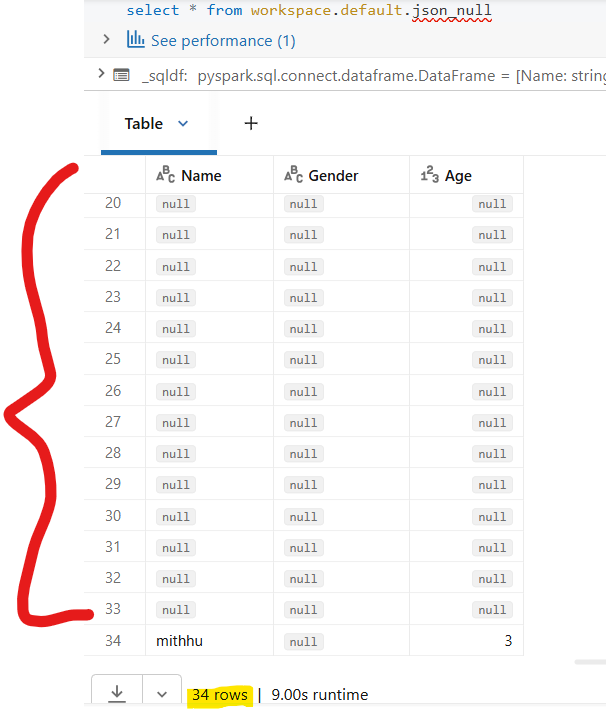
Problem : Upon running the code very first time,It loads 33 null records along with actual data rows.So total 35 rows get inserted.However, after re running the code with new file,it does not inserts any null rows.
I dont understand WHY 33 null rows at first run only.


1 ACCEPTED SOLUTION
Accepted Solutions

Options
- Mark as New
- Bookmark
- Subscribe
- Mute
- Subscribe to RSS Feed
- Permalink
- Report Inappropriate Content
04-02-2026 07:44 AM
Hi @mits1
Since you're using Databricks Free Edition with Serverless and reading from a Unity Catalog Volume (/Volumes/workspace/dev/input/), the issue is likely:
Volumes Directory Scan — Autoloader reads the directory, not just the file
When Autoloader scans /Volumes/workspace/dev/input/, it may be picking up additional hidden files in that directory.
Run this in your Databricks notebook:
# Check exactly what files Autoloader sees
dbutils.fs.ls("/Volumes/workspace/dev/input/")
Also check for hidden files:
%sh ls -la /Volumes/workspace/dev/input/
If Extra Files Are Found — Fix
spark.readStream \
.format("cloudFiles") \
.option("cloudFiles.format", "json") \
.option("cloudFiles.schemaLocation", "...") \
.option("pathGlobFilter", "*.json") \ # <-- ONLY pick .json files
.load('/Volumes/workspace/dev/input/')
pathGlobFilter forces Autoloader to ignore all non-JSON files in the directory, which would eliminate the null rows.
Could you run dbutils.fs.ls("/Volumes/workspace/dev/input/") and share what it returns? That should pinpoint the exact cause.
LR
11 REPLIES 11

Options
- Mark as New
- Bookmark
- Subscribe
- Mute
- Subscribe to RSS Feed
- Permalink
- Report Inappropriate Content
04-01-2026 08:16 AM
Hi @mits1,
This looks like the same issue I covered recently. Please see here.
The issue is that Autoloader is ingesting your checkpoint files as data. Because Checkpoint/ lives inside the data directory, Autoloader picks up those checkpoint JSONs. They don’t match your explicit schema, so all your business columns (and _metadata after cast) become NULL, and their content goes into _rescued_data.
To fix this, consider moving the checkpoint location outside the source path..
If this answer resolves your question, could you mark it as “Accept as Solution”? That helps other users quickly find the correct fix.
Regards,
Ashwin | Delivery Solution Architect @ Databricks
Helping you build and scale the Data Intelligence Platform.
***Opinions are my own***
Ashwin | Delivery Solution Architect @ Databricks
Helping you build and scale the Data Intelligence Platform.
***Opinions are my own***
Options
- Mark as New
- Bookmark
- Subscribe
- Mute
- Subscribe to RSS Feed
- Permalink
- Report Inappropriate Content
04-01-2026 11:01 AM
Hi Ashwin_DSA,
Thank you for your response.
As you can see that input and checkpoint locations are different.So this could not be the reason.
Options
- Mark as New
- Bookmark
- Subscribe
- Mute
- Subscribe to RSS Feed
- Permalink
- Report Inappropriate Content
04-01-2026 11:56 AM
Hi @mits1,
Sorry. I jumped to conclusions based on the post header and its relation to the other one. However, I don't think @lingareddy_Alva's reason is accurate either. This is because there is a distinction between schema inference and the actual stream processing. During schema inference, Auto Loader samples up to 50 GB or 1,000 files and generates a schema JSON file, which is stored in _schemas under cloudFiles.schemaLocation. In the actual stream processing phase, it uses the inferred schema to read files and write to your Delta table. During schema inference, Auto Loader does not write any data rows to your target table. It only inspects files and saves the inferred schema. Nothing about that phase creates "placeholder partitions" that get materialized as NULL rows. Empty partitions in Spark simply produce zero output rows. They don’t generate rows full of NULLs.
In contrast, Spark's JSON reader, including Auto Loader, operates in permissive mode, treating each line as a single JSON record. In this mode, any malformed, blank, or non-JSON lines result in records with actual columns set to null. Also, the raw text from these lines is stored in the _corrupt_record or rescued-data column. I'm guessing these are the rows you’re seeing.
So the more likely explanation is that on the first run, Auto Loader processes all pre‑existing files in /Volumes/workspace/dev/input/. Some of those lines/files are empty, whitespace‑only, or otherwise invalid JSON --> 33 NULL rows. Those files are now marked processed in the checkpoint and schema location, so subsequent runs never re‑read them, hence no more null rows.
Just to narrow this down, can you run a batch read against the exact same path and share what you see?
df = (spark.read
      .format("json")
      .option("columnNameOfCorruptRecord", "_corrupt_record")
      .load("/Volumes/workspace/dev/input/"))

df.select("*").where("_corrupt_record IS NOT NULL").show(truncate=False)
Can you also double‑check to ensure there aren’t extra or zero‑byte files in that directory.
display(dbutils.fs.ls("/Volumes/workspace/dev/input/"))If this answer resolves your question, could you mark it as “Accept as Solution”? That helps other users quickly find the correct fix.
Regards,
Ashwin | Delivery Solution Architect @ Databricks
Helping you build and scale the Data Intelligence Platform.
***Opinions are my own***
Ashwin | Delivery Solution Architect @ Databricks
Helping you build and scale the Data Intelligence Platform.
***Opinions are my own***
Options
- Mark as New
- Bookmark
- Subscribe
- Mute
- Subscribe to RSS Feed
- Permalink
- Report Inappropriate Content
04-01-2026 08:50 AM - edited 04-01-2026 08:58 AM
Hi @mits1
his is a classic Autoloader schema inference artifact. Here's exactly what's happening:
Why 33 Null Rows?
When Autoloader runs for the first time with cloudFiles.format = "json", it performs a two-phase operation:
Phase 1 — Schema Inference (Sampling)
Autoloader samples the input file(s) to infer the schema before actually reading the data. Internally, Spark reads the JSON file using a default byte-range or row-sampling mechanism. For a tiny file like yours, the sampler reads the raw bytes and creates placeholder/empty partitions — these manifest as null rows.
The number 33 is not random — it comes from Spark's default minimum partition count. Spark uses spark.default.parallelism or the number of cores × some multiplier to determine how many tasks to create. With a very small file, most partitions are empty byte ranges, but they still get written as null rows in the first commit.
Schema Inference (Sampling)
Autoloader samples the input file to infer the schema, creates the schema file in schemaLocation, and in doing so generates those ghost/empty partitions → 33 null rows written
Phase 2 — Actual Data Read (Stream Processing)
Autoloader now uses the inferred schema from Phase 1 to actually read and process the data as a stream → 2 real rows written (Alfred & John)
The 33 null rows are Spark's empty partition artifacts from the schema inference sampling pass on first run. Once the schema is saved to schemaLocation, subsequent runs skip inference entirely, which is why you only see it once. The cleanest long-term fix is to provide the schema explicitly.
The Fix
Option 1 — Pre-define the schema (recommended for production)

from pyspark.sql.types import StructType, StructField, StringType, IntegerType

schema = StructType([
    StructField("Name", StringType()),
    StructField("Gender", StringType()),
    StructField("Age", IntegerType())
])

spark.readStream
    .format("cloudFiles")
    .option("cloudFiles.format", "json")
    .option("cloudFiles.schemaLocation", "/Volumes/workspace/default/sys/schema1")
    .schema(schema) # explicitly provide schema
    .load('/Volumes/workspace/dev/input/')
    .writeStream
    ...

Option 2 — Use cloudFiles.inferColumnTypes
.option("cloudFiles.inferColumnTypes", "true")
This makes inference more precise and avoids the ghost partition issue.

Option 3 — Filter nulls at write time (quick workaround)
.load('/Volumes/workspace/dev/input/') \
.filter("Name IS NOT NULL") \   # <-- drop null rows
.writeStream \
LR
Options
- Mark as New
- Bookmark
- Subscribe
- Mute
- Subscribe to RSS Feed
- Permalink
- Report Inappropriate Content
04-01-2026 12:16 PM
Hi @lingareddy_Alva ,
Thank you for your response.
Just to inform you that
1. I am using Databrick's free edition to execute code using Serverless which doesnt allow me to get the partition numbers.
2. I intentionaly did not want to use/specify schema to know the schema inference behaviour.
3. As mention in your reply,
Option 2 — Use cloudFiles.inferColumnTypes
I have configured this property too but no good.
4.I did try option 1 but looks like it still creates 33 partitions.
My code :
from pyspark.sql.types import StructType, StructField, StringType, IntegerType
schema = StructType([
StructField("Name", StringType()),
StructField("Gender", StringType()),
StructField("Age", IntegerType())
])
df = spark.readStream.\
format("cloudFiles")\
.option("cloudFiles.format", "json")\
.option("cloudFiles.schemaLocation", "/Volumes/workspace/default/sys/schema5")\
.schema(schema)\
.load('/Volumes/workspace/dev/input/')\
.writeStream\
.format("delta")\
.option("checkpointLocation", "/Volumes/workspace/default/sys/checkpoint5")\
.option("mergeSchema", "true")\
.trigger(availableNow=True)\
.toTable("workspace.default.json_null")
Table Output : Attached
I don't find google answers helpful too.
Options
- Mark as New
- Bookmark
- Subscribe
- Mute
- Subscribe to RSS Feed
- Permalink
- Report Inappropriate Content
04-02-2026 07:44 AM
Hi @mits1
Since you're using Databricks Free Edition with Serverless and reading from a Unity Catalog Volume (/Volumes/workspace/dev/input/), the issue is likely:
Volumes Directory Scan — Autoloader reads the directory, not just the file
When Autoloader scans /Volumes/workspace/dev/input/, it may be picking up additional hidden files in that directory.
Run this in your Databricks notebook:
# Check exactly what files Autoloader sees
dbutils.fs.ls("/Volumes/workspace/dev/input/")
Also check for hidden files:
%sh ls -la /Volumes/workspace/dev/input/
If Extra Files Are Found — Fix
spark.readStream \
.format("cloudFiles") \
.option("cloudFiles.format", "json") \
.option("cloudFiles.schemaLocation", "...") \
.option("pathGlobFilter", "*.json") \ # <-- ONLY pick .json files
.load('/Volumes/workspace/dev/input/')
pathGlobFilter forces Autoloader to ignore all non-JSON files in the directory, which would eliminate the null rows.
Could you run dbutils.fs.ls("/Volumes/workspace/dev/input/") and share what it returns? That should pinpoint the exact cause.
LR
Options
- Mark as New
- Bookmark
- Subscribe
- Mute
- Subscribe to RSS Feed
- Permalink
- Report Inappropriate Content
04-03-2026 02:57 PM - edited 04-03-2026 03:01 PM
Hi ,
Bingooo!!!
.option("pathGlobFilter", "*.json") \ # <-- ONLY pick .json files WORKED FOR ME.
I read the documents throrughly and understood what ("cloudFiles.format", "json") it actually does.It tells autoloader
to parse the incoming file as json but pathGlobFilter picks up only specified format out of all formats (csv,xml etc).In the input directory I have .csv file with 33 records.
Now it inserts only 2 records (without nulls)
Thanks a lot for your time and efforts to solve this issue.
Options
- Mark as New
- Bookmark
- Subscribe
- Mute
- Subscribe to RSS Feed
- Permalink
- Report Inappropriate Content
04-03-2026 08:44 PM
Hello @mits1
It's my absolute pleasure! — That distinction between cloudFiles.format and pathGlobFilter trips up a lot of people. format tells Autoloader *how to parse*, while pathGlobFilter controls *what gets picked up* in the first place. Two very different layers. Happy ingesting!
LR

Options
- Mark as New
- Bookmark
- Subscribe
- Mute
- Subscribe to RSS Feed
- Permalink
- Report Inappropriate Content
04-02-2026 12:22 AM
Options
- Mark as New
- Bookmark
- Subscribe
- Mute
- Subscribe to RSS Feed
- Permalink
- Report Inappropriate Content
04-02-2026 02:57 AM
Hi @saurabh18cs ,
Thank you for your reply.
I did try this.
It inserts only 1 row with nulls, however,doesn't load all 2 records.Only 1st row gets inserted.
My json file is anyway not a multiline format.
Code :
df = spark.readStream.\
format("cloudFiles")\
.option("cloudFiles.format", "json")\
.option("multiLine", "true")\
.option("cloudFiles.schemaLocation", "/Volumes/workspace/default/sys/schema")\
.schema(schema)\
.load('/Volumes/workspace/dev/input/')\
.writeStream\
.format("delta")\
.option("checkpointLocation", "/Volumes/workspace/default/sys/checkpoint")\
.option("mergeSchema", "true")\
.trigger(availableNow=True)\
.toTable("workspace.default.json_null_ml")
Output :


Options
- Mark as New
- Bookmark
- Subscribe
- Mute
- Subscribe to RSS Feed
- Permalink
- Report Inappropriate Content
04-03-2026 04:55 PM
Hi ,
The extra rows could have been caused by various reasons:
- Extra files in the directory
- Empty or corrupt records
- Non-JSON content being picked up on the first run
You could make sure that your input path contains only valid JSON files or you could modify your script to include only JSON files.
Karthick Ramachandran Seshadri
Data Architect | MS/MBA
Data + AI/ML/GenAI
17x Databricks Credentials
Data Architect | MS/MBA
Data + AI/ML/GenAI
17x Databricks Credentials

Announcements


Related Content
- End-to-End Streaming NLP Pipeline with GDELT, Azure Data Factory, ADLS Gen2 and Databricks in Machine Learning
- Autoscaling with the autoloader without SDP in Data Engineering
- Autoloader inserts null rows in delta table while reading json file in Data Engineering
- Databricks autoloader with manual file delete? in Data Governance
- How to extract read path from notebooks. Especially from the autoloader in Data Engineering