
Turn on suggestions
Auto-suggest helps you quickly narrow down your search results by suggesting possible matches as you type.
Showing results for
Data Engineering
Join discussions on data engineering best practices, architectures, and optimization strategies within the Databricks Community. Exchange insights and solutions with fellow data engineers.
Turn on suggestions
Auto-suggest helps you quickly narrow down your search results by suggesting possible matches as you type.
Showing results for
- Databricks Community
- Data Engineering
- Re: Declarative Automation Bundle - Reusable job_c...
Options
- Subscribe to RSS Feed
- Mark Topic as New
- Mark Topic as Read
- Float this Topic for Current User
- Bookmark
- Subscribe
- Mute
- Printer Friendly Page

Options
- Mark as New
- Bookmark
- Subscribe
- Mute
- Subscribe to RSS Feed
- Permalink
- Report Inappropriate Content
05-01-2026 02:12 PM
Hi there, running into some trouble abstracting job_clusters configurations to improve reusability. At the moment, I have many job yaml files that require the following configuration:
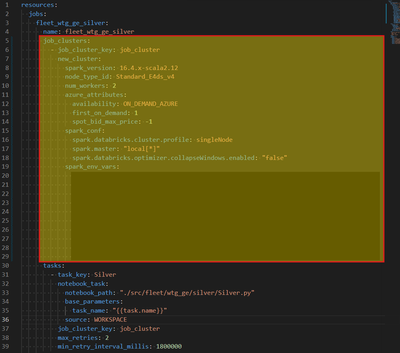
What would be the best approach(es) to remove this configuration from every job yaml file? Currently, we already have the following kinds of yaml files:
- base_config.yml
- databricks.yml
- Many "job_name".yml
- NOTE: Working version has the job_clusters configuration set for each individual yaml file
- meta_variables.yml
I did try creating a new `cluster_definitions.yml` as follows:
# Centralized cluster definitions for all fleet jobs.
# YAML anchors define reusable cluster profiles; each job references them via merge keys.
# DAB deep-merges these job_clusters with the tasks/parameters in individual fleet_*.yml files.

x-cluster-base: &cluster_base
  spark_version: 16.4.x-scala2.12
  spark_conf:
    spark.databricks.cluster.profile: singleNode
    spark.master: "local[*]"
    spark.databricks.optimizer.collapseWindows.enabled: "false"
  node_type_id: Standard_E4ds_v4
  num_workers: 2
  azure_attributes:
    availability: ON_DEMAND_AZURE
    first_on_demand: 1
    spot_bid_max_price: -1
  # spark_env_vars:
    # ...

resources:
  jobs:
    fleet_wtg_ge_silver:
      job_clusters:
        - job_cluster_key: job_cluster
          new_cluster:
            <<: *cluster_base
    fleet_wtg_ge_curated:
      job_clusters:
        - job_cluster_key: job_cluster
          new_cluster:
            <<: *cluster_base
    fleet_wtg_sgre_silver:
      job_clusters:
        - job_cluster_key: job_cluster
          new_cluster:
            <<: *cluster_base
    fleet_wtg_sgre_curated:
      job_clusters:
        - job_cluster_key: job_cluster
          new_cluster:
            <<: *cluster_base
    fleet_wtg_vestas_silver:
      job_clusters:
        - job_cluster_key: job_cluster
          new_cluster:
            <<: *cluster_base
    fleet_wtg_vestas_curated:
      job_clusters:
        - job_cluster_key: job_cluster
          new_cluster:
            <<: *cluster_base
But when I tried running the deployment, I got the following error:
Error: multiple resources have been defined with the same key: fleet_wtg_sgre_curated
  at jobs.fleet_wtg_sgre_curated
  in cluster_definitions.yml:59:7
     fleet_wtg_sgre_curated.yml:4:7

Error: multiple resources have been defined with the same key: feature_job_compute_cluster_fleet_wtg_ge_silver
  at jobs.feature_job_compute_cluster_fleet_wtg_ge_silver
  in fleet_wtg_ge_silver-v2.yml:4:7
     fleet_wtg_ge_silver-v3.yml:4:7

Error: multiple resources have been defined with the same key: fleet_wtg_vestas_silver
  at jobs.fleet_wtg_vestas_silver
  in cluster_definitions.yml:64:7
     fleet_wtg_vestas_silver.yml:4:7

Error: multiple resources have been defined with the same key: fleet_wtg_vestas_curated
  at jobs.fleet_wtg_vestas_curated
  in cluster_definitions.yml:69:7
     fleet_wtg_vestas_curated.yml:4:7

Error: multiple resources have been defined with the same key: fleet_wtg_ge_silver
  at jobs.fleet_wtg_ge_silver
  in cluster_definitions.yml:44:7
     fleet_wtg_ge_silver.yml:4:7

Error: multiple resources have been defined with the same key: fleet_wtg_ge_curated
  at jobs.fleet_wtg_ge_curated
  in cluster_definitions.yml:49:7
     fleet_wtg_ge_curated.yml:4:7
Would appreciate some help on this one!


1 ACCEPTED SOLUTION
Accepted Solutions

Options
- Mark as New
- Bookmark
- Subscribe
- Mute
- Subscribe to RSS Feed
- Permalink
- Report Inappropriate Content
05-04-2026 02:33 PM
Hello @ChristianRRL
My doubt about your issue is happening in cluster_definitions.yml because it is not only defining a reusable cluster profile it is also redefining the same jobs that already exist in the individual fleet_*.yml files.
Why ? because in DBKS asset bundles each entry under:
resources:
  jobs:
    <job_key>:
must be unique in the final resolved bundle.
So if fleet_wtg_ge_silver exists in fleet_wtg_ge_silver.yml and also in cluster_definitions.yml, the bundle sees 2 resources with the same key and fails.
I tried to replicate your issue and I had that.
DBKS supports splitting bundle configuration across multiple YAML files using include but the included files are combined into one bundle config so you cannot redefine the same top level job resource twice.
Better thing to do is to define the cluster as a complex variable and reference it from each job.
# cluster_definitions.yml

variables:
  fleet_job_cluster:
    description: Shared fleet job cluster definition
    type: complex
    default:
      spark_version: 16.4.x-scala2.12
      node_type_id: Standard_E4ds_v4
      num_workers: 2
      azure_attributes:
        availability: ON_DEMAND_AZURE
        first_on_demand: 1
        spot_bid_max_price: -1
      spark_conf:
        spark.databricks.cluster.profile: singleNode
        spark.master: "local[*]"
        spark.databricks.optimizer.collapseWindows.enabled: "false"
then in each job file:
resources:
  jobs:
    fleet_wtg_ge_silver:
      name: fleet_wtg_ge_silver

      job_clusters:
        - job_cluster_key: job_cluster
          new_cluster: ${var.fleet_job_cluster}

      tasks:
        - task_key: Silver
          notebook_task:
            notebook_path: ../src/fleet/wtg_ge/silver/Silver.py
            base_parameters:
              task_name: "{{task.name}}"
            source: WORKSPACE
          job_cluster_key: job_cluster
or simply use YAML anchors (but anchors are only practical when the anchor and the usage are in the same YAML document and they are not a good crossfile reuse mechanism for this case)
Also, this part caught my eyes :
fleet_wtg_ge_silver-v2.yml
fleet_wtg_ge_silver-v3.yml
the bundle include pattern is picking up multiple versions of the same job so try to clean up the include pattern or move old test versions outside the included folder :
include:
  - resources/jobs/*.yml
  - resources/common/*.yml
and avoid including archived files such as *-v2.yml and *-v3.yml.
So you can do a structure like :
databricks.yml
resources/
  common/
    cluster_definitions.yml
  jobs/
    fleet_wtg_ge_silver.yml
    fleet_wtg_ge_curated.yml
    fleet_wtg_sgre_silver.yml
with:
# databricks.yml
include:
  - resources/common/*.yml
  - resources/jobs/*.yml
If this answer resolves your question, could you please mark it as “Accept as Solution”? It will help other users quickly find the correct fix.
Senior BI/Data Engineer | Microsoft MVP Data Platform | Microsoft MVP Power BI | Power BI Super User | C# Corner MVP
Senior BI/Data Engineer | Microsoft MVP Data Platform | Microsoft MVP Power BI | Power BI Super User | C# Corner MVP
3 REPLIES 3
Options
- Mark as New
- Bookmark
- Subscribe
- Mute
- Subscribe to RSS Feed
- Permalink
- Report Inappropriate Content
05-04-2026 09:35 AM
Hi everyone, quick comment on my Friday post for relevance. I would appreciate any help on this case.
Thanks!
Options
- Mark as New
- Bookmark
- Subscribe
- Mute
- Subscribe to RSS Feed
- Permalink
- Report Inappropriate Content
05-04-2026 02:33 PM
Hello @ChristianRRL
My doubt about your issue is happening in cluster_definitions.yml because it is not only defining a reusable cluster profile it is also redefining the same jobs that already exist in the individual fleet_*.yml files.
Why ? because in DBKS asset bundles each entry under:
resources:
  jobs:
    <job_key>:
must be unique in the final resolved bundle.
So if fleet_wtg_ge_silver exists in fleet_wtg_ge_silver.yml and also in cluster_definitions.yml, the bundle sees 2 resources with the same key and fails.
I tried to replicate your issue and I had that.
DBKS supports splitting bundle configuration across multiple YAML files using include but the included files are combined into one bundle config so you cannot redefine the same top level job resource twice.
Better thing to do is to define the cluster as a complex variable and reference it from each job.
# cluster_definitions.yml

variables:
  fleet_job_cluster:
    description: Shared fleet job cluster definition
    type: complex
    default:
      spark_version: 16.4.x-scala2.12
      node_type_id: Standard_E4ds_v4
      num_workers: 2
      azure_attributes:
        availability: ON_DEMAND_AZURE
        first_on_demand: 1
        spot_bid_max_price: -1
      spark_conf:
        spark.databricks.cluster.profile: singleNode
        spark.master: "local[*]"
        spark.databricks.optimizer.collapseWindows.enabled: "false"
then in each job file:
resources:
  jobs:
    fleet_wtg_ge_silver:
      name: fleet_wtg_ge_silver

      job_clusters:
        - job_cluster_key: job_cluster
          new_cluster: ${var.fleet_job_cluster}

      tasks:
        - task_key: Silver
          notebook_task:
            notebook_path: ../src/fleet/wtg_ge/silver/Silver.py
            base_parameters:
              task_name: "{{task.name}}"
            source: WORKSPACE
          job_cluster_key: job_cluster
or simply use YAML anchors (but anchors are only practical when the anchor and the usage are in the same YAML document and they are not a good crossfile reuse mechanism for this case)
Also, this part caught my eyes :
fleet_wtg_ge_silver-v2.yml
fleet_wtg_ge_silver-v3.yml
the bundle include pattern is picking up multiple versions of the same job so try to clean up the include pattern or move old test versions outside the included folder :
include:
  - resources/jobs/*.yml
  - resources/common/*.yml
and avoid including archived files such as *-v2.yml and *-v3.yml.
So you can do a structure like :
databricks.yml
resources/
  common/
    cluster_definitions.yml
  jobs/
    fleet_wtg_ge_silver.yml
    fleet_wtg_ge_curated.yml
    fleet_wtg_sgre_silver.yml
with:
# databricks.yml
include:
  - resources/common/*.yml
  - resources/jobs/*.yml
If this answer resolves your question, could you please mark it as “Accept as Solution”? It will help other users quickly find the correct fix.
Senior BI/Data Engineer | Microsoft MVP Data Platform | Microsoft MVP Power BI | Power BI Super User | C# Corner MVP
Senior BI/Data Engineer | Microsoft MVP Data Platform | Microsoft MVP Power BI | Power BI Super User | C# Corner MVP
Options
- Mark as New
- Bookmark
- Subscribe
- Mute
- Subscribe to RSS Feed
- Permalink
- Report Inappropriate Content
05-06-2026 11:47 AM
Using complex variable is the right suggestion. Thank you!

Announcements


Related Content
- Folder structure for Autoloader and Declarative Pipelines in Data Engineering
- sdp-meta (dlt-meta) vs lakeflow_framework: when should we use which? in Data Engineering
- Best Compute Option for Near-Real-Time Databricks API Ingestion Pipeline in Data Engineering
- Serverless compute throws OUT_OF_MEMORY exception in Data Engineering
- Declarative Automation Bundle - Reusable job_cluster configuration in Data Engineering