
Turn on suggestions
Auto-suggest helps you quickly narrow down your search results by suggesting possible matches as you type.
Showing results for
Data Engineering
Join discussions on data engineering best practices, architectures, and optimization strategies within the Databricks Community. Exchange insights and solutions with fellow data engineers.
Turn on suggestions
Auto-suggest helps you quickly narrow down your search results by suggesting possible matches as you type.
Showing results for
- Databricks Community
- Data Engineering
- Re: Merge with schema evolution fails because of u...
Options
- Subscribe to RSS Feed
- Mark Topic as New
- Mark Topic as Read
- Float this Topic for Current User
- Bookmark
- Subscribe
- Mute
- Printer Friendly Page
Merge with schema evolution fails because of upper case columns

Options
- Mark as New
- Bookmark
- Subscribe
- Mute
- Subscribe to RSS Feed
- Permalink
- Report Inappropriate Content
01-12-2026 08:10 AM - edited 01-12-2026 08:11 AM
The following is a minimal reproducible example of what I'm facing right now.
%sql
CREATE OR REPLACE TABLE edw_nprd_aen.bronze.test_table (
  id INT
);

INSERT INTO edw_nprd_aen.bronze.test_table
VALUES (1);

SELECT *
FROM edw_nprd_aen.bronze.test_table
df = spark.createDataFrame([[1, 2], [3, 4]], 'id int, nest_col int')
df.display()
df.createOrReplaceTempView('v_final')
df_cols = set([col.upper() for col in df.columns])
table_cols = set([col.upper() for col in spark.table('edw_nprd_aen.bronze.test_table').columns])
all_cols = df_cols.union(table_cols)

merge_string = f"""
    MERGE WITH SCHEMA EVOLUTION INTO edw_nprd_aen.bronze.test_table AS target
    USING v_final AS source
    ON target.id = source.id
    WHEN MATCHED THEN UPDATE SET
    {'\n, '.join(f'{col} = source.{col}' if col in df_cols else f'{col} = NULL' for col in all_cols)}
"""
print(merge_string)
spark.sql(merge_string)

-- Output

MERGE WITH SCHEMA EVOLUTION INTO edw_nprd_aen.bronze.test_table AS target
USING v_final AS source
ON target.id = source.id
WHEN MATCHED THEN UPDATE SET
NEST_COL = source.NEST_COL
, ID = source.ID

[DELTA_CONFLICT_SET_COLUMN] There is a conflict from these SET columns: [`NEST_COL`, `nest_col`]. SQLSTATE: 42701
File <command-5916479188032645>, line 13
      5 merge_string = f"""
      6     MERGE WITH SCHEMA EVOLUTION INTO edw_nprd_aen.bronze.test_table AS target
      7     USING v_final AS source
   (...)
     10     {'\n, '.join(f'{col} = source.{col}' if col in df_cols else f'{col} = NULL' for col in all_cols)}
     11 """
     12 print(merge_string)
---> 13 spark.sql(merge_string)
The error is saying a conflict between the same two columns with different case.
It disappears when I modify the case of the columns of the dataframe
df = df.withColumnsRenamed({col: col.upper() for col in df.columns})
df.createOrReplaceTempView('v_final')

# Do merge and it works fine
None of my case sensitive options are on.
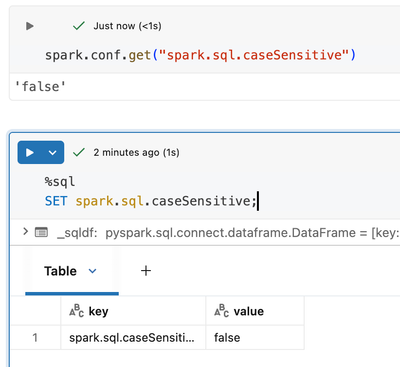
Could someone explain what is happening here? I suspect it to be a bug
Labels:
- Labels:
-
Delta Lake
-
Spark


10 REPLIES 10

Options
- Mark as New
- Bookmark
- Subscribe
- Mute
- Subscribe to RSS Feed
- Permalink
- Report Inappropriate Content
01-12-2026 10:31 PM
Hi @Dhruv-22,
It's actually not a bug. Let me explain what's happening.
The Root Cause
The issue stems from how schema evolution works with Delta Lake's MERGE statement, combined with Spark SQL's case-insensitivity settings.
Here's the key insight: spark.sql.caseSensitive = false affects query resolution, but NOT schema evolution behavior.
When you run MERGE WITH SCHEMA EVOLUTION, Delta Lake needs to determine which columns to add to the target table. Here's what happens:
- Your source DataFrame has columns: id, nest_col (lowercase)
- Your MERGE statement references: NEST_COL, ID (uppercase, from your f-string)
- Delta sees NEST_COL in the SET clause but nest_col in the actual source schema
- Since schema evolution adds columns by exact name from the source, Delta tries to add nest_col (from DataFrame) while your SET clause references NEST_COL
Delta interprets this as two different columns being set—hence the conflict error.
Why Case Sensitivity Setting Doesn't Help
The spark.sql.caseSensitive = false setting controls how Spark resolves column references in queries. But during schema evolution, Delta Lake performs a literal schema merge where column names are matched exactly as they appear in the source DataFrame's schema.
So even though Spark treats NEST_COL and nest_col as equivalent for query purposes, Delta's schema evolution logic sees them as distinct when comparing your SET clause against the source schema.
Options
- Mark as New
- Bookmark
- Subscribe
- Mute
- Subscribe to RSS Feed
- Permalink
- Report Inappropriate Content
01-13-2026 08:23 AM
Hi @css-1029
Thanks for the response, I understand the mechanics behind what is happening. But, why is it not a bug? If the the casing is to be respected then it should be across all columns and merge statements. Why does it only fail when adding a new column in a particular type of merge statement (schema evolution)? It seems that the error is an unintended one.
Options
- Mark as New
- Bookmark
- Subscribe
- Mute
- Subscribe to RSS Feed
- Permalink
- Report Inappropriate Content
01-13-2026 03:30 PM
Hi @Dhruv-22 ,
I totally agree with you. A configuration setting like spark.sql.caseSensitive should be a system-wide contract. If schema evolution silently ignores this setting and does literal string matching on column names, that's a violation of the expected behavior. The error message even references both NEST_COL and nest_col as if they're different columns—which contradicts what the case sensitivity setting promises.

Options
- Mark as New
- Bookmark
- Subscribe
- Mute
- Subscribe to RSS Feed
- Permalink
- Report Inappropriate Content
03-08-2026 05:56 PM
Hi @Dhruv-22,
The DELTA_CONFLICT_SET_COLUMN error you are seeing is expected behavior given how your MERGE statement is constructed. The root cause is a mismatch between the column names used in your SET clause and the actual column names in the source view.
HERE IS WHAT IS HAPPENING
In your code, you build the SET clause using uppercased column names:
df_cols = set([col.upper() for col in df.columns])
This produces a MERGE statement like:
WHEN MATCHED THEN UPDATE SET
NEST_COL = source.NEST_COL
, ID = source.ID
However, your temporary view v_final still has the original column names (id, nest_col) because you created it before any renaming. When MERGE WITH SCHEMA EVOLUTION processes this, it sees NEST_COL in the SET clause as a potential new column (since the target table does not have it yet), and it also sees nest_col coming from the source view. Even though Databricks SQL is case-insensitive by default, the schema evolution logic detects that both NEST_COL and nest_col would resolve to the same column, which triggers the conflict error.
THE FIX
You have two clean options:
OPTION 1: Normalize the DataFrame columns BEFORE creating the temp view
df = df.withColumnsRenamed({col: col.upper() for col in df.columns})
df.createOrReplaceTempView('v_final')
This is the workaround you already found, and it is the correct approach. It ensures the source view column names match exactly what your SET clause references.
OPTION 2: Use the original column casing in your SET clause instead of uppercasing
Rather than converting to uppercase, build the column set preserving original casing:
df_cols = set(df.columns)
table_cols = set(spark.table('edw_nprd_aen.bronze.test_table').columns)
all_cols = df_cols.union(table_cols)

merge_string = f"""
    MERGE WITH SCHEMA EVOLUTION INTO edw_nprd_aen.bronze.test_table AS target
    USING v_final AS source
    ON target.id = source.id
    WHEN MATCHED THEN UPDATE SET
    {', '.join(f'{col} = source.{col}' if col in df_cols else f'{col} = NULL' for col in all_cols)}
"""
This avoids the case mismatch entirely.
OPTION 3 (SIMPLEST): Use UPDATE SET * with schema evolution
If you want all source columns to be merged (which seems to be your intent), you can skip the manual column building altogether:
MERGE WITH SCHEMA EVOLUTION INTO edw_nprd_aen.bronze.test_table AS target
USING v_final AS source
ON target.id = source.id
WHEN MATCHED THEN UPDATE SET *
WHEN NOT MATCHED THEN INSERT *
The UPDATE SET * syntax automatically handles column resolution and schema evolution without requiring you to enumerate columns manually.
WHY THIS HAPPENS
The key insight is that MERGE WITH SCHEMA EVOLUTION needs to determine whether a column in the SET clause is an existing column or a new column to add. When your SET clause says NEST_COL = source.NEST_COL but the source view actually has nest_col (lowercase), the engine sees these as potentially two separate columns that would collide when resolved case-insensitively. It raises the conflict error rather than guessing which one you intended.
This is not a bug. It is a safeguard to prevent ambiguous column resolution during schema evolution. The solution is simply to keep column name casing consistent between your SET clause references and the actual source/target column names.
REFERENCES
- MERGE INTO syntax: https://docs.databricks.com/en/sql/language-manual/delta-merge-into.html
- Schema evolution with MERGE: https://docs.databricks.com/en/delta/update-schema.html#merge-schema-evolution
* This reply used an agent system I built to research and draft this response based on the wide set of documentation I have available and previous memory. I personally review the draft for any obvious issues and for monitoring system reliability and update it when I detect any drift, but there is still a small chance that something is inaccurate, especially if you are experimenting with brand new features.
If this answer resolves your question, could you mark it as "Accept as Solution"? That helps other users quickly find the correct fix.
Options
- Mark as New
- Bookmark
- Subscribe
- Mute
- Subscribe to RSS Feed
- Permalink
- Report Inappropriate Content
03-08-2026 11:55 PM - edited 03-09-2026 12:05 AM
Hi @SteveOstrowski
Thanks for replying. I have few doubts. Could you help me clarify the same?
- You said, "..., the schema evolution logic detects that both NEST_COL and nest_col would resolve to the same column, which triggers the conflict error.".
- Could you explain why this results in an error? Because column names should be case insensitive and the names 'Nest_col', 'NEST_COL', 'NeSt_CoL', 'nest_col' should all point to the same column.
- You said, "... SET clause says NEST_COL = source.NEST_COL but the source view actually has nest_col (lowercase), the engine sees these as potentially two separate columns that would collide"
- Shouldn't the source treat them as same? Isn't that what case-insensitive should be about?
- Also, I may be misunderstanding. But your two statements seem to be conflicting with each other.
Options
- Mark as New
- Bookmark
- Subscribe
- Mute
- Subscribe to RSS Feed
- Permalink
- Report Inappropriate Content
03-09-2026 05:26 PM - edited 03-09-2026 05:33 PM
Hi @Dhruv-22,
You raise a fair point, and I want to clarify my earlier explanation because it was not as precise as it should have been.
You are correct that Databricks SQL is case-insensitive for query resolution. Under normal circumstances, NEST_COL and nest_col are treated as the same column. The distinction here is specific to how MERGE WITH SCHEMA EVOLUTION processes the SET clause internally.
THE MORE PRECISE EXPLANATION
When schema evolution is enabled, the engine does two things during a MERGE:
1. It processes the explicit SET clause assignments you wrote (e.g., NEST_COL = source.NEST_COL)
2. It also looks at the source schema to determine if any source columns should be added to the target
The conflict arises because the engine sees what appears to be two separate assignments to the same target column:
- Your explicit SET clause: NEST_COL = source.NEST_COL
- The schema evolution mapper independently trying to map source column nest_col to the target
Both resolve to the same target column case-insensitively, and the engine raises DELTA_CONFLICT_SET_COLUMN because a single MERGE cannot assign a target column twice. It is essentially a "duplicate assignment" safeguard, not a case-sensitivity bug.
Without schema evolution enabled, this would not happen because step 2 does not occur. The engine would simply resolve NEST_COL case-insensitively and proceed.
So to be clear: the case-insensitive resolution itself works correctly. The issue is that the schema evolution layer creates a second implicit assignment path that collides with your explicit one. The fix (normalizing column casing before creating the view) eliminates the collision by ensuring the explicit and implicit paths reference the exact same column name, so the engine can deduplicate them.
I hope that clears up the confusion from my earlier explanation.
*ai-assistance used to prepare the reply, but I reviewed it before posting
*ai-assistance used to prepare the reply, but I reviewed it before posting
Options
- Mark as New
- Bookmark
- Subscribe
- Mute
- Subscribe to RSS Feed
- Permalink
- Report Inappropriate Content
03-10-2026 07:05 AM
Thanks for replying. I got the process of how databricks processes the schema evolution command internally. It helps a lot.
As you mentioned there are 2 steps. First, is the explicit set statement which I wrote. This statement is processed case-insensitively, right? Because in SET clause i can write 'NEST_COL', 'NesT_Col' or any other casing and it would still point to the same column. I have some doubts then.
- Shouldn't the second step also follow case-insensitivity then? During second step when looking at source schema to determine if any source columns should be added to target, shouldn't the comparison be case-insensitive? The end user only writes the 'set' clause which is step 1 and is case-insensitive
- Also, considering the broader picture, since the query is supposed to be case-insensitive, shouldn't any sub-implementations take into consideration that the query is case-insensitive?
Options
- Mark as New
- Bookmark
- Subscribe
- Mute
- Subscribe to RSS Feed
- Permalink
- Report Inappropriate Content
03-10-2026 12:32 PM - edited 03-10-2026 12:35 PM
Hi @Dhruv-22,
You are making a valid point, and honestly I think you and @css-1029 are right that the behavior is inconsistent.
To answer your two questions directly:
1. YES, the schema evolution step should ideally follow the same case-insensitivity contract as the rest of the query engine. When spark.sql.caseSensitive is false (the default), all column resolution should be case-insensitive, including the internal mapping that schema evolution performs. The fact that the schema evolution mapper treats NEST_COL and nest_col as potentially distinct mappings, while the SET clause resolver treats them as the same column, is an inconsistency in how the two subsystems handle casing.
2. YES, you are correct in principle. If the user-facing SQL contract is case-insensitive, sub-implementations that operate on column names should normalize casing before comparing. The schema evolution layer performing a case-sensitive comparison internally while the rest of the query engine is case-insensitive creates the exact contradiction you are describing.
So the practical summary is: this is a gap in how schema evolution interacts with case-insensitive column resolution. The workaround (normalizing your source column casing to match the target before the MERGE) is straightforward, but you are right that it should not be necessary if the system consistently honored its own case-insensitivity setting.
If you feel strongly about this, I would encourage you to file a feature request or bug report through your Databricks support channel or if you don't have support, use the Databricks Ideas portal at https://ideas.databricks.com. Raising it there helps the engineering team prioritize a fix, because this is the kind of edge case that benefits from real user feedback to drive the priority.
* This reply used an agent system I built to research and draft this response based on the wide set of documentation I have available and previous memory. I personally review the draft for any obvious issues and for monitoring system reliability and update it when I detect any drift, but there is still a small chance that something is inaccurate, especially if you are experimenting with brand new features.
If this answer resolves your question, could you mark it as "Accept as Solution"? That helps other users quickly find the correct fix.
Options
- Mark as New
- Bookmark
- Subscribe
- Mute
- Subscribe to RSS Feed
- Permalink
- Report Inappropriate Content
03-11-2026 09:44 AM
Hi @Dhruv-22 ,
I did check with our product teams and they agree with what I wrote above, and that if you have a support contract to open a ticket about it. They are aware of this behavior and the workaround needed. However, they haven't seen this affect a customer in practice. So, if you feel strongly enough about it to log a ticket, please do so.
Thanks!
Options
- Mark as New
- Bookmark
- Subscribe
- Mute
- Subscribe to RSS Feed
- Permalink
- Report Inappropriate Content
03-12-2026 06:40 AM
Hey @SteveOstrowski
Thanks for the effort and suggestion. I have given the feedback via databricks feedback. I don't have any support though.

Announcements


Related Content
- NetSuite connector (Lakeflow Connect) — transactionline refresh takes 3.5–4.8 hrs regardless in Warehousing & Analytics
- (Design Decision) Why VOID in STRUCT is not castable to VARIANT? in Data Engineering
- How to export clean values from ai/bi dashboard table that uses html formatted columns in Warehousing & Analytics
- Collation Change Planning & Fixing in Data Engineering
- oreign Iceberg tables via HMS federation fail with browse_only_table on all compute — request Public in Data Engineering