
Turn on suggestions
Auto-suggest helps you quickly narrow down your search results by suggesting possible matches as you type.
Showing results for
Data Engineering
Join discussions on data engineering best practices, architectures, and optimization strategies within the Databricks Community. Exchange insights and solutions with fellow data engineers.
Turn on suggestions
Auto-suggest helps you quickly narrow down your search results by suggesting possible matches as you type.
Showing results for
- Databricks Community
- Data Engineering
- Re: What is the difference between OPTIMIZE and Au...
Options
- Subscribe to RSS Feed
- Mark Topic as New
- Mark Topic as Read
- Float this Topic for Current User
- Bookmark
- Subscribe
- Mute
- Printer Friendly Page
What is the difference between OPTIMIZE and Auto Optimize?

Options
- Mark as New
- Bookmark
- Subscribe
- Mute
- Subscribe to RSS Feed
- Permalink
- Report Inappropriate Content
06-23-2021 02:28 PM
I see that Delta Lake has an OPTIMIZE command and also table properties for Auto Optimize. What are the differences between these and when should I use one over the other?


5 REPLIES 5
Options
- Mark as New
- Bookmark
- Subscribe
- Mute
- Subscribe to RSS Feed
- Permalink
- Report Inappropriate Content
06-23-2021 02:36 PM
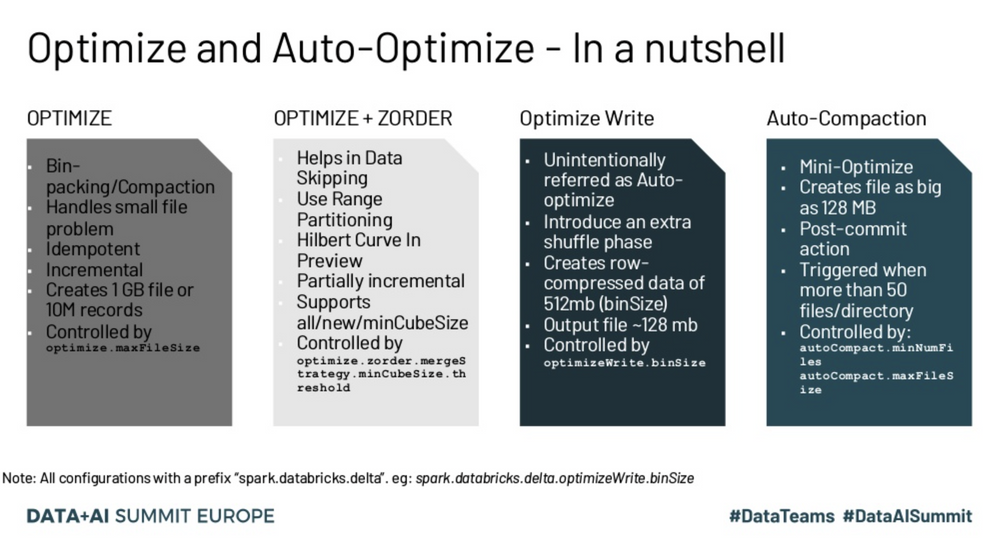
The OPTIMIZE command is a SQL command that can be run regularly or Ad Hoc. What it does is pack small files into larger files. Additionally, you can specify predicates to only run the command on a subset of a table, and also specify that you want to ZORDER on specific columns of the table.
Auto Optimize is a table property that consists of two parts: Optimized Writes and Auto Compaction. Once enabled on a table, all writes to that table will be carried out according to the config. Optimized Writes lowers the number of files output per write, whereas Auto Compaction will perform a more selective version of the OPTIMIZE SQL command after each write, and will bin pack partitions that have a large number of small files per partition (50 small files at time of writing).
If you want to ZORDER a table, you must use the OPTIMIZE SQL command. Otherwise, you can follow guidelines for Auto Optimize found here

Options
- Mark as New
- Bookmark
- Subscribe
- Mute
- Subscribe to RSS Feed
- Permalink
- Report Inappropriate Content
06-24-2021 12:18 PM

Options
- Mark as New
- Bookmark
- Subscribe
- Mute
- Subscribe to RSS Feed
- Permalink
- Report Inappropriate Content
03-13-2025 10:08 AM
Is this still valid answer in 2025 ? https://docs.databricks.com/aws/en/delta/tune-file-size#auto-compaction-for-delta-lake-on-databricks

Options
- Mark as New
- Bookmark
- Subscribe
- Mute
- Subscribe to RSS Feed
- Permalink
- Report Inappropriate Content
12-04-2025 07:26 PM
Yes, it is if you are using external tables. If you are using Unity Catalog managed tables, you should just use Predictive Optimization.

Options
- Mark as New
- Bookmark
- Subscribe
- Mute
- Subscribe to RSS Feed
- Permalink
- Report Inappropriate Content
12-05-2025 09:59 AM
Auto Optimize = automatically reduces small files during writes. Best for ongoing ETL.
OPTIMIZE = manual compaction + Z-ORDER for improving performance on existing data.
They are complementary, not competing.
Most teams use Auto Optimize for daily ingestion and still run scheduled OPTIMIZE jobs weekly or monthly for Z-ORDER and deep compaction.

Announcements


%20(1).png)
Related Content
- Streaming read fails with "Detected a data update" after a restatement job touches the source in Data Engineering
- Auto-TTL on pipeline streaming table not firing in Data Engineering
- Can the 5% deletion-vector threshold used by OPTIMIZE be configured? in Data Engineering
- Predictive Optimization for Streaming tables in Lakeflow pipelines in Data Engineering
- PAPER: Optimization of SCD Type 2 via the Riemann Semicircle Projection in Data Engineering