
Turn on suggestions
Auto-suggest helps you quickly narrow down your search results by suggesting possible matches as you type.
Showing results for
Data Governance
Join discussions on data governance practices, compliance, and security within the Databricks Community. Exchange strategies and insights to ensure data integrity and regulatory compliance.
Turn on suggestions
Auto-suggest helps you quickly narrow down your search results by suggesting possible matches as you type.
Showing results for
- Databricks Community
- Data Governance
- Hide VIEW definition in Unity-Catalog
Options
- Subscribe to RSS Feed
- Mark Topic as New
- Mark Topic as Read
- Float this Topic for Current User
- Bookmark
- Subscribe
- Mute
- Printer Friendly Page

Options
- Mark as New
- Bookmark
- Subscribe
- Mute
- Subscribe to RSS Feed
- Permalink
- Report Inappropriate Content
09-19-2023 01:53 AM
Hi,
I am trying to set up Unity-Catalog for my company and ran into a problem today. Basically, for each new source of data we ingest, we create a view-layer on top of the "tables". We do that because we have pseudonymized information in our datalake environment, and we decrypt the information on-the-fly using views.
We organize the view-layer by putting views that belong to a source inside a database/schema. We then provide access to the whole database/schema for users that need it.
BEFORE UNITY-CATALOG:
Back then I discovered that, if you can view the metadata of VIEWS, you could see the key that was used to decrypt columns in plain-text. I could, however, restrict this by simply removing READ_METADATA permission from users. That way, users could not see the schema, history, or any other detail about the view (see screenshot depicted below).

WITH UNITY-CATALOG:
Even if I provide only USE CATALOG (on catalog level), USE SCHEMA and SELECT (on database/schema level) permission to users, they can still see the "View definition" in the Details tab of that view. This exposes the decryption key in plain-text (see screenshot depicted below).
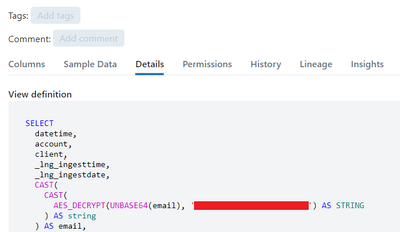
I searched and I don't see anything like READ_METADATA permission we had before, in order to restrict this for our users in Unity-Catalog. Do you have any idea on how can I hide this information?


1 ACCEPTED SOLUTION
Accepted Solutions
Options
- Mark as New
- Bookmark
- Subscribe
- Mute
- Subscribe to RSS Feed
- Permalink
- Report Inappropriate Content
09-19-2023 02:24 AM
One solution I found is, creating a function which does the decryption of the column, and from the view creation, I simply call the function and pass the column.
This solution however pushes me to put the decryption key inside the function in plain-text. But, to be honest, this wouldn't be a problem since I can make this function highly secure.
Should someone else have a better solution, please feel free to share.
5 REPLIES 5
Options
- Mark as New
- Bookmark
- Subscribe
- Mute
- Subscribe to RSS Feed
- Permalink
- Report Inappropriate Content
09-19-2023 02:24 AM
One solution I found is, creating a function which does the decryption of the column, and from the view creation, I simply call the function and pass the column.
This solution however pushes me to put the decryption key inside the function in plain-text. But, to be honest, this wouldn't be a problem since I can make this function highly secure.
Should someone else have a better solution, please feel free to share.

Options
- Mark as New
- Bookmark
- Subscribe
- Mute
- Subscribe to RSS Feed
- Permalink
- Report Inappropriate Content
01-21-2025 06:03 AM
Hi @BMex , thanks for the solution. We tried a similar approach but the function needs execute permission for the view users which is making them view the definition of the functions. How did you manage to restrict it?
Options
- Mark as New
- Bookmark
- Subscribe
- Mute
- Subscribe to RSS Feed
- Permalink
- Report Inappropriate Content
01-29-2025 05:57 AM
@hafeez, if you have secrets there, use the `secret(scope, secret_key)` syntax which would "hide" the actual key. Otherwise, I don't believe there is another way to "hide" the definition. Even if you put it inside a schema which they don't have access to, they still can use DatabricksSQL to query the extended definition of the function.
Options
- Mark as New
- Bookmark
- Subscribe
- Mute
- Subscribe to RSS Feed
- Permalink
- Report Inappropriate Content
01-29-2025 07:34 AM
Hi @BMex thanks for the info. We did a similar approach and guess the definition cannot be hidden :).
Thanks for your reply.

Options
- Mark as New
- Bookmark
- Subscribe
- Mute
- Subscribe to RSS Feed
- Permalink
- Report Inappropriate Content
01-30-2025 06:23 AM
Databricks actually has pretty good secrets management. If you need to secure a key, do this: https://learn.microsoft.com/en-us/azure/databricks/security/secrets/
To use the key in your SQL statements, do this: https://learn.microsoft.com/en-us/azure/databricks/sql/language-manual/functions/secret
You can also move the decryption to a UDF (either Python or SQL) and call that in your view, which would also keep the encryption algorithm name away from prying eyes.

Announcements


Related Content
- End-to-End Streaming NLP Pipeline with GDELT, Azure Data Factory, ADLS Gen2 and Databricks in Machine Learning
- Declarative Until It Isn't: Four Sharp Edges of Lakeflow Declarative Pipelines in Data Engineering
- Streaming tables vs materialized views in declarative pipelines: what actually decides the choice? in Data Engineering
- Pipeline still needs USE SCHEMA on an old schema it no longer writes to in Data Governance
- Materialized View backing pipeline retains old Unity Catalog after catalog rename in Data Engineering