
Turn on suggestions
Auto-suggest helps you quickly narrow down your search results by suggesting possible matches as you type.
Showing results for
Databricks Free Edition Help
Engage in discussions about the Databricks Free Edition within the Databricks Community. Share insights, tips, and best practices for getting started, troubleshooting issues, and maximizing the value of your trial experience to explore Databricks' capabilities effectively.
Turn on suggestions
Auto-suggest helps you quickly narrow down your search results by suggesting possible matches as you type.
Showing results for
- Databricks Community
- Databricks Free Edition Help
- Databricks workspace issue
Options
- Subscribe to RSS Feed
- Mark Topic as New
- Mark Topic as Read
- Float this Topic for Current User
- Bookmark
- Subscribe
- Mute
- Printer Friendly Page

Options
- Mark as New
- Bookmark
- Subscribe
- Mute
- Subscribe to RSS Feed
- Permalink
- Report Inappropriate Content
01-23-2026 03:09 AM
Hello Databricks Support Team,
I am unable to access my Databricks workspace due to a login redirect loop.
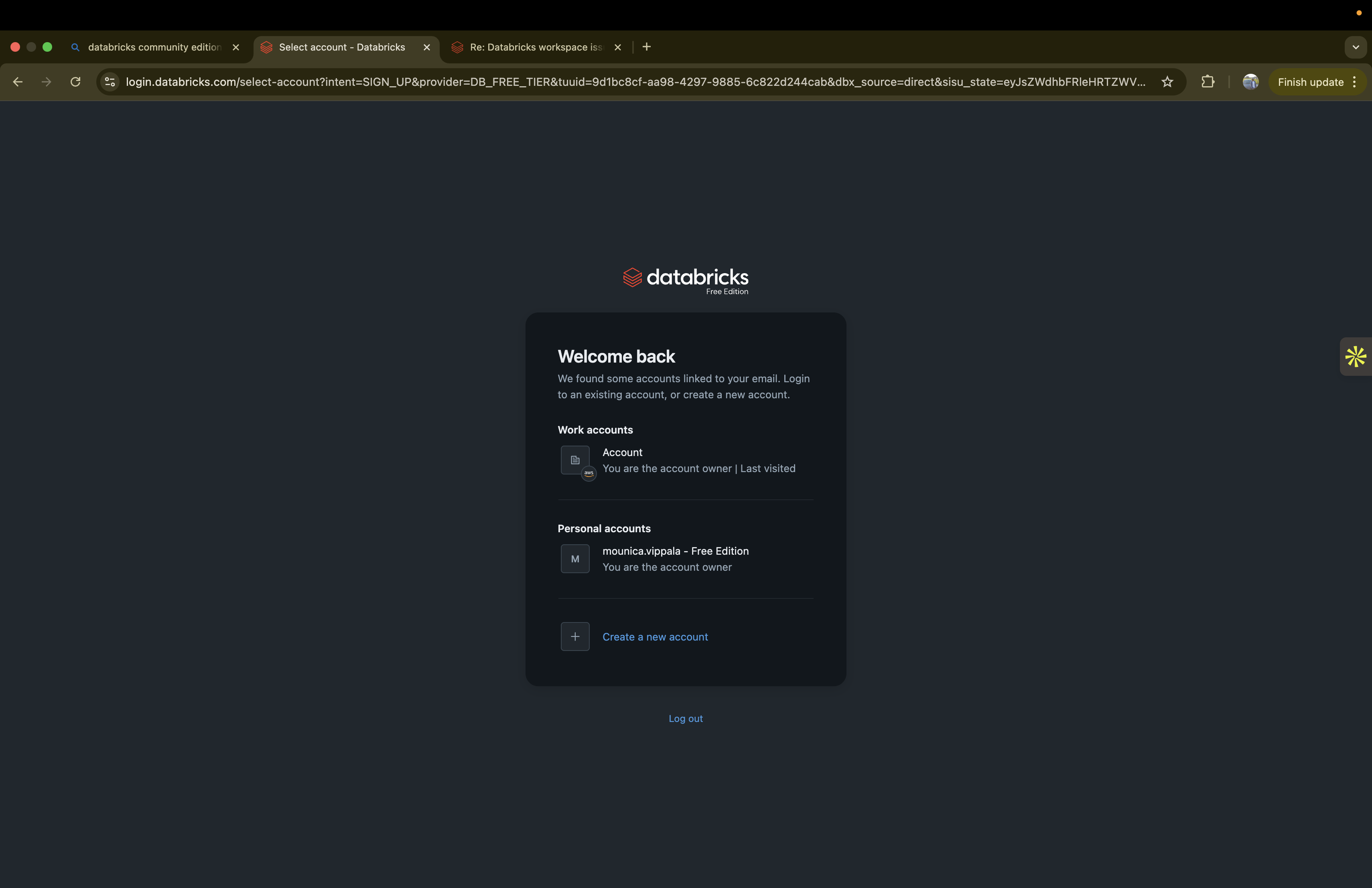
When I sign in, my Databricks account is displayed correctly. However, when I click on the account/workspace, I am redirected back to the Databricks sign in page instead of entering the workspace. This happens repeatedly.
Please investigate whether this is related to authentication, account-to-workspace mapping
Thank you for your assistance.


1 ACCEPTED SOLUTION
Accepted Solutions

Options
- Mark as New
- Bookmark
- Subscribe
- Mute
- Subscribe to RSS Feed
- Permalink
- Report Inappropriate Content
01-31-2026 03:35 AM
Databricks retired the Community Edition on Jan 1. Your old account must be part of it and facing issue as it was not migrated earlier. You can use the new account created in the free edition to learn & explore most new features unlike community edition.
4 REPLIES 4

Options
- Mark as New
- Bookmark
- Subscribe
- Mute
- Subscribe to RSS Feed
- Permalink
- Report Inappropriate Content
01-23-2026 04:25 AM
Hey @mouni2 , is this Databricks Free edition or paid Databricks? I am going to assume you are using Free Edition so here are some things to consider:
What you’re running into is almost always a browser cookie issue. Specifically, the browser is blocking third-party cookies between the Databricks login domain and your workspace domain. When that happens, the login session can’t stick, so you get bounced back to sign-in over and over again.
With Free Edition, authentication starts on the Databricks login service (login.databricks.com) and then redirects you to your workspace, which lives on a different Databricks domain. If cross-domain cookies are blocked, the redirect completes but the session doesn’t persist — hence the loop.
What I’d do first:
-
Enable third-party cookies (or add explicit site exceptions) for both the Databricks login domain and your workspace domain, then try again.
-
If you’re on Safari, temporarily disable “Prevent cross-site tracking.” If you’re on Chrome or Edge, allow third-party cookies (or add exceptions) and turn off any privacy or ad-blocking extensions just for Databricks.
-
Try a different browser or a fresh browser profile to rule out extensions or managed policies interfering.
Authentication specifics for Free Edition
A couple of important constraints to keep in mind with Free Edition:
-
Free Edition supports only email OTP, Sign in with Google, or Sign in with Microsoft. Enterprise SSO isn’t available, so be sure you’re using the same method you originally signed up with.
-
Free Edition gives you exactly one workspace and no Account Console access. Because of that, redirect loops are almost never about workspace mapping — they’re almost always cookie or session related.
Stepby-step troubleshooting
-
-
login.databricks.com
-
your workspace domain (for example, a region-specific *.databricks.com URL)
Then sign in again using the same method you used when creating your Free Edition account.
Clear cookies and site data for Databricks domains:
-
-
Temporarily disable privacy or anti-tracking extensions, along with any corporate browser policies that block third-party cookies, and retry.
- Try using an incongnito browser.
-
Test in an alternate browser (for example, Chrome instead of Safari) or a clean browser profile to isolate local settings.
-
If you recently migrated from Community Edition, double-check that you’re selecting the Free Edition workspace — after migration, you may see more than one option.
Hopefully this gets you past your issue.
Regards, Louis.
Options
- Mark as New
- Bookmark
- Subscribe
- Mute
- Subscribe to RSS Feed
- Permalink
- Report Inappropriate Content
01-30-2026 06:27 PM
Hi @Louis_Frolio ,
Thanks for the detailed troubleshooting steps.
I followed all of them step by step
The issue persists only for my original account.
I can see the account during login, but after authentication it redirects back to the login page instead of opening the workspace.
To isolate the issue, I created a new Free Edition account, and that one works correctly with no redirect loop. This suggests the problem is specific to the original account rather than browser or local settings.
Could you please check if there’s an issue with the old account or workspace association on the backend, or advise on how it can be reset or fixed?
Thanks for your help.
Best,
Mouni
Options
- Mark as New
- Bookmark
- Subscribe
- Mute
- Subscribe to RSS Feed
- Permalink
- Report Inappropriate Content
01-31-2026 03:35 AM
Databricks retired the Community Edition on Jan 1. Your old account must be part of it and facing issue as it was not migrated earlier. You can use the new account created in the free edition to learn & explore most new features unlike community edition.

Options
- Mark as New
- Bookmark
- Subscribe
- Mute
- Subscribe to RSS Feed
- Permalink
- Report Inappropriate Content
03-08-2026 06:06 PM
Hi @mouni2,
Based on your description, your original account was likely a Databricks Community Edition account. Community Edition was retired on January 1, 2026, and existing Community Edition workspaces are no longer accessible. This is the most common cause of the redirect loop you are experiencing: the workspace associated with your old account no longer exists, so the authentication flow completes but has nowhere to land, sending you back to the sign-in page.
The good news is that you have already confirmed the solution by creating a new Databricks Free Edition account that works correctly. Free Edition is the replacement for Community Edition and includes a number of capabilities that were not available in Community Edition, including:
- Serverless compute (no cluster startup wait times)
- Unity Catalog for data governance
- AI/BI Dashboards and Genie for natural-language data exploration
- Lakeflow for building data pipelines
- Built-in AI assistant for coding help
WHAT TO DO NEXT
Since your new Free Edition account is working, you can continue using that going forward. Unfortunately, Community Edition workspaces and any data or notebooks stored in them are not automatically migrated to Free Edition. If you had notebooks or data in your old Community Edition workspace, those would need to be recreated in the new environment.
If you had previously exported notebooks from your Community Edition workspace (as .dbc, .py, or .ipynb files), you can import them into your new Free Edition workspace using the Workspace browser: click the kebab menu (three dots) next to a folder and select "Import."
REFERENCES
- Databricks Free Edition overview: https://docs.databricks.com/aws/en/getting-started/free-edition
- Free Edition limitations: https://docs.databricks.com/aws/en/getting-started/free-edition-limitations
- Free Edition sign-up: https://login.databricks.com/?intent=CE_SIGN_UP
* This reply used an agent system I built to research and draft this response based on the wide set of documentation I have available and previous memory. I personally review the draft for any obvious issues and for monitoring system reliability and update it when I detect any drift, but there is still a small chance that something is inaccurate, especially if you are experimenting with brand new features.
If this answer resolves your question, could you mark it as "Accept as Solution"? That helps other users quickly find the correct fix.

Announcements


Related Content
- Databricks Data Ingestion in Get Started Discussions
- External location not accessble with job and general purpose cluster but works fine with serverless in Get Started Discussions
- Databricks ML Professional Certification: What Changed Between My First and Second in Certifications
- Certification Not Issued in Certifications
- Request for Databricks Partner Solutions Architect Essentials (Champion Series) badge in Certifications