
Turn on suggestions
Auto-suggest helps you quickly narrow down your search results by suggesting possible matches as you type.
Showing results for
Databricks Free Edition Help
Engage in discussions about the Databricks Free Edition within the Databricks Community. Share insights, tips, and best practices for getting started, troubleshooting issues, and maximizing the value of your trial experience to explore Databricks' capabilities effectively.
Turn on suggestions
Auto-suggest helps you quickly narrow down your search results by suggesting possible matches as you type.
Showing results for
- Databricks Community
- Databricks Free Edition Help
- How to Connect Databricks Genie AI via API
Options
- Subscribe to RSS Feed
- Mark Topic as New
- Mark Topic as Read
- Float this Topic for Current User
- Bookmark
- Subscribe
- Mute
- Printer Friendly Page

Options
- Mark as New
- Bookmark
- Subscribe
- Mute
- Subscribe to RSS Feed
- Permalink
- Report Inappropriate Content
05-31-2026 10:49 PM
How can I connect Databricks Genie AI from a third-party tool using API execution?


1 ACCEPTED SOLUTION
Accepted Solutions

Options
- Mark as New
- Bookmark
- Subscribe
- Mute
- Subscribe to RSS Feed
- Permalink
- Report Inappropriate Content
06-01-2026 06:02 AM - edited 06-01-2026 06:03 AM
Hello @SantiNath_Dey 👋
Connecting a third-party tool to Databricks Genie AI is fully supported. While you can use the Databricks Managed MCP Server (which is perfect if your third-party tool is an AI agent framework like LangGraph or Claude Desktop), the simplest and most common way to execute queries programmatically is using the Genie Spaces REST API via the Databricks SDK.
Here is the simplest way to get it running without overcomplicating things:
1. Authentication
For third-party tools, the best practice is to use OAuth M2M (Service Principal). For quick local testing, you can use a Personal Access Token (PAT). Your tool simply needs to pass this token via the DATABRICKS_TOKEN environment variable or in the HTTP header as Authorization: Bearer <YOUR_TOKEN>.
2. The Execution Flow
Because Genie takes time to analyze data and generate SQL, the API is asynchronous. The flow always requires two steps:
Ask the question (Start the conversation).
Poll for the status (Loop until the status returns as COMPLETED).
You can find the direct reference for these endpoints in the Databricks Genie REST API Documentation.
3. Python Code Example (Using Databricks SDK)
Instead of manually wiring up raw REST requests or dealing with complex MCP protocols, you can use the official Databricks SDK (pip install databricks-sdk). See the full Databricks SDK for Python (Genie Modules) for detailed method details.
from databricks.sdk import WorkspaceClient
import time

# 1. Initialize client (Automatically picks up DATABRICKS_HOST and DATABRICKS_TOKEN from env variables)
w = WorkspaceClient()
space_id = "YOUR_GENIE_SPACE_ID_HERE" # (e.g., a 32-character hex string)
question = "What were the total sales last month?"

# 2. Ask the question to Genie
message = w.genie.start_conversation(
    space_id=space_id,
    content=question
)
conversation_id = message.conversation_id
message_id = message.id

print(f"Asked Genie! Conversation ID: {conversation_id}")

# 3. Poll until Genie is done thinking
while True:
    response = w.genie.get_message(
        space_id=space_id,
        conversation_id=conversation_id,
        message_id=message_id
    )

    if response.status.value == "COMPLETED":
        print("\nGenie Response:")
        print(response.content)
        break
    elif response.status.value in ["FAILED", "CANCELED"]:
        print(f"\nQuery stopped with status: {response.status.value}")
        break

    print("Waiting for Genie to finish...")
    time.sleep(3) # Wait 3 seconds before checking again
What if you must use the MCP Server?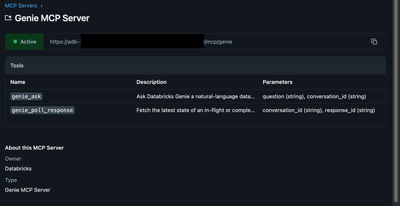
If your third-party tool strictly relies on the Model Context Protocol (MCP) to discover tools, Databricks does provide a managed endpoint:
URL Pattern: https://<workspace-url>/api/2.0/mcp/genie
MCP Tools: It exposes genie_ask (to start the chat) and genie_poll_response (to fetch the results).
However, unless you are specifically building an agentic workflow that requires MCP tool-calling, sticking to the standard SDK/API approach highlighted above will save you a lot of development overhead!
Hope this helps!
5 REPLIES 5

Options
- Mark as New
- Bookmark
- Subscribe
- Mute
- Subscribe to RSS Feed
- Permalink
- Report Inappropriate Content
06-01-2026 05:56 AM - edited 06-01-2026 05:57 AM
Hi @SantiNath_Dey ,
The Genie API provides two types of capabilities: Conversation APIs (Public Preview) for natural language data querying in chatbots, applications, and AI agent frameworks, and Management APIs for programmatic creation, configuration, and deployment of Genie spaces. The conversation APIs support stateful conversations where users can ask follow-up questions over time.
Using Genie Code programatically is currently not supported:
from databricks.sdk import WorkspaceClient

w = WorkspaceClient()  # picks up env vars or ~/.databrickscfg

# Start a conversation
result = w.genie.start_conversation_and_wait(
    space_id="<your_space_id>",
    content="What were total sales last month?"
)

# Follow-up
follow_up = w.genie.create_message_and_wait(
    space_id="<your_space_id>",
    conversation_id=result.conversation_id,
    content="Break that down by region"
)
Options
- Mark as New
- Bookmark
- Subscribe
- Mute
- Subscribe to RSS Feed
- Permalink
- Report Inappropriate Content
06-01-2026 09:36 AM
Thanks for quick response
Options
- Mark as New
- Bookmark
- Subscribe
- Mute
- Subscribe to RSS Feed
- Permalink
- Report Inappropriate Content
06-01-2026 10:22 AM
No problem 🙂
Options
- Mark as New
- Bookmark
- Subscribe
- Mute
- Subscribe to RSS Feed
- Permalink
- Report Inappropriate Content
06-01-2026 06:02 AM - edited 06-01-2026 06:03 AM
Hello @SantiNath_Dey 👋
Connecting a third-party tool to Databricks Genie AI is fully supported. While you can use the Databricks Managed MCP Server (which is perfect if your third-party tool is an AI agent framework like LangGraph or Claude Desktop), the simplest and most common way to execute queries programmatically is using the Genie Spaces REST API via the Databricks SDK.
Here is the simplest way to get it running without overcomplicating things:
1. Authentication
For third-party tools, the best practice is to use OAuth M2M (Service Principal). For quick local testing, you can use a Personal Access Token (PAT). Your tool simply needs to pass this token via the DATABRICKS_TOKEN environment variable or in the HTTP header as Authorization: Bearer <YOUR_TOKEN>.
2. The Execution Flow
Because Genie takes time to analyze data and generate SQL, the API is asynchronous. The flow always requires two steps:
Ask the question (Start the conversation).
Poll for the status (Loop until the status returns as COMPLETED).
You can find the direct reference for these endpoints in the Databricks Genie REST API Documentation.
3. Python Code Example (Using Databricks SDK)
Instead of manually wiring up raw REST requests or dealing with complex MCP protocols, you can use the official Databricks SDK (pip install databricks-sdk). See the full Databricks SDK for Python (Genie Modules) for detailed method details.
from databricks.sdk import WorkspaceClient
import time

# 1. Initialize client (Automatically picks up DATABRICKS_HOST and DATABRICKS_TOKEN from env variables)
w = WorkspaceClient()
space_id = "YOUR_GENIE_SPACE_ID_HERE" # (e.g., a 32-character hex string)
question = "What were the total sales last month?"

# 2. Ask the question to Genie
message = w.genie.start_conversation(
    space_id=space_id,
    content=question
)
conversation_id = message.conversation_id
message_id = message.id

print(f"Asked Genie! Conversation ID: {conversation_id}")

# 3. Poll until Genie is done thinking
while True:
    response = w.genie.get_message(
        space_id=space_id,
        conversation_id=conversation_id,
        message_id=message_id
    )

    if response.status.value == "COMPLETED":
        print("\nGenie Response:")
        print(response.content)
        break
    elif response.status.value in ["FAILED", "CANCELED"]:
        print(f"\nQuery stopped with status: {response.status.value}")
        break

    print("Waiting for Genie to finish...")
    time.sleep(3) # Wait 3 seconds before checking again
What if you must use the MCP Server?
If your third-party tool strictly relies on the Model Context Protocol (MCP) to discover tools, Databricks does provide a managed endpoint:
URL Pattern: https://<workspace-url>/api/2.0/mcp/genie
MCP Tools: It exposes genie_ask (to start the chat) and genie_poll_response (to fetch the results).
However, unless you are specifically building an agentic workflow that requires MCP tool-calling, sticking to the standard SDK/API approach highlighted above will save you a lot of development overhead!
Hope this helps!
Options
- Mark as New
- Bookmark
- Subscribe
- Mute
- Subscribe to RSS Feed
- Permalink
- Report Inappropriate Content
06-01-2026 06:09 AM
Hi @SantiNath_Dey , FYI: The managed MCP server feature may not available on the Free/Community Edition of Databricks.

Announcements


Related Content
- Databricks Data Ingestion in Get Started Discussions
- From Semantic Similarity to Business Authority: Why Genie Ontology and OntoRank Matter in Get Started Discussions
- Databricks App Access Issue - Free Tier Platform in Databricks Free Edition Help
- Is the Semantic Layer the Real Challenge With Databricks Genie? in Get Started Discussions
- Excel Add-in Regression - Sign-in opens external browser window instead of embedding in task pane, r in Get Started Discussions