
Turn on suggestions
Auto-suggest helps you quickly narrow down your search results by suggesting possible matches as you type.
Showing results for
Generative AI
Explore discussions on generative artificial intelligence techniques and applications within the Databricks Community. Share ideas, challenges, and breakthroughs in this cutting-edge field.
Turn on suggestions
Auto-suggest helps you quickly narrow down your search results by suggesting possible matches as you type.
Showing results for
- Databricks Community
- Generative AI
- WORKSPACE HAS NO DAILY TOKEN ALLOWANCE
Options
- Subscribe to RSS Feed
- Mark Topic as New
- Mark Topic as Read
- Float this Topic for Current User
- Bookmark
- Subscribe
- Mute
- Printer Friendly Page
WORKSPACE HAS NO DAILY TOKEN ALLOWANCE

Options
- Mark as New
- Bookmark
- Subscribe
- Mute
- Subscribe to RSS Feed
- Permalink
- Report Inappropriate Content
Tuesday
Hello Team,
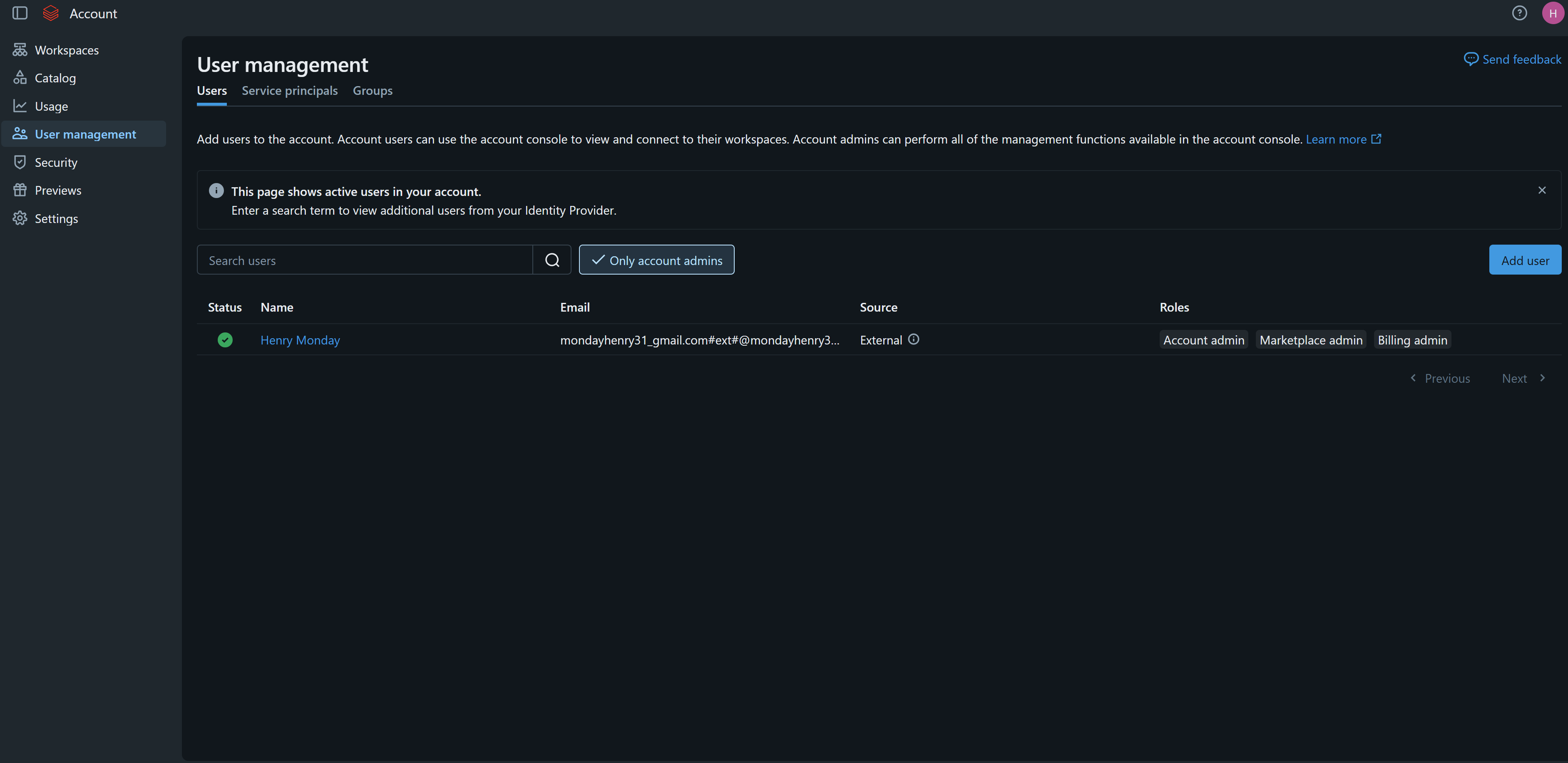
When I try to debug and troubleshoot this error: "This workspace has no daily token allowance for the assistant. Ask your workspace admin to enable it, then try again." I am the Admin, but I still don't see any way to resolve this issue, I have tried creating a budget with the product genie, I have also navigated to the User Management and on there as shown in on of the snapshot the users and the Admin still I keep hitting that error prompt when I use it alongside a notebook in the workspace.
After chatting with the agent on your website, when I try to access the Help Center, I keep getting this error prompt: "You currently do not have access to Help Center. Please reach out to your admin or send an email to help@databricks.com" for my email address: "mondayhenry31@gmail.com".
Is it that I need a separate subscription from my Azure on Databricks and like a separate Admin access which I can't seem to understand. Please help, as I am trying to go through a hands-on course project, and I am stuck here.
Regards


7 REPLIES 7

Options
- Mark as New
- Bookmark
- Subscribe
- Mute
- Subscribe to RSS Feed
- Permalink
- Report Inappropriate Content
Tuesday
Hello @HOguns ,
Long response, but it is worth it.
Thank you for sharing the screenshots. There appear to be two separate issues: the Genie Code daily-token allowance and Help Center access.
1. Confirm the Databricks identity being used
The screenshots show several external identities for the same person, including mondayhenry31@gmail.com, an Azure guest identity containing #ext#, and onmicrosoft.com identities. The Account admin role appears to be assigned to the #ext# identity, not clearly to the plain Gmail identity.
Please ask your Microsoft Entra ID administrator to confirm which user principal name (UPN) is used when you sign in to Azure Databricks. Then:
- Sign out of Databricks and Microsoft accounts in the browser, or use an incognito window.
- Sign in using the same identity that has the Databricks Account admin role.
- Confirm that this identity is assigned to the affected workspace.
- If workspace administration is required, confirm that it also has the Workspace admin role.
Account-admin access and workspace access are separate permissions. Azure Databricks also recommends avoiding duplicate identities and using one identity-provisioning method. Do not delete the duplicate entries until the canonical Entra ID identity has been confirmed.
References: Azure Databricks account administration, Manage users in Azure Databricks, and Automatic identity management.
2. The budget does not create the daily token allowance
The screenshot confirms that Genie Code is displaying the error:
This workspace has no daily token allowance for the assistant. Ask your workspace admin to enable it, then try again.
A Genie budget is a usage-cost control; creating a budget does not by itself provision or enable the assistant’s daily token allowance. If a budget is configured, verify that it is scoped to the Genie product using the documented Unity Gateway resource and databricks-product = genie tag.
After correcting the sign-in identity and workspace assignment, start a new Genie Code session and test again. If the same error remains, this requires a Databricks-side account/workspace entitlement or provisioning check rather than another change in User Management.
- When contacting Databricks, include:
- Databricks account ID
- Workspace ID and workspace URL
- Azure region
- The exact identity/UPN used to sign in
- Approximate time of the failure and a screenshot of the error
- Confirmation that the user identity and workspace assignment were checked
Reference: Genie Code on Azure Databricks.
3. Help Center access is separate from workspace administration
The message stating that the user does not have access to Help Center is not necessarily caused by missing workspace permissions. Help Center access depends on the organization’s Databricks support entitlement and whether the exact email address is registered as an authorized support contact.
The customer should:
- Sign in to Help Center with the exact email associated with the Databricks support entitlement.
- If mondayhenry31@gmail.com is not the authorized support contact, ask the account owner or support administrator to add the correct email address.
- If this is a course, trial, or learning environment without a support contract, use the course support channel or Databricks Community; Help Center case access may not be included.
- If access is still denied, email help@databricks.com with the account ID, workspace ID, workspace URL, Azure region, login identity, and the Help Center error.
Reference: Azure Databricks support.
Summary
A separate Azure subscription is not normally required just to use the workspace or assign Databricks administrator roles. However, the screenshots suggest that the account has an identity/role mismatch that should be corrected first. If the Genie Code error continues after using the canonical identity, Databricks Support must verify the workspace’s Genie Code daily allowance and provisioning. Help Center access is a separate support entitlement from workspace administration.
Options
- Mark as New
- Bookmark
- Subscribe
- Mute
- Subscribe to RSS Feed
- Permalink
- Report Inappropriate Content
Tuesday
Hi @Valeria_Koz_DBX,
Thank you for your prompt feedback; I have done exactly as you highlighted in No. 1 with the service principal name "mondayhenry31_gmail.com#EXT#@mondayhenry31gmail.onmicrosoft.com" and I have used this to sign in using the in-Private/incognito mode, but I still hit the same impasse. Based on No 2.
Databricks account ID - 06348851-c57a-4116-9779-6baae571c2a1
Workspace ID and workspace URL - 7405617987563324
Azure region - East US
The exact identity/UPN used to sign in - mondayhenry31_gmail.com#EXT#@mondayhenry31gmail.onmicrosoft.com
Approximate time of the failure and a screenshot of the error - 11:40 Canada Time EDT
Confirmation that the user identity and workspace assignment were checked - Yes it was checked
Below I have provided the workspace details as well
Name
Status
Resource group
Region
Subscription
Created
Metastore
Running
rg-dp750
eastus
06348851-c57a-4116-9779-6baae571c2a1
yesterday at 3:37 PM
Regard
Options
- Mark as New
- Bookmark
- Subscribe
- Mute
- Subscribe to RSS Feed
- Permalink
- Report Inappropriate Content
Tuesday
@HOguns
Did you posted here, or Contacted Help Center with all of the details above?
Ideally, you want to follow the below steps
- Use the Databricks Help Center if you can access it, and open a case for Azure Databricks → Genie Code/Assistant.
- If Help Center access is denied, email help@databricks.com from the same address used for the Databricks account. Help Center access may require an authorized support contact or support entitlement.
Options
- Mark as New
- Bookmark
- Subscribe
- Mute
- Subscribe to RSS Feed
- Permalink
- Report Inappropriate Content
Tuesday
Hello @Valeria_Koz_DBX
I contacted the Help Center via email since I am unable to do point 1 above to open a case. The response from your team via email was to post it here, and one of the engineers would help instead.
Regards
Options
- Mark as New
- Bookmark
- Subscribe
- Mute
- Subscribe to RSS Feed
- Permalink
- Report Inappropriate Content
yesterday
Hi @HOguns,
I am not an engineer, I cover the delivery side of Genie.
However, I passed it to one of our internal teams. Let's see if they pick it up. I am not sure how engineers pick it up from here
In the meantime, can you also please send it to databricks-community@databricks.com, so it is not missed out on
Options
- Mark as New
- Bookmark
- Subscribe
- Mute
- Subscribe to RSS Feed
- Permalink
- Report Inappropriate Content
yesterday
Alright, thank you. I will have to delete the workspace now because its running on a pay as you go and I am still stuck.

Options
- Mark as New
- Bookmark
- Subscribe
- Mute
- Subscribe to RSS Feed
- Permalink
- Report Inappropriate Content
19m ago
Hey, I had a simillar problem, with the same Error Code.
I asked Codex to fix it and the solution is very simple.
In the Genie Code window, next to the send button, change from auto to low.
I dont know, this seems like a bug since some weeks to me.

Announcements




Related Content
- Salesforce Hosted MCP + UC HTTP connection — stops working after ~1 hour? in Generative AI
- DeepSeek V4.1 Flash returns workspace ITPM rate-limit error on fresh/idle workspace in Generative AI
- org.apache.iceberg.connect.IcebergSinkConnector to sink data from kafka to databricks - large volume in Data Engineering
- Feature enablement for Foundation Model Unity Catalog permissions in Data Governance