cancel
Showing results for 
Search instead for 
Did you mean: 
Warehousing & Analytics
Engage in discussions on data warehousing, analytics, and BI solutions within the Databricks Community. Share insights, tips, and best practices for leveraging data for informed decision-making.
cancel
Showing results for 
Search instead for 
Did you mean: 

Create Cascading Dropdown in Dashboard

_its_akshaye
New Contributor

I am creating a dashboard, and I am looking to implement the scenario below.

  • How do I create a cascading dropdown where selecting one field filters the available values in another dropdown?
  • In a dropdown, how do I show a description for each option for user selection but pass its associated ID/key as the parameter value?

Let me know if you have any ideas on how to implement it.

1 ACCEPTED SOLUTION

Accepted Solutions

pradeep_singh
Contributor III

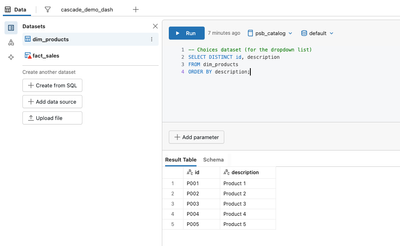
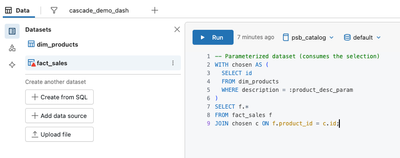
Create a dataset that returns the “parent” values . Add filter A and connect it to that dataset field. Create a dataset for “child” values whose query is parameterized by the parent selection, or simply filters on the parent field:
 

dbxdev_0-1768965448130.png

dbxdev_1-1768965468517.png

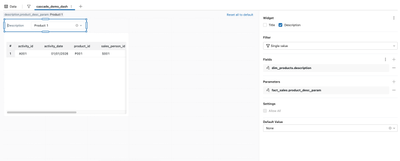
Configure the filter widget’s Fields to use description from the choices dataset, and its Parameters to set :product_desc_param. Your query looks up the associated ID after selection. This gives users friendly labels while your query operates on IDs 
dbxdev_2-1768965525870.png

dbxdev_3-1768965571857.png

https://docs.databricks.com/aws/en/dashboards/parameters

Thank You
Pradeep Singh - https://www.linkedin.com/in/dbxdev

View solution in original post

1 REPLY 1

pradeep_singh
Contributor III

Create a dataset that returns the “parent” values . Add filter A and connect it to that dataset field. Create a dataset for “child” values whose query is parameterized by the parent selection, or simply filters on the parent field:


dbxdev_0-1768965448130.png

dbxdev_1-1768965468517.png

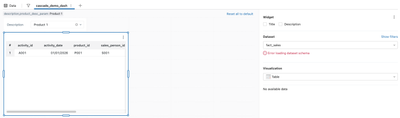
Configure the filter widget’s Fields to use description from the choices dataset, and its Parameters to set :product_desc_param. Your query looks up the associated ID after selection. This gives users friendly labels while your query operates on IDs 
dbxdev_2-1768965525870.png

dbxdev_3-1768965571857.png

https://docs.databricks.com/aws/en/dashboards/parameters

Thank You
Pradeep Singh - https://www.linkedin.com/in/dbxdev