
Turn on suggestions
Auto-suggest helps you quickly narrow down your search results by suggesting possible matches as you type.
Showing results for
Warehousing & Analytics
Engage in discussions on data warehousing, analytics, and BI solutions within the Databricks Community. Share insights, tips, and best practices for leveraging data for informed decision-making.
Turn on suggestions
Auto-suggest helps you quickly narrow down your search results by suggesting possible matches as you type.
Showing results for
- Databricks Community
- Warehousing & Analytics
- Customizing the order of fields in the hover over ...
Options
- Subscribe to RSS Feed
- Mark Topic as New
- Mark Topic as Read
- Float this Topic for Current User
- Bookmark
- Subscribe
- Mute
- Printer Friendly Page

Options
- Mark as New
- Bookmark
- Subscribe
- Mute
- Subscribe to RSS Feed
- Permalink
- Report Inappropriate Content
05-18-2026 03:31 AM - edited 05-18-2026 03:31 AM
Hi team,
My work involves building dashboards that provide key insights to stakeholders. I am currently using the AI/BI dashboard functionality and seemed to have hit a limitation that I'm hoping someone can help me work around.
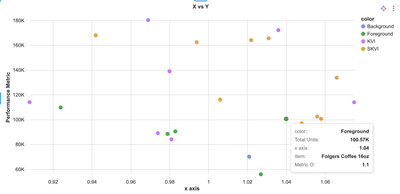
One of the visualizations that I have is a scatter plot. I want to customize the order of metrics within the hover over such that a metric not on the X and Y axis is show first. It seems like it's not possible to do so at the moment as the X, Y, color always show up at the top with no ability to change their order with respect to other metrics in the tooltip.
Is that correct? Any ideas how I can work around this?
In the example below, I want item to come first


1 ACCEPTED SOLUTION
Accepted Solutions

Options
- Mark as New
- Bookmark
- Subscribe
- Mute
- Subscribe to RSS Feed
- Permalink
- Report Inappropriate Content
05-18-2026 06:20 AM
Hi @Bahjat,
As @szymon_dybczak has mentioned, there isn’t currently a way to reorder them so a field like Item appears at the top. As of now, AI/BI scatter plot tooltips show the x-axis, y-axis, and colour/grouping fields first by default. If you’d like to upvote that ask, here’s the public feature request: Custom ordering of tooltips.
This may not be ideal, but a practical workaround is to add a small table next to the scatter plot with Item as the first column, and then use the scatter plot for selection/filtering. Cross-filtering works across visualisations that use the same dataset, so selecting a point in the scatter can update the nearby table. The docs for that pattern are here: Use dashboard filters.
If this answer resolves your question, could you mark it as “Accept as Solution”? That helps other users quickly find the correct fix.
Regards,
Ashwin | Delivery Solution Architect @ Databricks
Helping you build and scale the Data Intelligence Platform.
***Opinions are my own***
Ashwin | Delivery Solution Architect @ Databricks
Helping you build and scale the Data Intelligence Platform.
***Opinions are my own***
4 REPLIES 4

Options
- Mark as New
- Bookmark
- Subscribe
- Mute
- Subscribe to RSS Feed
- Permalink
- Report Inappropriate Content
05-18-2026 05:42 AM - edited 05-18-2026 05:43 AM
Hi @Bahjat ,
Unfortunately, tooltip ordering does not currently appear to be configurable. Maybe try to suggest addition of that feature on Databricks Ideas portal.
Options
- Mark as New
- Bookmark
- Subscribe
- Mute
- Subscribe to RSS Feed
- Permalink
- Report Inappropriate Content
05-18-2026 06:20 AM
Hi @Bahjat,
As @szymon_dybczak has mentioned, there isn’t currently a way to reorder them so a field like Item appears at the top. As of now, AI/BI scatter plot tooltips show the x-axis, y-axis, and colour/grouping fields first by default. If you’d like to upvote that ask, here’s the public feature request: Custom ordering of tooltips.
This may not be ideal, but a practical workaround is to add a small table next to the scatter plot with Item as the first column, and then use the scatter plot for selection/filtering. Cross-filtering works across visualisations that use the same dataset, so selecting a point in the scatter can update the nearby table. The docs for that pattern are here: Use dashboard filters.
If this answer resolves your question, could you mark it as “Accept as Solution”? That helps other users quickly find the correct fix.
Regards,
Ashwin | Delivery Solution Architect @ Databricks
Helping you build and scale the Data Intelligence Platform.
***Opinions are my own***
Ashwin | Delivery Solution Architect @ Databricks
Helping you build and scale the Data Intelligence Platform.
***Opinions are my own***
Options
- Mark as New
- Bookmark
- Subscribe
- Mute
- Subscribe to RSS Feed
- Permalink
- Report Inappropriate Content
05-18-2026 06:24 AM
Thanks both! appreciate the feedback.
Options
- Mark as New
- Bookmark
- Subscribe
- Mute
- Subscribe to RSS Feed
- Permalink
- Report Inappropriate Content
05-18-2026 06:28 AM
No problem 🙂

Announcements


