cancel
Showing results for 
Search instead for 
Did you mean: 
Warehousing & Analytics
Engage in discussions on data warehousing, analytics, and BI solutions within the Databricks Community. Share insights, tips, and best practices for leveraging data for informed decision-making.
cancel
Showing results for 
Search instead for 
Did you mean: 

Moving average calculation in Databricks AI/BI dashboard

meljung
New Contributor II

So, I can't figure out how to do moving average as custom calculation in Databricks dashboard. I'm applying many different filters and the denominator of the metric has to change dynamically based on the chosen filters. So, in this case using `Custom Calculation` worked fine and example calculation of the metric is shown below. But now I'm facing a problem where I need to take a moving average of this dynamically calculated metric. I can't do the calculation in the query because the calculation wouldn't be correct when filtered. I also can't use parameters as filters because some business use cases limit the parameters. I'd appreciate if you have any suggestions.
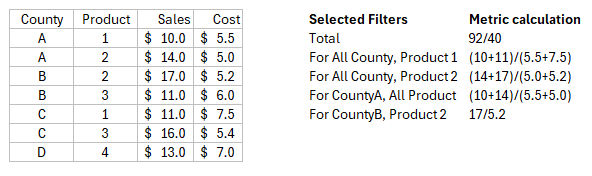
Screenshot 2025-06-17 134351.png

1 ACCEPTED SOLUTION

Accepted Solutions

mark_ott
Databricks Employee
Databricks Employee

Currently, Databricks dashboards do not support applying a moving average “custom calculation” on top of another custom metric that itself is dynamic with respect to the filters.

Workarounds

  • Segmented SQL Datasets: Pre-compute the filtered sets (as much as possible) in the SQL layer, then apply the moving average calculation there. Pass any possible filter through widgets or parameterize the dataset if business constraints allow.

  • Export and Post-Process: For highly dynamic cases that cannot be handled in the dashboard or SQL alone, export the filtered data (e.g., for a given set of filters), calculate the moving average externally (such as in a Databricks notebook), and visualize that result in the dashboard.

  • Product Wishlist: If true moving average on custom calculations in the dashboard is critical, consider submitting a feature request via official support or community forums. This scenario—window functions on top of dynamic aggregates in dashboards—is a known product limitation

View solution in original post

2 REPLIES 2

mark_ott
Databricks Employee
Databricks Employee

Currently, Databricks dashboards do not support applying a moving average “custom calculation” on top of another custom metric that itself is dynamic with respect to the filters.

Workarounds

  • Segmented SQL Datasets: Pre-compute the filtered sets (as much as possible) in the SQL layer, then apply the moving average calculation there. Pass any possible filter through widgets or parameterize the dataset if business constraints allow.

  • Export and Post-Process: For highly dynamic cases that cannot be handled in the dashboard or SQL alone, export the filtered data (e.g., for a given set of filters), calculate the moving average externally (such as in a Databricks notebook), and visualize that result in the dashboard.

  • Product Wishlist: If true moving average on custom calculations in the dashboard is critical, consider submitting a feature request via official support or community forums. This scenario—window functions on top of dynamic aggregates in dashboards—is a known product limitation

davidray
New Contributor II

You’re running into a current limitation in Databricks AI/BI dashboards. Right now, a moving average cannot be applied on top of a Custom Calculation when that metric itself is dynamically recalculated based on filters. Since your denominator changes with the filters, the dashboard layer doesn’t support stacking another calculation on top of it.

Here are some practical workarounds:

1. Push the full metric into SQL
Define the complete metric logic in your dataset query so it remains filter-aware, and then calculate the moving average within the query. This ensures that the moving average respects all applied dashboard filters.

2. Layered datasets
Create one dataset that calculates the dynamic metric, then a second dataset that applies the moving average on top. This can work depending on how your filters interact with each dataset.

3. Notebook-backed calculation
For highly dynamic scenarios, compute the filtered metric and moving average inside a notebook and expose the result as a table or view for the dashboard. This gives full control over the calculation while keeping the dashboard visualization simple.

Currently, applying a moving average on top of dynamic dashboard metrics is a known limitation. If this is critical for your workflows, consider submitting it as a feature request to Databricks.