
Turn on suggestions
Auto-suggest helps you quickly narrow down your search results by suggesting possible matches as you type.
Showing results for
Administration & Architecture
Explore discussions on Databricks administration, deployment strategies, and architectural best practices. Connect with administrators and architects to optimize your Databricks environment for performance, scalability, and security.
Turn on suggestions
Auto-suggest helps you quickly narrow down your search results by suggesting possible matches as you type.
Showing results for
- Databricks Community
- Administration & Architecture
- Databricks Default Catalog with House Icon
Options
- Subscribe to RSS Feed
- Mark Topic as New
- Mark Topic as Read
- Float this Topic for Current User
- Bookmark
- Subscribe
- Mute
- Printer Friendly Page
Databricks Default Catalog with House Icon

Options
- Mark as New
- Bookmark
- Subscribe
- Mute
- Subscribe to RSS Feed
- Permalink
- Report Inappropriate Content
03-06-2026 02:09 AM
Hi everyone,
I have a question regarding workspace catalogs in Databricks with Unity Catalog.
In our setup, when a new workspace is created and automatically assigned to a Unity Catalog metastore (with automatic workspace catalog creation enabled), a catalog is automatically created with the same name as the workspace. In the Catalog Explorer this catalog appears with the house icon, indicating that it is the workspace catalog.
My questions are the following:
Is it possible to rename this automatically created workspace catalog?
If not, is there any supported workaround (for example through SQL, API, or configuration changes) to modify the name after it has been created?
Additionally, I have observed a case where the catalog with the house icon has a different name from the workspace, which made me wonder whether the name can somehow be customized or changed under certain conditions.
I would like to confirm whether this catalog name is strictly system-managed or if there is any way to control or modify it or somehow create it when i create the workspace.
Thanks in advance for any clarification.


4 REPLIES 4

Options
- Mark as New
- Bookmark
- Subscribe
- Mute
- Subscribe to RSS Feed
- Permalink
- Report Inappropriate Content
03-06-2026 03:30 AM
Hi @vziog ,
Yes, you can rename the workspace catalog.
UI: As a workspace admin:
- Go to Catalog > find the catalog with the house icon
- Open its details page.
- Use the kebab menu > Rename
https://docs.databricks.com/aws/en/data-governance/unity-catalog/get-started#:~:text=The%20workspac....
API: https://docs.databricks.com/api/workspace/catalogs/update
Options
- Mark as New
- Bookmark
- Subscribe
- Mute
- Subscribe to RSS Feed
- Permalink
- Report Inappropriate Content
03-06-2026 03:50 AM

Options
- Mark as New
- Bookmark
- Subscribe
- Mute
- Subscribe to RSS Feed
- Permalink
- Report Inappropriate Content
03-24-2026 12:22 PM

Options
- Mark as New
- Bookmark
- Subscribe
- Mute
- Subscribe to RSS Feed
- Permalink
- Report Inappropriate Content
03-07-2026 12:22 PM
Hi @vziog,
I can see the earlier suggestion about using the kebab menu Rename didn't fully solve the problem. There are actually a few distinct concepts at play here, and understanding the difference is the key.
WHAT IS THE WORKSPACE CATALOG (HOUSE ICON)?
When your workspace was provisioned with Unity Catalog (especially workspaces created after November 2023), Databricks automatically creates a "workspace catalog" named after your workspace. This is the catalog with the house icon in Catalog Explorer. It is automatically bound to your workspace (only accessible from that specific workspace by default).
The house icon indicates this is the workspace catalog -- the catalog that was auto-provisioned with the workspace. This is a system-tracked designation.
Docs: https://docs.databricks.com/aws/en/data-governance/unity-catalog/get-started.html
WHY THE UI "RENAME" DIDN'T WORK AS EXPECTED
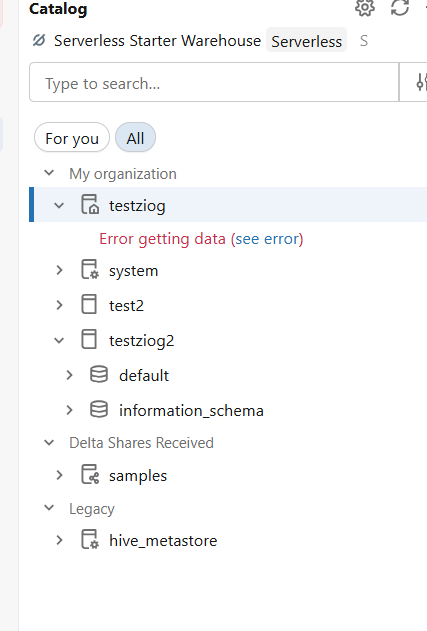
The behavior you observed -- where Rename creates a NEW catalog with the new name while the old one shows an error -- is consistent with how catalog renaming works in Databricks. From the documentation on managing catalogs:
"To rename a catalog using SQL, you must create a new catalog and move all assets into the new catalog."
In other words, there is no true in-place rename for catalogs (neither in the UI nor via SQL). The UI Rename operation effectively creates a new catalog with the new name. The original workspace catalog designation (the house icon) stays associated with the original name, which is why you see the error.
Additionally, the ALTER CATALOG SQL command supports SET OWNER, SET TAGS, etc. but does NOT have a RENAME TO syntax.
Docs:
- Managing catalogs: https://docs.databricks.com/aws/en/catalogs/manage-catalog
- ALTER CATALOG reference: https://docs.databricks.com/aws/en/sql/language-manual/sql-ref-syntax-ddl-alter-catalog.html
THE "DEFAULT CATALOG" IS A SEPARATE SETTING
There is an important distinction between:
1. Workspace catalog (house icon) -- the auto-provisioned catalog, named after your workspace
2. Default catalog -- the catalog assumed when you don't specify a catalog name in queries
The default catalog is a workspace-level admin setting that can be changed:
1. Click your username (top-right) > Admin Settings
2. Go to the Advanced tab
3. Find "Default catalog for the workspace"
4. Enter the catalog name you want as the default
5. Click Save
6. Restart all SQL warehouses and clusters for the change to take effect
You can also override the default catalog at the cluster level using the Spark configuration:
spark.databricks.sql.initial.catalog.namespace <your_catalog_name>
And at the session level using:
USE CATALOG <your_catalog_name>;
The resolution order is: session setting > cluster Spark config > workspace default catalog setting.
Docs: https://docs.databricks.com/aws/en/catalogs/default
HOW COULD THE HOUSE ICON CATALOG HAVE A DIFFERENT NAME THAN THE WORKSPACE?
You mentioned observing a case where the house-icon catalog had a different name from the workspace. This can happen because, as the documentation states, "a workspace admin can change its name, change its ownership, or even delete it." If a workspace admin successfully renamed or recreated the catalog before the current behavior, or if the workspace name was changed after provisioning, the names could diverge.
RECOMMENDED APPROACH
Unfortunately, there is no way to do a true in-place rename of the workspace catalog (the one with the house icon). If you need a different name, the recommended approach is:
1. Create a new catalog with the desired name
2. Move your schemas and tables to the new catalog (you can use CREATE SCHEMA ... CLONE or manual migration)
3. Update the workspace default catalog setting to point to the new catalog (Admin Settings > Advanced)
4. Bind the new catalog to your workspace if needed (for workspace isolation)
5. Optionally delete the old catalog once migration is complete
To answer your questions directly:
- Can you rename the workspace catalog? Not in-place, no. The UI "Rename" creates a new catalog.
- Workaround? Create a new catalog with the desired name and migrate assets.
- Can you customize the name during workspace creation? The auto-provisioned catalog always takes the workspace name initially, but you can change the default catalog setting afterward.
DOCUMENTATION REFERENCES
- Get started with Unity Catalog: https://docs.databricks.com/aws/en/data-governance/unity-catalog/get-started.html
- Manage catalogs: https://docs.databricks.com/aws/en/catalogs/manage-catalog
- Manage the default catalog: https://docs.databricks.com/aws/en/catalogs/default
- ALTER CATALOG reference: https://docs.databricks.com/aws/en/sql/language-manual/sql-ref-syntax-ddl-alter-catalog.html
- Catalog binding: https://docs.databricks.com/aws/en/catalogs/binding
I hope this clears things up! Let me know if you have follow-up questions.
* This reply used an agent system I built to research and draft this response based on the wide set of documentation I have available and previous memory. I personally review the draft for any obvious issues and for monitoring system reliability and update it when I detect any drift, but there is still a small chance that something is inaccurate, especially if you are experimenting with brand new features.

Announcements




Related Content
- What information about external agents can be retrieved from Unity Catalog? in Data Governance
- Genie One Foundations: What Data Teams Should Get Right Before Rolling It Out in Data Engineering
- org.apache.iceberg.connect.IcebergSinkConnector to sink data from kafka to databricks - large volume in Data Engineering
- Serverless DNS failures after trial upgrade (AWS us-east-2) in Administration & Architecture
- How can I configure Lakeflow Connect SQL Server CDC Gateway to use a desired VM type? in Data Engineering