cancel
Showing results forย 
Search instead forย 
Did you mean:ย 
Data Engineering
Join discussions on data engineering best practices, architectures, and optimization strategies within the Databricks Community. Exchange insights and solutions with fellow data engineers.
cancel
Showing results forย 
Search instead forย 
Did you mean:ย 

Jobs & Pipelines: is it possible for "Run parameters" to display a value generated in code?

397973
New Contributor III

Hi. I'm testing out the "Run parameters" you see in Jobs & Pipelines. As far as I know, this value is set manually by "Job parameters" on the right side bar. 

Can I set the value within code though? Like if I want something dynamically generated depending on the current month and that value propagates to other notebooks within the job. 

But I'd also like to see the value in the GUI but I don't see how to get it to show a value generated in my Python code.

397973_0-1776867978321.png

Please advise if you know how to do it. Thanks. 

1 ACCEPTED SOLUTION

Accepted Solutions

Ashwin_DSA
Databricks Employee
Databricks Employee

Hi @397973,

Interesting question and I did not know the answer. So, I ran the test you described on my own workspace. Sharing what I found in case it saves you time.

The short answer is that the task values won't populate the Run parameters column. Values set with dbutils.jobs.taskValues.set do propagate to downstream tasks through {{tasks.<task>.values.<key>}}, which is the "pass data between tasks" half of your question. But the Run object itself feeds the Run parameters column, and task values live one level down on each Task. They won't surface in that column.

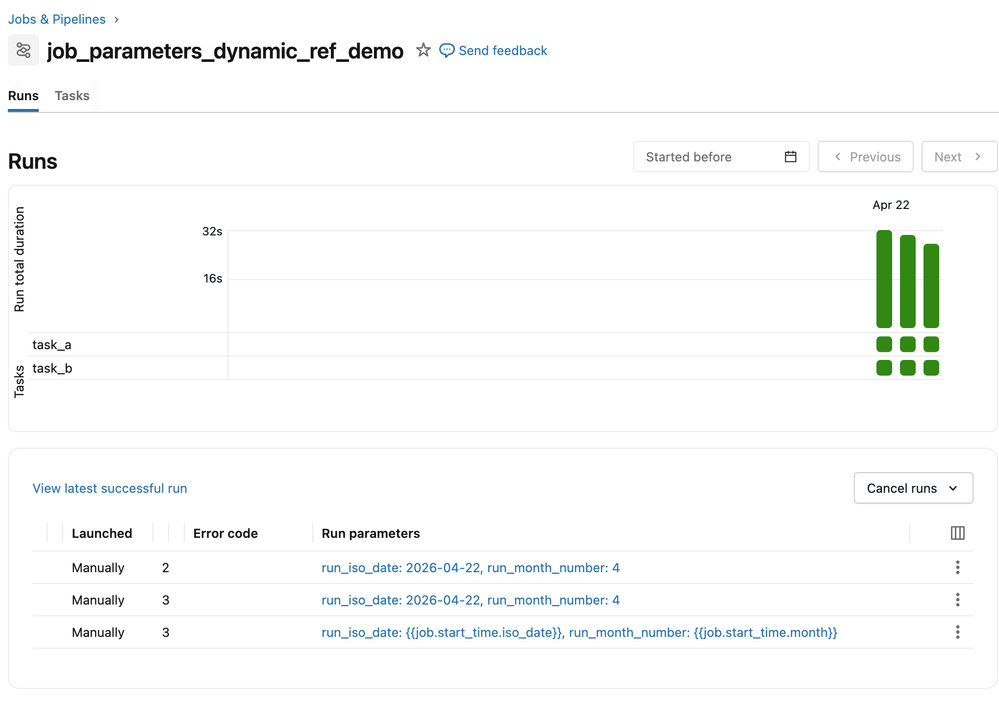
Why the column looks the way it does is because it reads from two sources... the job parameter defaults as written, and any overrides passed at run-now time. Dynamic value references like {{job.start_time.month}} get resolved when a task consumes the parameter, not for display in the column. So if you set the default to {{job.start_time.month}}, tasks will receive 4, but the column will show the literal {{job.start_time.month}} text. I confirmed this by running a job both ways.

Three options depending on how much you care about the column:

  1. Define a job parameter with {{job.start_time.iso_date}} or {{job.start_time.month}} as default. Tasks read it via a widget and get the resolved value. The column shows the template text for scheduled runs and concrete values only when someone passes an override. Often fine, since the run's start time is already visible in the Runs list.

  2. Skip the column entirely and rely on the run start time already shown on each row. If the goal is "scan the list and know which month each run was for," this is free.

  3.  Launcher pattern. A small notebook scheduled to run monthly that computes the month in Python and calls w.jobs.run_now(job_id=<real_job>, job_parameters={"run_month_number": str(month)}). The concrete value lands as an override on the real run, so the column shows run_month_number: 4. It works, but you're maintaining a second job to populate one column.
Ashwin_DSA_0-1776874504131.png


One question back to you... Is the column visibility a hard requirement, or a nice-to-have? If it's just "I want to see the month at a glance," option 2 already covers it. If an ops process actually reads that cell, option 3 is the only way to get a Python-computed value in there. That framing should help you decide whether the extra job is worth the upkeep as I personally think it is a bit convoluted and more than what your use case may warrant.

Hope that helps.

If this answer resolves your question, could you mark it as โ€œAccept as Solutionโ€? That helps other users quickly find the correct fix.

Regards,
Ashwin | Delivery Solution Architect @ Databricks
Helping you build and scale the Data Intelligence Platform.
***Opinions are my own***


View solution in original post

2 REPLIES 2

Ashwin_DSA
Databricks Employee
Databricks Employee

Hi @397973,

Interesting question and I did not know the answer. So, I ran the test you described on my own workspace. Sharing what I found in case it saves you time.

The short answer is that the task values won't populate the Run parameters column. Values set with dbutils.jobs.taskValues.set do propagate to downstream tasks through {{tasks.<task>.values.<key>}}, which is the "pass data between tasks" half of your question. But the Run object itself feeds the Run parameters column, and task values live one level down on each Task. They won't surface in that column.

Why the column looks the way it does is because it reads from two sources... the job parameter defaults as written, and any overrides passed at run-now time. Dynamic value references like {{job.start_time.month}} get resolved when a task consumes the parameter, not for display in the column. So if you set the default to {{job.start_time.month}}, tasks will receive 4, but the column will show the literal {{job.start_time.month}} text. I confirmed this by running a job both ways.

Three options depending on how much you care about the column:

  1. Define a job parameter with {{job.start_time.iso_date}} or {{job.start_time.month}} as default. Tasks read it via a widget and get the resolved value. The column shows the template text for scheduled runs and concrete values only when someone passes an override. Often fine, since the run's start time is already visible in the Runs list.

  2. Skip the column entirely and rely on the run start time already shown on each row. If the goal is "scan the list and know which month each run was for," this is free.

  3.  Launcher pattern. A small notebook scheduled to run monthly that computes the month in Python and calls w.jobs.run_now(job_id=<real_job>, job_parameters={"run_month_number": str(month)}). The concrete value lands as an override on the real run, so the column shows run_month_number: 4. It works, but you're maintaining a second job to populate one column.

Ashwin_DSA_0-1776874504131.png


One question back to you... Is the column visibility a hard requirement, or a nice-to-have? If it's just "I want to see the month at a glance," option 2 already covers it. If an ops process actually reads that cell, option 3 is the only way to get a Python-computed value in there. That framing should help you decide whether the extra job is worth the upkeep as I personally think it is a bit convoluted and more than what your use case may warrant.

Hope that helps.

If this answer resolves your question, could you mark it as โ€œAccept as Solutionโ€? That helps other users quickly find the correct fix.

Regards,
Ashwin | Delivery Solution Architect @ Databricks
Helping you build and scale the Data Intelligence Platform.
***Opinions are my own***

397973
New Contributor III

It's a nice to have, not required. I'll just set it in code. Thanks for checking.
