
Turn on suggestions
Auto-suggest helps you quickly narrow down your search results by suggesting possible matches as you type.
Showing results for
Warehousing & Analytics
Engage in discussions on data warehousing, analytics, and BI solutions within the Databricks Community. Share insights, tips, and best practices for leveraging data for informed decision-making.
Turn on suggestions
Auto-suggest helps you quickly narrow down your search results by suggesting possible matches as you type.
Showing results for
- Databricks Community
- Warehousing & Analytics
- Re: flexible Calculated field in Dashboard changin...
Options
- Subscribe to RSS Feed
- Mark Topic as New
- Mark Topic as Read
- Float this Topic for Current User
- Bookmark
- Subscribe
- Mute
- Printer Friendly Page

Options
- Mark as New
- Bookmark
- Subscribe
- Mute
- Subscribe to RSS Feed
- Permalink
- Report Inappropriate Content
03-03-2026 07:13 AM
Hi guys,
I am making a Dashboard where I want to show the AOV per Brand with a date filter to change the days used in the calculation.
AOV = sales / orders
I have sales and orders per day and would like to have the AOV dependant on the Days selected.
The only way I found to display the AOV is to calculate it per day and then put an avg() over it in the widget, but this doesn´t show the the true number (avg of avg). Ideally it would be sth similar to what you can do in excel with pivot calulated fields.
I am using sql


1 ACCEPTED SOLUTION
Accepted Solutions

Options
- Mark as New
- Bookmark
- Subscribe
- Mute
- Subscribe to RSS Feed
- Permalink
- Report Inappropriate Content
03-04-2026 04:51 AM
Hi @a_d - Thanks for confirming.
Here is a good example.
I've also tested it and given some snapshots below if it helps. My data looks something like the below.
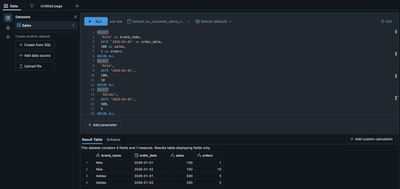
You can see above the results (on the right side) an option to create a custom calculation. In the editor, add the formula. SUM(sales) / SUM(orders)
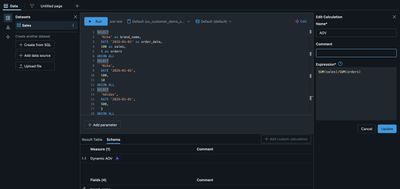
You can then build the visualisation and choose the custom measure you have created.
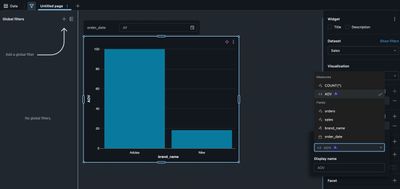
Hope that helps!
If this answer resolves your question, could you mark it as “Accept as Solution”? That helps other users quickly find the correct fix.
Regards,
Ashwin | Delivery Solution Architect @ Databricks
Helping you build and scale the Data Intelligence Platform.
***Opinions are my own***
Ashwin | Delivery Solution Architect @ Databricks
Helping you build and scale the Data Intelligence Platform.
***Opinions are my own***
4 REPLIES 4
Options
- Mark as New
- Bookmark
- Subscribe
- Mute
- Subscribe to RSS Feed
- Permalink
- Report Inappropriate Content
03-04-2026 01:03 AM
Hi @a_d,
Could you please confirm that you are referring to dashboards in Databricks and not another reporting tool?
And, when you mention a flexible calculated field, do you mean a Custom Calculation? If not, have you considered using a custom calculated measure?
If this answer resolves your question, could you mark it as “Accept as Solution”? That helps other users quickly find the correct fix.
Regards,
Regards,
Ashwin | Delivery Solution Architect @ Databricks
Helping you build and scale the Data Intelligence Platform.
***Opinions are my own***
Ashwin | Delivery Solution Architect @ Databricks
Helping you build and scale the Data Intelligence Platform.
***Opinions are my own***
Options
- Mark as New
- Bookmark
- Subscribe
- Mute
- Subscribe to RSS Feed
- Permalink
- Report Inappropriate Content
03-04-2026 03:54 AM
Hi @Ashwin_DSA ,
yes I´m referring to Dashboards in Databricks.
Can you explain how I could create a calculated measure? I think this would solve my problem.
I want the user to be able to change the daterange on the datepicker and then the AOV would be calculated based on the sales for the dates filtered.
Options
- Mark as New
- Bookmark
- Subscribe
- Mute
- Subscribe to RSS Feed
- Permalink
- Report Inappropriate Content
03-04-2026 04:51 AM
Hi @a_d - Thanks for confirming.
Here is a good example.
I've also tested it and given some snapshots below if it helps. My data looks something like the below.
You can see above the results (on the right side) an option to create a custom calculation. In the editor, add the formula. SUM(sales) / SUM(orders)
You can then build the visualisation and choose the custom measure you have created.
Hope that helps!
If this answer resolves your question, could you mark it as “Accept as Solution”? That helps other users quickly find the correct fix.
Regards,
Ashwin | Delivery Solution Architect @ Databricks
Helping you build and scale the Data Intelligence Platform.
***Opinions are my own***
Ashwin | Delivery Solution Architect @ Databricks
Helping you build and scale the Data Intelligence Platform.
***Opinions are my own***
Options
- Mark as New
- Bookmark
- Subscribe
- Mute
- Subscribe to RSS Feed
- Permalink
- Report Inappropriate Content
03-04-2026 05:52 AM
Hi @Ashwin_DSA ,
thank you so much, that´s excactly what I wanted 🙂

Announcements


Related Content
- Declarative Until It Isn't: Four Sharp Edges of Lakeflow Declarative Pipelines in Data Engineering
- Text on Dashboards changing color automatically. in Warehousing & Analytics
- Databricks Genie Code One Month In — What It Means for Us as Data Engineers in Generative AI
- Discrepancy between Azure Billing and Databricks System Tables in Data Engineering
- flexible Calculated field in Dashboard changing with filters used in Warehousing & Analytics